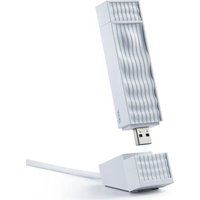
Wave D7 Wi-Fi 7 USB Adapter - Smart Home ACER - Free user manual and instructions
Find the device manual for free Wave D7 Wi-Fi 7 USB Adapter ACER in PDF.


Pick your language and provide your email: we'll send you a specifically translated version.
| Product Type | Wi-Fi 7 USB Adapter |
| Brand | Acer |
| Model | Wave D7 |
| Wireless Standard | IEEE 802.11be (Wi-Fi 7) |
| Frequency Bands | 2.4 GHz, 5 GHz, 6 GHz |
| Maximum Speed | Up to 5.8 Gbps |
| Interface | USB 3.2 Gen 1 Type-A |
| Antenna | Internal dual-band antenna |
| Security | WPA3, WPA2, WPA |
| LED Indicators | Power and Link/Activity |
| Dimensions | 2.8 x 1.0 x 0.6 inches (71 x 25 x 15 mm) |
| Weight | 0.7 oz (20 g) |
| Power Consumption | 2.5 W (max) |
| Operating Temperature | 32°F to 104°F (0°C to 40°C) |
| Operating Humidity | 10% to 90% non-condensing |
| Compatibility | Windows 10, Windows 11, Linux |
| Driver Support | Automatic driver installation via Windows Update |
| Warranty | 2 years limited |
| Package Contents | USB adapter, quick start guide |
| Cleaning Instructions | Wipe with a dry, soft cloth. Do not use liquids. |
Frequently Asked Questions - Wave D7 Wi-Fi 7 USB Adapter ACER
What is the maximum speed of the Acer Wave D7 Wi-Fi 7 USB Adapter?
The adapter supports speeds up to 5.8 Gbps on the 6 GHz band, with combined speeds across all bands.
Is this adapter compatible with older Wi-Fi standards?
Yes, it is backward compatible with Wi-Fi 6/6E, Wi-Fi 5, and older standards.
Does the adapter work with a USB 2.0 port?
It is designed for USB 3.0 or higher for optimal performance, but it will work at reduced speeds on USB 2.0.
How do I install the driver?
Plug the adapter into a USB port; Windows will automatically download and install the driver via Windows Update. Manual drivers can be downloaded from the Acer support site.
What security protocols does it support?
It supports WPA3, WPA2, and WPA encryption for secure connections.
Can I use this adapter with a Mac?
The adapter is primarily compatible with Windows and Linux. macOS drivers are not officially provided.
Does the adapter support Bluetooth?
No, this is a Wi-Fi only USB adapter and does not include Bluetooth functionality.
What is the operating range?
Range depends on environment and router, but typically up to 100 feet indoors with line-of-sight.
Why is the LED not lighting up?
Ensure the adapter is firmly inserted. If the LED is off, try a different USB port or check if the driver is installed correctly.
How do I clean the adapter?
Use a dry, soft cloth to wipe the exterior. Do not use water or cleaning solutions.
User questions about Wave D7 Wi-Fi 7 USB Adapter ACER
0 question about this device. Answer the ones you know or ask your own.
Ask a new question about this device
No questions yet. Be the first to ask one.
Download the instructions for your Smart Home in PDF format for free! Find your manual Wave D7 Wi-Fi 7 USB Adapter - ACER and take your electronic device back in hand. On this page are published all the documents necessary for the use of your device. Wave D7 Wi-Fi 7 USB Adapter by ACER.
USER MANUAL Wave D7 Wi-Fi 7 USB Adapter ACER



Manual assistant
Powered by Anthropic
Waiting for your message
Product information
Brand : ACER
Model : Wave D7 Wi-Fi 7 USB Adapter
Category : Smart Home