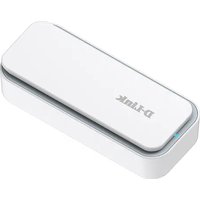
D501 - Powerline Adapter D-LINK - Free user manual and instructions
Find the device manual for free D501 D-LINK in PDF.


Pick your language and provide your email: we'll send you a specifically translated version.
| Product Type | Powerline Adapter |
| Model | D501 |
| Brand | D-Link |
| Powerline Standard | HomePlug AV |
| Maximum Data Rate | 200 Mbps |
| Frequency Band | 2-28 MHz |
| Modulation Technology | OFDM |
| Interface | 1 x 10/100 Fast Ethernet Port |
| LED Indicators | Power, Ethernet, Powerline |
| Security | 128-bit AES Encryption with Pairing Button |
| Dimensions (W x D x H) | 65 x 45 x 30 mm (approx.) |
| Weight | 85 g (approx.) |
| Power Consumption | Less than 2W idle, 4W active |
| Operating Temperature | 0°C to 40°C |
| Humidity | 10% to 90% non-condensing |
| Plug Type | EU (Type F) integrated plug |
| Compatibility | All HomePlug AV compliant devices |
| Maintenance | Wipe with dry cloth, unplug before cleaning |
| Safety Certifications | CE, RoHS |
| Repairability | No user-serviceable parts; contact support |
Frequently Asked Questions - D501 D-LINK
How do I set up the D-Link D501 powerline adapter?
Plug one adapter into a wall outlet and connect it to your router via Ethernet cable. Plug the second adapter into another outlet and press the Pair button on both units to establish a secure connection.
Can I use the D501 with other brands of powerline adapters?
The D501 uses HomePlug AV standard. It should be compatible with other HomePlug AV certified adapters, but using D-Link adapters is recommended for best performance.
How do I reset the D-Link D501 to factory defaults?
Locate the Reset button (small pinhole) on the adapter. Using a paperclip, press and hold for about 10 seconds until the LEDs flash. Release to reset.
What does the Powerline LED indicate?
The Powerline LED shows connection status: solid green indicates a good connection, blinking indicates activity, and off means no connection. If off, try pairing again or check the electrical circuit.
Why is my powerline adapter not working after plugging it in?
Ensure both adapters are plugged directly into a wall outlet, not a power strip. Press the Pair button on each to re-establish encryption. Check that the Ethernet cable is firmly connected.
Can I connect the D501 to a switch?
Yes, you can connect the D501 to a network switch using an Ethernet cable to extend the wired network to other rooms via powerline.
What is the maximum distance between two D501 adapters?
The HomePlug AV standard supports up to 300 meters over household electrical wiring, but real-world performance depends on wiring quality and distance. Typically, up to 100-200 meters is reliable.
Does the D501 support gigabit speeds?
No, the D501 provides up to 200 Mbps which is suitable for HD streaming and internet browsing, but not for high-speed local file transfers. Its Ethernet port is 10/100 Mbps.
How do I clean the D-Link D501?
Unplug the adapter and wipe it with a soft, dry cloth. Do not use liquid cleaners or abrasives as they may damage the device.
Where can I find the manual for the D501?
The manual can be downloaded for free from notice-facile.com in PDF format. You can also request a translated version by email.
User questions about D501 D-LINK
0 question about this device. Answer the ones you know or ask your own.
Ask a new question about this device
No questions yet. Be the first to ask one.
Download the instructions for your Powerline Adapter in PDF format for free! Find your manual D501 - D-LINK and take your electronic device back in hand. On this page are published all the documents necessary for the use of your device. D501 by D-LINK.
USER MANUAL D501 D-LINK


Manual assistant
Powered by Anthropic
Waiting for your message
Product information
Brand : D-LINK
Model : D501
Category : Powerline Adapter