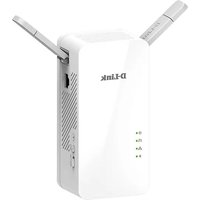
DHP-W610AV - Powerline Adapter D-LINK - Free user manual and instructions
Find the device manual for free DHP-W610AV D-LINK in PDF.


Pick your language and provide your email: we'll send you a specifically translated version.
| Type de produit | Powerline AV2 1200 Wi-Fi Adapter |
| Interface réseau | 1x Gigabit Ethernet port |
| Standard Wi-Fi | 802.11ac/n/g/b/a |
| Fréquence Wi-Fi | 2.4 GHz and 5 GHz |
| Débit Powerline | Up to 1200 Mbps |
| Débit Wi-Fi | Up to 300 Mbps (2.4 GHz) + 867 Mbps (5 GHz) |
| Portée Powerline | Up to 300 meters over household wiring |
| Dimensions | 95 x 60 x 45 mm (3.74 x 2.36 x 1.77 in) |
| Poids | 150 g (5.3 oz) |
| Alimentation | 100-240 V AC, 50-60 Hz, integrated power plug |
| Consommation électrique | Max 5 W, standby < 0.5 W |
| Sécurité | 128-bit AES encryption for Powerline; WPA/WPA2 for Wi-Fi |
| Boutons | Pair button, reset button, Wi-Fi button |
| Indicateurs LED | Power, Powerline link, Ethernet, Wi-Fi |
| Température de fonctionnement | 0°C to 40°C (32°F to 104°F) |
| Humidité de fonctionnement | 10% to 90% non-condensing |
| Entretien et nettoyage | Unplug before cleaning; use a dry cloth; avoid liquids |
| Pièces détachées et réparabilité | Not user-serviceable; contact D-Link support for issues |
| Certifications | CE, FCC, RoHS |
| Garantie | 2 years limited |
Frequently Asked Questions - DHP-W610AV D-LINK
How do I set up the DHP-W610AV?
Plug the adapter into a wall outlet, wait for the Powerline LED to turn solid, then press the Pair button on both adapters to synchronize. For Wi-Fi, press the Wi-Fi button to enable and connect your device to the SSID printed on the label.
What is the maximum speed of this Powerline adapter?
The Powerline speed is up to 1200 Mbps, but actual throughput depends on your home wiring and distance. Wi-Fi speeds are up to 300 Mbps on 2.4 GHz and 867 Mbps on 5 GHz.
Can I use this adapter with other Powerline devices?
Yes, the DHP-W610AV is compatible with all HomePlug AV2 standards, and can pair with other AV or AV2 adapters. However, for best performance, use same standard.
How do I reset the adapter to factory defaults?
Use a paperclip to press and hold the recessed Reset button for about 10 seconds until all LEDs flash. The adapter will reboot and restore default settings.
Why is the Powerline LED not lighting up?
Ensure both adapters are plugged directly into wall outlets (not power strips). Try pressing the Pair button again. If problem persists, check if your electrical circuit is shared; cross-phase connections can reduce signal.
Is the Wi-Fi signal secure?
Yes, the Wi-Fi supports WPA2 encryption. The default network key is on the label. For better security, change the SSID and password through the web interface or D-Link app.
Can I use this adapter to extend my existing Wi-Fi network?
Yes, connect the DHP-W610AV to your router via Ethernet to create a new Wi-Fi access point. You can configure the same SSID as your main network for seamless roaming.
What does the Pair button do?
The Pair button secures the Powerline connection using 128-bit AES encryption. Press it on one adapter within 2 minutes, then press on the other to securely link them.
The adapter gets warm. Is this normal?
Yes, a slight warmth is normal due to the power electronics. If it becomes too hot to touch, unplug it and check ventilation. Do not cover the adapter.
How can I improve performance?
Plug adapters directly into wall outlets, avoid power strips or surge protectors. Reduce distance between adapters and avoid electrical noise from appliances like motors. For Wi-Fi, place the adapter in an open area.
User questions about DHP-W610AV D-LINK
0 question about this device. Answer the ones you know or ask your own.
Ask a new question about this device
No questions yet. Be the first to ask one.
Download the instructions for your Powerline Adapter in PDF format for free! Find your manual DHP-W610AV - D-LINK and take your electronic device back in hand. On this page are published all the documents necessary for the use of your device. DHP-W610AV by D-LINK.
USER MANUAL DHP-W610AV D-LINK


Manual assistant
Powered by Anthropic
Waiting for your message
Product information
Brand : D-LINK
Model : DHP-W610AV
Category : Powerline Adapter