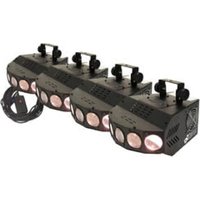
Saturn 4 - Stage lighting American Audio - Free user manual and instructions
Find the device manual for free Saturn 4 American Audio in PDF.


Pick your language and provide your email: we'll send you a specifically translated version.
| Product Type | DJ Controller / Mixer |
| Brand | American Audio |
| Model | Saturn 4 |
| Channels | 4 |
| Dimensions (L x W x H) | 12.2 x 8.5 x 2.3 inches |
| Weight | 3.8 lbs |
| Power Supply | 12V DC, 500mA |
| Audio Outputs | 2x RCA (master), 1x 1/4" headphone |
| Audio Inputs | 4x RCA pairs (line level) |
| Crossfader | Replaceable, contact-free |
| Equalizer | 3-band (High, Mid, Low) per channel |
| USB Connectivity | Not supported |
| Materials | Plastic body, metal faceplate |
| Cleaning Instructions | Wipe with soft, dry cloth. Avoid solvents. |
| Safety Warnings | Keep away from liquids and extreme temperatures. |
| Spare Parts Availability | Contact American Audio support |
| Operating Temperature Range | 0°C to 40°C (32°F to 104°F) |
| Warranty | 1 year limited |
Frequently Asked Questions - Saturn 4 American Audio
How do I connect the Saturn 4 to my speakers?
Connect the Master Output (RCA) to your amplifier or powered speakers using standard RCA cables. Ensure the device is powered off before making connections.
Can I use turntables with the Saturn 4?
The Saturn 4 does not have a phono preamp. Turntables with line-level output or an external phono preamp are required. Connect to any line input.
How do I adjust the EQ on a channel?
Each channel has a dedicated 3-band equalizer with controls for High, Mid, and Low frequencies. Rotate the knobs to boost or cut frequencies as desired.
What power supply does the Saturn 4 need?
The device requires a 12V DC power adapter with at least 500mA current. Use only the supplied adapter to avoid damage.
How should I clean my Saturn 4?
Use a soft, lint-free cloth slightly dampened with water to wipe the surface. Do not use chemical cleaners or spray liquids directly on the unit. Unplug before cleaning.
Does the Saturn 4 support Bluetooth?
No, the Saturn 4 does not have Bluetooth connectivity. It is a wired mixer/controller. Use external Bluetooth receivers if needed.
How do I replace the crossfader?
The crossfader is user-replaceable. Remove the faceplate screws, unplug the old fader, and install a compatible replacement. Contact American Audio support for part numbers.
Is the Saturn 4 compatible with DJ software?
The Saturn 4 is a standalone analog mixer without USB or MIDI. It does not control software. It can be used with external sound cards for computer integration.
How can I reset the Saturn 4?
If the unit behaves erratically, perform a power cycle: turn off, disconnect power for 30 seconds, then reconnect and power on. There is no factory reset button.
What cables are included with the Saturn 4?
The package includes a 12V DC power adapter and a user manual. Audio cables are not included; purchase RCA cables separately.
User questions about Saturn 4 American Audio
0 question about this device. Answer the ones you know or ask your own.
Ask a new question about this device
No questions yet. Be the first to ask one.
Download the instructions for your Stage lighting in PDF format for free! Find your manual Saturn 4 - American Audio and take your electronic device back in hand. On this page are published all the documents necessary for the use of your device. Saturn 4 by American Audio.
USER MANUAL Saturn 4 American Audio


Manual assistant
Powered by Anthropic
Waiting for your message
Product information
Brand : American Audio
Model : Saturn 4
Category : Stage lighting