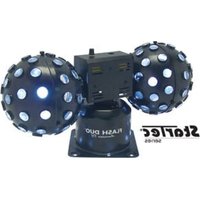
Flash Duo - Stage lighting American Audio - Free user manual and instructions
Find the device manual for free Flash Duo American Audio in PDF.


Pick your language and provide your email: we'll send you a specifically translated version.
| Product Type | DJ Controller |
| Brand | American Audio |
| Model | Flash Duo |
| Dimensions (W x D x H) | 12.5 x 8.3 x 2.0 inches (31.8 x 21.1 x 5.1 cm) |
| Weight | 3.1 lbs (1.4 kg) |
| Power Supply | USB bus power or 5V DC adapter (not included) |
| USB Connection | USB 2.0 Type B |
| Audio Outputs | 1/4" TRS balanced main output, 1/8" headphone jack |
| Audio Inputs | None |
| Controls | Two jog wheels, pitch faders, play/cue buttons, EQ knobs, filter knobs, performance pads |
| Pads | 8 velocity-sensitive RGB performance pads per deck |
| Software Compatibility | Serato DJ Lite, Virtual DJ, Mixxx |
| Built-in Sound Card | Yes, 2-channel |
| MIDI Compatibility | USB MIDI class compliant |
| Operating System | Windows 7+, macOS 10.10+ |
| Cleaning Instructions | Wipe with a soft, dry cloth. Do not use solvents. |
| Safety Warnings | Keep away from liquids, do not expose to extreme temperatures, use only provided USB cable. |
| Spare Parts Availability | Replacement faders and knobs available from authorized dealers. |
| Repairability Index | Moderate – internal components are accessible with basic tools. |
| General Info | American Audio Flash Duo is a 2-channel DJ controller designed for beginner to intermediate DJs. |
Frequently Asked Questions - Flash Duo American Audio
How do I connect the Flash Duo to my computer?
Use the provided USB cable to connect the controller to a USB port on your computer. The device will be recognized automatically. For best performance, use a USB 2.0 port.
Does the Flash Duo work with Serato DJ Pro?
The Flash Duo is compatible with Serato DJ Lite out of the box. For Serato DJ Pro, you need a paid license or subscription.
Why is there no sound coming from my speakers?
Check the master output connection (1/4" TRS). Ensure the master volume knob is turned up. Also verify that the software audio output is set to the controller's sound card.
Can I use the Flash Duo standalone without a computer?
No, the Flash Duo is a controller and requires a computer running DJ software to function.
How do I assign the performance pads to hot cues?
In your DJ software, go to the controller mapping or pad mode settings. Select 'Hot Cue' mode for the pads. Details vary by software.
What is the warranty period for the Flash Duo?
American Audio typically offers a 1-year limited warranty from the date of purchase. Retain your receipt.
How can I update the firmware on the Flash Duo?
Visit the American Audio website and download the latest firmware. Connect the controller, run the updater, and follow on-screen instructions.
The jog wheels feel stiff. What should I do?
Jog wheels may have a break-in period. If persistent, check for debris. Do not lubricate; contact support for service.
Can I use the Flash Duo with Android or iOS devices?
The controller is designed for desktop operating systems. Some DJ apps on iOS/Android may support USB MIDI, but compatibility is not guaranteed.
How do I clean the Flash Duo?
Turn off and disconnect the device. Use a soft, slightly damp cloth to wipe the surface. Avoid moisture entering openings. Never use abrasive cleaners.
User questions about Flash Duo American Audio
0 question about this device. Answer the ones you know or ask your own.
Ask a new question about this device
No questions yet. Be the first to ask one.
Download the instructions for your Stage lighting in PDF format for free! Find your manual Flash Duo - American Audio and take your electronic device back in hand. On this page are published all the documents necessary for the use of your device. Flash Duo by American Audio.
USER MANUAL Flash Duo American Audio
Manual assistant
Powered by Anthropic
Waiting for your message
Product information
Brand : American Audio
Model : Flash Duo
Category : Stage lighting