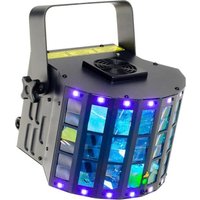
Razor Derby - LED Lighting Varytec - Free user manual and instructions
Find the device manual for free Razor Derby Varytec in PDF.


Pick your language and provide your email: we'll send you a specifically translated version.
| Product Type | Moving Head Effect Light |
| Brand | Varytec |
| Model | Razor Derby |
| Dimensions (with base) | 200 x 200 x 400 mm |
| Weight | 8.5 kg |
| Power Supply | AC 100-240V, 50/60 Hz |
| Power Consumption | 250 W |
| Light Source | 230W RGBW LED |
| Beam Angle | 4° - 25° zoom |
| Pan Range | 540° |
| Tilt Range | 270° |
| DMX Control | Yes, 16/18/20 channel modes |
| Sound Activation | Built-in microphone with sensitivity adjustment |
| Master/Slave Mode | Yes, via DMX cable |
| Display | LCD screen with menus |
| Cooling System | Active ventilation with silent fans |
| Mounting | Omega brackets for truss or floor standing |
| Maintenance & Cleaning | Use a soft cloth; clean lens with mild glass cleaner |
| Safety | Safety cable attachment point; do not look directly into beam |
| Spare Parts & Repairability | Replacement LED engine, power supply, and mainboard available |
Frequently Asked Questions - Razor Derby Varytec
How do I reset the Razor Derby moving head to its home position?
Press the Menu button, navigate to Reset using the arrows, and press Enter. The fixture will automatically pan, tilt, and reset its effects.
How do I set the DMX address for the fixture?
Press Menu, go to DMX Address, use the arrows to select the desired address, and press Enter to confirm. The address range depends on the channel mode.
Can I use the Razor Derby without a DMX controller?
Yes, you can use the Sound Activation mode. Press Menu, select Sound, and adjust sensitivity via the Up/Down buttons.
What is the recommended safety distance from the fixture?
Maintain at least 1 meter between the fixture and any combustible materials. For audience use, ensure a minimum distance of 5 meters from the lens.
How do I clean the lens of the Razor Derby?
Use a soft, lint-free cloth moistened with a mild glass cleaner. Do not spray directly onto the lens; apply to the cloth first. Clean when the fixture is cool.
What should I do if the fixture does not respond to DMX?
Check the DMX cable connections, ensure the terminator is used at the end of the chain, and verify that the DMX address matches the controller. Also confirm the channel mode is correct.
How do I replace the LED engine?
This should be done by a qualified technician. Disconnect power, remove the head cover, unscrew the LED module, and replace with an identical Varytec part. Reassemble and test.
Can I mount the Razor Derby on a truss?
Yes, use the included omega brackets and a safety cable. Ensure the truss can support the weight (8.5 kg). Tighten all clamps securely.
What is the maximum ambient temperature for safe operation?
Do not operate the fixture in ambient temperatures exceeding 40°C (104°F). Ensure adequate ventilation around the device.
How do I update the firmware?
Check the Varytec website for firmware updates. Typically, you connect a USB cable from the fixture's USB port to a PC and run the update software. Refer to the service manual.
User questions about Razor Derby Varytec
0 question about this device. Answer the ones you know or ask your own.
Ask a new question about this device
No questions yet. Be the first to ask one.
Download the instructions for your LED Lighting in PDF format for free! Find your manual Razor Derby - Varytec and take your electronic device back in hand. On this page are published all the documents necessary for the use of your device. Razor Derby by Varytec.
USER MANUAL Razor Derby Varytec
Manual assistant
Powered by Anthropic
Waiting for your message
Product information
Brand : Varytec
Model : Razor Derby
Category : LED Lighting