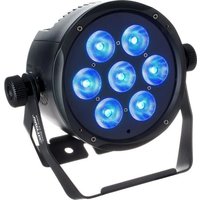
Sidus X4 QUAD - LED Lighting Varytec - Free user manual and instructions
Find the device manual for free Sidus X4 QUAD Varytec in PDF.


Pick your language and provide your email: we'll send you a specifically translated version.
| Product Type | LED Par Light |
| Model | Sidus X4 QUAD |
| Brand | Varytec |
| LED Source | 4 x 10W RGBW LEDs |
| Beam Angle | 25° |
| DMX Channels | 8 or 16 channel modes |
| Control Modes | DMX, Master/Slave, Auto, Sound-Active |
| Power Supply | AC 100-240V, 50/60Hz |
| Power Consumption | 120W |
| Dimensions (L x W x H) | 250 x 250 x 300 mm |
| Weight | 3.0 kg |
| Housing Material | Metal, black finish |
| Cooling | Fan-cooled |
| IP Rating | IP20 |
| Connectors | DMX in/out (XLR 3-pin), PowerCon in/out |
| Fuse Protection | T2A/250V |
| Safety Features | Overheat protection, safety cable attachment |
| Included Accessories | Power cord, DMX cable, mounting bracket, manual |
| Maintenance & Cleaning | Use a dry, soft cloth; avoid liquids |
| Repair & Spare Parts | Contact authorized service center; standard LED modules replaceable |
| Operating Temperature | -10°C to 40°C |
Frequently Asked Questions - Sidus X4 QUAD Varytec
How do I set the DMX address on the Sidus X4 QUAD?
Press the MENU button until DMX Address appears. Use the UP/DOWN buttons to set the desired address. Press ENTER to confirm.
Can I use the fixture in sound-active mode?
Yes, select Sound mode via the menu. The fixture will react to music via its internal microphone. Adjust sensitivity if needed.
What DMX channels does it support?
The Sidus X4 QUAD has two channel modes: 8-channel (basic RGBW) and 16-channel (advanced with strobe, color macros, etc.). Select via menu.
How do I perform a master/slave setup?
Set one fixture to Master mode and others to Slave via the control menu. Connect them with DMX cables. The slaves will follow the master.
What is the recommended cleaning procedure?
Disconnect power. Use a soft, dry cloth to wipe the housing and lens. Do not use solvents or liquids. Clean the fan grilles periodically.
Can I replace the LEDs myself?
No, LED replacement requires professional service. Contact an authorized Varytec service center to avoid damage and maintain warranty.
What power supply do I need?
The fixture operates on AC 100-240V, 50/60Hz. Use a grounded outlet. The included PowerCon cable ensures secure connection.
How do I reset the fixture to factory defaults?
In the menu, navigate to Factory Reset (usually under Settings). Confirm with ENTER. All parameters will return to default.
What is the beam angle and can it be changed?
The beam angle is fixed at 25°. It cannot be adjusted, but you can use optional diffusion filters for a wider spread.
Is the fixture suitable for outdoor use?
No, it has an IP20 rating, meaning it is only suitable for indoor use in dry environments. Avoid exposure to rain or moisture.
User questions about Sidus X4 QUAD Varytec
0 question about this device. Answer the ones you know or ask your own.
Ask a new question about this device
No questions yet. Be the first to ask one.
Download the instructions for your LED Lighting in PDF format for free! Find your manual Sidus X4 QUAD - Varytec and take your electronic device back in hand. On this page are published all the documents necessary for the use of your device. Sidus X4 QUAD by Varytec.
USER MANUAL Sidus X4 QUAD Varytec
Manual assistant
Powered by Anthropic
Waiting for your message
Product information
Brand : Varytec
Model : Sidus X4 QUAD
Category : LED Lighting