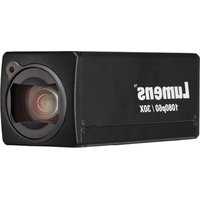
BC-602 - Camera Lumens - Free user manual and instructions
Find the device manual for free BC-602 Lumens in PDF.


Pick your language and provide your email: we'll send you a specifically translated version.
| Product Type | Document Camera |
| Brand | Lumens |
| Model | BC-602 |
| Image Sensor | 1/2.8" CMOS |
| Resolution | 1920 x 1080 (Full HD) |
| Frame Rate | 30 fps |
| Optical Zoom | 10x |
| Digital Zoom | 12x |
| Connectivity | HDMI, USB, VGA, RS-232 |
| Dimensions (W x D x H) | 385 mm x 135 mm x 525 mm |
| Weight | 2.5 kg |
| Power Supply | AC 100-240V, 50/60 Hz |
| Power Consumption | 30 W (max) |
| Functions | Image capture, video recording, annotation, split-screen |
| Cleaning | Wipe with dry cloth; do not use solvents |
| Safety | Use only with specified adapter; keep away from moisture |
| Spare Parts | Available from authorized dealers (e.g., lamp replacement) |
| Repairability | Service by qualified personnel only |
| General Info | Designed for classroom and office presentations |
Frequently Asked Questions - BC-602 Lumens
How do I connect the BC-602 to a computer?
Connect the USB cable from the camera to your computer. The device will be recognized as a USB video device. For HDMI output, connect an HDMI cable directly to a monitor or projector.
How do I adjust the focus?
Use the Auto Focus button on the control panel or remote to automatically focus. For manual focus, rotate the focus ring around the lens.
Can I record video with the BC-602?
Yes, press the Record button on the control panel or remote to start/stop video recording. Recorded files are saved to a connected USB drive or internal memory (if supported).
What is the maximum resolution?
The BC-602 supports up to 1920 x 1080 (Full HD) at 30 fps via HDMI and USB.
How do I clean the lens?
Use a soft, lint-free cloth slightly dampened with lens cleaning solution. Gently wipe the lens in a circular motion. Avoid using paper towels or harsh chemicals.
How do I replace the internal lamp?
Turn off the device and unplug it. Open the lamp compartment on the side of the arm. Replace the old lamp with a Lumens BC-602 lamp kit. Follow the instructions in the manual for safe replacement.
Is there a remote control?
Yes, an infrared remote control is included. It allows you to control zoom, focus, capture, and other functions from a distance.
How do I update the firmware?
Download the latest firmware from the Lumens support website. Copy the firmware file to a USB drive, insert it into the camera, and navigate to Settings > Firmware Update.
What software is compatible with the BC-602?
The camera works with Lumens Ladibug software for Windows and Mac. It also functions as a standard USB video device compatible with third-party capture software.
How do I troubleshoot 'No Signal' on my display?
Ensure the HDMI or VGA cable is securely connected. Verify the display input source matches the connected port. Try a different cable or port. If using USB, check that the computer recognizes the device in Device Manager.
User questions about BC-602 Lumens
0 question about this device. Answer the ones you know or ask your own.
Ask a new question about this device
No questions yet. Be the first to ask one.
Download the instructions for your Camera in PDF format for free! Find your manual BC-602 - Lumens and take your electronic device back in hand. On this page are published all the documents necessary for the use of your device. BC-602 by Lumens.
USER MANUAL BC-602 Lumens
Manual assistant
Powered by Anthropic
Waiting for your message
Product information
Brand : Lumens
Model : BC-602
Category : Camera