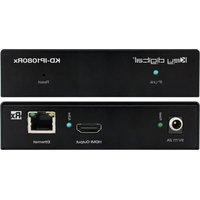
KD-IP1080RX - Audio/video converter Key Digital - Free user manual and instructions
Find the device manual for free KD-IP1080RX Key Digital in PDF.


Pick your language and provide your email: we'll send you a specifically translated version.
| Product Type | Audio/Video Converter (HDMI over IP Receiver) |
| Brand | Key Digital |
| Model | KD-IP1080RX |
| Dimensions (L x W x H) | 150 mm x 100 mm x 30 mm |
| Weight | 0.5 kg (1.1 lbs) |
| Power Supply | 5V DC, 2A (included) |
| Power Consumption | 5W (max) |
| Video Input | 1x RJ-45 (HDBaseT) for video/audio/power |
| Video Output | 1x HDMI Type A |
| Supported Video Resolutions | Up to 1080p @60Hz, 4Kx2K @30Hz (limited) |
| Audio Formats | LPCM 2.0, Dolby Digital, DTS |
| HDCP Support | HDCP 1.4 |
| Transmission Distance | Up to 100m over Cat5e/6 |
| LED Indicators | Power, Link, Signal |
| Operating Temperature | 0°C to 40°C (32°F to 104°F) |
| Storage Temperature | -20°C to 60°C (-4°F to 140°F) |
| Humidity | 10% to 90% RH (non-condensing) |
| Safety Certifications | CE, FCC, RoHS |
| Maintenance & Cleaning | Use dry cloth; avoid liquids. Unplug before cleaning. |
| Spare Parts / Repairability | Only authorized service centers. No user-serviceable parts. |
| General Information | Designed for extending HDMI signals over IP networks. |
Frequently Asked Questions - KD-IP1080RX Key Digital
What is the Key Digital KD-IP1080RX used for?
The KD-IP1080RX is an audio/video converter receiver that receives HDMI signals over an IP network via HDBaseT technology. It is used to extend HDMI signals up to 100 meters over a single Cat5e/6 cable.
Does the KD-IP1080RX support 4K resolution?
It supports 1080p @60Hz and can handle 4Kx2K @30Hz for limited applications. For full 4K, consider a different model.
How do I connect the KD-IP1080RX?
Connect the transmitter (KD-IP1080TX) to your source via HDMI, then connect a Cat5e/6 cable from the transmitter’s output to the receiver’s RJ-45 input. The receiver outputs HDMI to your display. Power both units.
What is the maximum cable length?
Up to 100 meters using Cat5e or Cat6 cable for 1080p signals.
Does it require a separate power supply?
Yes, each unit (transmitter and receiver) needs 5V DC 2A power adapters, which are included.
Is HDCP supported?
Yes, it supports HDCP 1.4, which is compatible with most Blu-ray players and streaming devices.
Can I use multiple receivers with one transmitter?
No, this is a point-to-point device. For multi-room distribution, you need a different system.
How do I reset the device?
Unplug the power adapter, wait 10 seconds, then reconnect. There is no reset button.
What audio formats are supported?
It supports LPCM 2.0, Dolby Digital, and DTS. For advanced formats like Dolby TrueHD, check compatibility.
Can I use it outdoors?
The KD-IP1080RX is designed for indoor use only. Avoid exposure to moisture, dust, and extreme temperatures.
User questions about KD-IP1080RX Key Digital
0 question about this device. Answer the ones you know or ask your own.
Ask a new question about this device
No questions yet. Be the first to ask one.
Download the instructions for your Audio/video converter in PDF format for free! Find your manual KD-IP1080RX - Key Digital and take your electronic device back in hand. On this page are published all the documents necessary for the use of your device. KD-IP1080RX by Key Digital.
USER MANUAL KD-IP1080RX Key Digital

Manual assistant
Powered by Anthropic
Waiting for your message
Product information
Brand : Key Digital
Model : KD-IP1080RX
Category : Audio/video converter