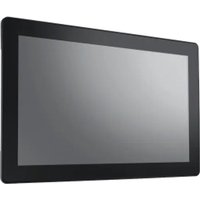
UTC-115H - Touchscreen Computer Advantech - Free user manual and instructions
Find the device manual for free UTC-115H Advantech in PDF.


Pick your language and provide your email: we'll send you a specifically translated version.
| Product Type | Industrial Touch Panel Computer |
| Model | UTC-115H |
| Brand | Advantech |
| Display Size | 15 inches |
| Display Resolution | 1024 x 768 pixels (XGA) |
| Touch Technology | Projected Capacitive Touch |
| Processor | Intel Celeron J1900 2.0 GHz |
| Memory | 4 GB DDR3L (max 8 GB) |
| Storage | 64 GB mSATA SSD |
| Operating System | Windows 10 IoT Enterprise / Linux |
| Power Supply | DC 12V input, power adapter included |
| Power Consumption | 20W typical |
| Dimensions (W x H x D) | 380 x 310 x 58 mm |
| Weight | 4.2 kg (9.26 lbs) |
| Mounting | Panel mount (open frame) / VESA 100x100 mm |
| IP Rating | IP65 (front panel) |
| I/O Ports | 2 x GbE LAN, 4 x USB 2.0, 2 x RS-232, 1 x VGA, 1 x Audio |
| Expansion Slots | 1 x Mini-PCIe (for Wi-Fi/Bluetooth) |
| Operating Temperature | 0°C to 50°C (32°F to 122°F) |
| Storage Temperature | -20°C to 60°C (-4°F to 140°F) |
| Humidity | 10% to 90% (non-condensing) |
| Certifications | CE, FCC, UL |
| Accessories Included | Power adapter, mounting brackets, user manual |
| Care and Maintenance | Clean with soft dry cloth; disconnect power before cleaning |
| Safety | Use only provided power adapter; avoid liquid ingress; ensure proper grounding |
Frequently Asked Questions - UTC-115H Advantech
How do I install the UTC-115H?
Refer to the user manual for detailed mounting instructions. The device supports VESA 100x100 mm and panel mount. Ensure proper ventilation and secure the unit with the provided brackets.
What operating systems are supported?
The UTC-115H supports Windows 10 IoT Enterprise and Linux (Ubuntu). Check the manual for specific driver support.
How do I connect to a network?
Use the two Gigabit Ethernet ports for wired connection. For Wi-Fi, install a compatible Mini-PCIe module in the expansion slot.
Can I upgrade the RAM?
Yes, the memory is expandable up to 8 GB DDR3L. Access the SODIMM slot by removing the back cover. Consult the manual for compatible modules.
What is the touchscreen technology?
The UTC-115H features projected capacitive touch, supporting multi-touch gestures. Use a conductive stylus or bare finger for input.
How do I clean the touchscreen?
Disconnect power and wipe the screen with a soft, lint-free cloth slightly dampened with water or mild glass cleaner. Avoid abrasive materials.
Is the device suitable for outdoor use?
The front panel is rated IP65, but the unit is designed for indoor industrial environments. Direct sunlight may affect visibility; consider an anti-glare option.
What should I do if the system does not boot?
Check the power adapter connection and input voltage. Ensure the power switch is on. If still no boot, try a CMOS reset by removing the battery for 30 seconds (see manual).
How do I update drivers?
Download the latest drivers from Advantech's official website under the UTC-115H product page. Follow the installation guide in the manual.
Where can I find spare parts?
Contact Advantech authorized distributors or visit the spare parts section on the Advantech website. Commonly available parts include power adapters, fans, and touch controllers.
User questions about UTC-115H Advantech
0 question about this device. Answer the ones you know or ask your own.
Ask a new question about this device
No questions yet. Be the first to ask one.
Download the instructions for your Touchscreen Computer in PDF format for free! Find your manual UTC-115H - Advantech and take your electronic device back in hand. On this page are published all the documents necessary for the use of your device. UTC-115H by Advantech.
USER MANUAL UTC-115H Advantech


Manual assistant
Powered by Anthropic
Waiting for your message
Product information
Brand : Advantech
Model : UTC-115H
Category : Touchscreen Computer