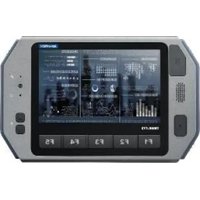
TREK-773 - Mobile data terminal Advantech - Free user manual and instructions
Find the device manual for free TREK-773 Advantech in PDF.


Pick your language and provide your email: we'll send you a specifically translated version.
| Product Type | Vehicle-Mounted Rugged Computer |
| Brand | Advantech |
| Model | TREK-773 |
| Display Size | 8.4 inches (approx.) |
| Display Resolution | 800 x 600 pixels (typical) |
| Processor | Intel Atom or Celeron (approx.) |
| Memory | 2 GB RAM (typical) |
| Storage | 32 GB SSD (typical) |
| Operating System | Windows Embedded or Linux |
| Dimensions (W x H x D) | 262 x 196 x 65 mm (approx.) |
| Weight | 2.5 kg (approx.) |
| Power Input | 9-36 V DC |
| Power Consumption | 15 W (typical) |
| Main Functions | GPS navigation, fleet management, data logging, vehicle diagnostics |
| Connectivity | Wi-Fi, Bluetooth, GPS, RS232, USB, CAN bus |
| Ingress Protection | IP65 (front panel) |
| Operating Temperature | -20°C to 60°C |
| Mounting Type | VESA or RAM mount |
| Safety Certifications | CE, FCC, E-Mark |
| Maintenance & Cleaning | Clean with a soft, dry cloth; avoid harsh chemicals |
| Spare Parts & Repairability | Contact Advantech support; some parts like SSD are user-replaceable |
| General Information | Designed for in-vehicle use in transportation and logistics |
Frequently Asked Questions - TREK-773 Advantech
How do I mount the TREK-773 in my vehicle?
The TREK-773 supports VESA and RAM mounting. Use the included brackets and screws to secure it to a flat surface. Ensure the mount is vibration-resistant for safety.
What operating system does the TREK-773 run?
It typically runs Windows Embedded or Linux. Check your specific model for pre-installed OS.
Can I connect external devices like a keyboard?
Yes, via USB ports or RS232. Bluetooth keyboard is also supported.
How do I update the GPS maps?
Map updates depend on the software. Use a USB drive or SD card to load new maps. Contact your navigation software provider.
What is the power consumption and input voltage?
It accepts 9-36 V DC and consumes about 15 W typical. Use the included vehicle power adapter.
Is the TREK-773 waterproof?
The front panel is IP65 rated, meaning it resists dust and water jets. The back may require protection in wet conditions.
How do I clean the screen?
Use a soft, dry cloth. For stubborn dirt, slightly dampen with water. Avoid alcohol or ammonia-based cleaners.
Can I replace the SSD myself?
Yes, the SSD is user-replaceable. Remove the back cover and disconnect the old SSD. Refer to the manual for compatible models.
What should I do if the device freezes?
Perform a hard reset by pressing and holding the power button for 10 seconds. If that fails, disconnect the power for 30 seconds.
Where can I find the user manual?
The manual is available on notice-facile.com or the Advantech support website. You can download it in PDF format.
User questions about TREK-773 Advantech
0 question about this device. Answer the ones you know or ask your own.
Ask a new question about this device
No questions yet. Be the first to ask one.
Download the instructions for your Mobile data terminal in PDF format for free! Find your manual TREK-773 - Advantech and take your electronic device back in hand. On this page are published all the documents necessary for the use of your device. TREK-773 by Advantech.
USER MANUAL TREK-773 Advantech
Manual assistant
Powered by Anthropic
Waiting for your message
Product information
Brand : Advantech
Model : TREK-773
Category : Mobile data terminal