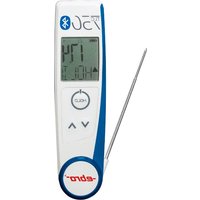
TLC 750 BT - Thermometer Ebro - Free user manual and instructions
Find the device manual for free TLC 750 BT Ebro in PDF.


Pick your language and provide your email: we'll send you a specifically translated version.
| Product type | Temperature data logger with Bluetooth |
| Dimensions (approx.) | 100 x 50 x 20 mm |
| Weight (approx.) | 100 g |
| Power source | 2 x AA batteries |
| Battery life | Up to 1 year (depending on logging interval) |
| Communication | Bluetooth 4.0 |
| Measurement range | -40°C to +125°C |
| Accuracy | ±0.5°C (-20°C to +60°C) |
| Resolution | 0.1°C |
| Memory capacity | Up to 20,000 readings |
| Logging interval | 1 second to 24 hours (programmable) |
| Operating temperature | -20°C to +60°C |
| Storage temperature | -40°C to +85°C |
| Protection rating | IP54 (dust and splash proof) |
| Display | LCD with current temperature, min/max, and battery status |
| Data export | Via Ebro app (Android/iOS) or USB cable (optional) |
| Software compatibility | Ebro Data Logger Software for PC |
| Maintenance | Clean with a soft, dry cloth. Do not use solvents. |
| Safety precautions | Do not immerse in liquids. Keep away from corrosive substances. |
| Spare parts | Batteries and USB cable available from Ebro distributors. |
| Repairability | Battery replacement possible. Other repairs by Ebro service only. |
| General information | Brand: Ebro, Model: TLC 750 BT, Category: Temperature Data Logger |
Frequently Asked Questions - TLC 750 BT Ebro
How do I start logging with the Ebro TLC 750 BT?
Insert batteries, download the Ebro app, pair via Bluetooth, and configure logging interval. Press the start button to begin.
Can I use the TLC 750 BT without Bluetooth?
Yes, you can log data autonomously. Use the USB cable (optional) to transfer data to a PC.
How do I replace the batteries?
Slide the battery cover open, replace with two AA alkaline batteries, ensuring correct polarity. Close the cover securely.
What is the maximum logging capacity?
The device can store up to 20,000 readings. Once full, it stops logging unless configured to overwrite.
How accurate is the temperature measurement?
Accuracy is ±0.5°C in the range -20°C to +60°C, and ±1°C outside that range.
Can I export data to Excel?
Yes, via the Ebro Data Logger Software (PC) or the app. Data can be exported as CSV for Excel.
Is the device waterproof?
It has an IP54 rating, meaning it is dust and splash resistant. Do not submerge.
How do I reset the device?
Remove batteries for 10 seconds, reinsert. All data remains in memory. To clear memory, use the app or software.
What is the temperature range for use?
Operating: -20°C to +60°C. Storage: -40°C to +85°C.
Where can I find the user manual?
The manual is available for free download at notice-facile.com in PDF format. Search for 'Ebro TLC 750 BT'.
User questions about TLC 750 BT Ebro
0 question about this device. Answer the ones you know or ask your own.
Ask a new question about this device
No questions yet. Be the first to ask one.
Download the instructions for your Thermometer in PDF format for free! Find your manual TLC 750 BT - Ebro and take your electronic device back in hand. On this page are published all the documents necessary for the use of your device. TLC 750 BT by Ebro.
USER MANUAL TLC 750 BT Ebro


Manual assistant
Powered by Anthropic
Waiting for your message
Product information
Brand : Ebro
Model : TLC 750 BT
Category : Thermometer