
TLC 750 NFC - Thermometer Ebro - Free user manual and instructions
Find the device manual for free TLC 750 NFC Ebro in PDF.


| Product Type | Temperature/Humidity Data Logger with NFC |
| Model | TLC 750 NFC |
| Brand | Ebro |
| Measurement Parameters | Temperature and Humidity |
| Temperature Range | -20°C to +60°C (-4°F to +140°F) |
| Temperature Accuracy | ±0.5°C (typical) |
| Humidity Range | 0% to 100% RH (non-condensing) |
| Humidity Accuracy | ±3% RH (typical) |
| Data Storage Capacity | 32,000 readings (per parameter) |
| Logging Interval | Programmable from 1 second to 24 hours |
| Interface | NFC (Near Field Communication) for Android/iOS |
| Communication Standard | ISO 15693 / NFC Tag Type 5 |
| Power Supply | 1 x 3.6V Lithium battery (CR2450 or equivalent) |
| Battery Life | Up to 2 years (depending on usage) |
| Dimensions (L x W x H) | Approx. 85 x 55 x 12 mm |
| Weight | Approx. 30 g (with battery) |
| Enclosure Material | Plastic (ABS) |
| Protection Rating | IP20 (indoor use only) |
| Software Compatibility | Ebro WinLog (PC) and Ebro NFC App (mobile) |
| Calibration | Factory calibrated, certificate available |
| Compliance | CE, RoHS, DIN 50928 |
| Included Accessories | Battery, quick start guide |
| Warranty | 2 years |
Frequently Asked Questions - TLC 750 NFC Ebro
User questions about TLC 750 NFC Ebro
0 question about this device. Answer the ones you know or ask your own.
Ask a new question about this device
Download the instructions for your Thermometer in PDF format for free! Find your manual TLC 750 NFC - Ebro and take your electronic device back in hand. On this page are published all the documents necessary for the use of your device. TLC 750 NFC by Ebro.
USER MANUAL TLC 750 NFC Ebro
- Before working with the device ....3
- Overview....3
- Safety instructions....4
- Precautions .... 4
- Device operation .... 5
5.1 Switching on .... 5
5.2 Switching off....5
5.3 Penetration probe temperature measurements ....5
5.4 Infrared temperature measurements....5
5.5 Logging modes 6
5.5.1 AdHoc logging mode....6
5.5.2 List logging mode 7
5.6 Settings Menu....8
5.6.1 Settings Menu Enter....8
5.6.2 Settings Menu Operation ....8
5.6.3 Settings Menu Entries....9 - What to do if....10
- Battery indicator and charge....10
- Care and Maintenance .... 11
- Disposal....11
- Technical specifications *....12
- Standards .... 13
- Regulatory information....13
- Service information....16
- Manufacturer information .... 16
1. Before working with the device
- Please read the operating instructions carefully.
- Familiarize yourself with your new device, get to know all the functions and components, learn important details for commissioning and handling the device and get tips for the case of a malfunction.
- By observing the operating instructions, you will also avoid damage to the device and the risk of your statutory rights of defects due to misuse. For damages resulting from failure to comply with this User manual, we assume no liability.
- Pay particular attention to the safety instructions!
- Keep this manual in a safe place!
2. Overview
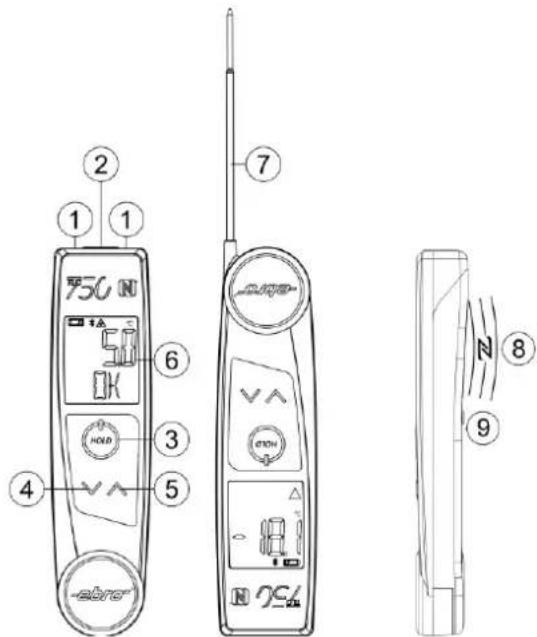
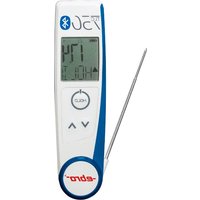
The TLC 750 NFC and TLC 750 BT are both infrared and contact thermometers. You can choose between these two types of measurement at any time. While using them as an infrared thermometer, two integrated laser pointers help to aim at the desired measuring surface.
The model variant TLC 750 BT has a Bluetooth LE interface integrated for wireless data transmission. In addition, the device offers a USB interface for wired data transmission. The integrated battery can be charged via the USB interface on the backside of the housing or using wireless charging technology.
In addition to the functions of the TLC 750 BT device, the model variant TLC 750 NFC has an NFC reader integrated with which NFC tags can be read.
1..... two laser pointers
2.....Infrared lens
3..... Measurement button
4.....Down button
5..... Up button
6..... Display
7...... Penetration probe
8..... NFC reader antenna position (on backside)
9..... USB interface position (on backside)
3. Safety instructions

The device is not suitable for children. Keep out of the reach of children!
Risk of injury!
There is a risk of injury when the probe needle is unfolded.
Risk of contamination! In case of injuries with the probe needle you could contract dangerous germs!
Burns!
After measuring high temperatures, the probe needle still is hot for some time.
Avoid over-tightening the penetration probe pivot. Overstressing the penetration probe may cause breakage.
Operate the device only within the specified parameters.

Warning of laser light!
Risk of injury to the eyes! Do not aim the laser directly or indirectly via reflective surfaces to the eyes.
If the device or its accessories are mechanically damaged, do not use them any more!
The device may never be thrown in fire or heated up to similar temperatures via other means! Danger of explosion of the battery!
The cover of the battery compartment must not be opened. Only the flap covering the USB port may be opened for the purpose of recharging the battery. In order to maintain protection class IP 65, close the flap afterwards again.
Please also see the instructions regarding charging (chapter 7), cleaning (chapter 8) and the allowed power supplies (chapter 10).
4. Precautions
Protect the thermometer from the following influences:
• Strong electromagnetic fields e.g. induction heaters
- Static electricity
- Do not use on or near hot or very cold objects.
5. Device operation
5.1 Switching on
The device can be switched on by pressing the measurement button or by unfolding the penetration probe. If penetration probe is folded, IRT measurement is active. Otherwise core temperature measurement is active.
When the device is switched on, the device waits for a Bluetooth connection and displays this with a flashing Bluetooth symbol. Once connected, the Bluetooth icon is permanently displayed.
5.2 Switching off
The device will switch off automatically after 1 minute if in infrared mode, or after 10 minutes if in penetration probe mode. The backlight switches off after 10 seconds of inactivity.
5.3 Penetration probe temperature measurements
The Penetration probe must be unfolded for this mode of operation. Position the probe needle where you want to measure the temperature. Wait until temperature has stabilized. By pressing the measurement button last measured temperature value is held until the measurement button is pressed again.
5.4 Infrared temperature measurements
The penetration sensor must be closed for this mode of operation. To take a reading with the infrared sensor, point the infrared lens at the point to be measured and press and hold the measurement button. Aim so that both laser points are on the object to be measured. The area whose temperature is measured is located between the two laser points. If the measurement button is released the last measured value is held.
5.5 Logging modes
5.5.1 AdHoc logging mode
This mode offers real time measurement data transmission via a Bluetooth LE connection. In addition measurement values can be stored at internal storage memory for readout at a later time. The device has to be programmed by host software for this mode.
| Step | Description | LCD display |
| 1 | In infrared mode temperature measurements are taken while the measurement button is pressed.In penetration probe mode temperature measurements are taken while no key is pressed. | 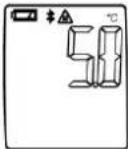 |
| 2 | In infrared mode temperature value is held if the measurement button is released. In this state device alternately shows “HOLD” and “SAVE”.In penetration probe mode temperature measurement is held if the measurement button is shortly pressed. In this state device alternately shows “HOLD” and “SAVE”.If Bluetooth is connected measurement data is transferred via Bluetooth.Only available at TLC 750 NFC device:If the measurement button is pressed down the internal NFC reader searches every time once for NFC tags.If a NFC tag was found device shows “TAG” and alternately “HOLD” and “SAVE”.If Bluetooth is connected NFC tag data is transferred via Bluetooth. |   |
| 3 | To store measurement to internal storage memory the down button has to be pressed. Device confirms with "OK".To discard the measurement the up button has to be pressed. Device confirms the memory with the display "CLR".Pressing the measurement button takes a new measurement.Only available at TLC 750 NFC device:To store NFC tag data to internal storage memory the down button has to be pressed. Device confirms the memory storage executing with "OK".To discard NFC tag data the up button has to be pressed. Devices confirms with "CLR". | 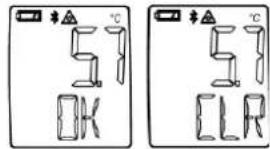 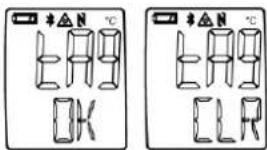 |
5.5.2 List logging mode
This operating mode offers a guided tour with display of the measuring locations. In addition measurement values can be stored at internal storage memory for readout at a later time. Device has to be programmed by host software with a tour list before list logging mode is active.
| Step | Description | LCD display | |
| 1 | After device is started the first location text is shown on LCD. This location texts are free programmable by host software. |  | |
| 2 | By using the up and down buttons it is possible to change measurement location |  | |
| 3 | In infrared mode temperature measurements are taken while the measurement button is pressed.In penetration probe mode temperature measurements are taken while no key is pressed | 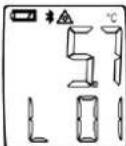 | |
| 4 | In infrared mode temperature value is held if the measurement button is released.In penetration probe mode temperature measurement is held if the measurement button is shortly pressed. In this state display alternately shows “HOLD” and “SAVE”. |  |  |
| 5 | To store measurement to internal storage memory the down button has to be pressed. Device confirms with "OK". List location is automatically changed to next list location.To discard measurement the up button has to be pressed. Device confirms with "CLR".Pressing the measurement button takes a new measurement. |  | 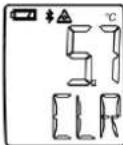 |
5.6 Settings Menu
5.6.1 Settings Menu Enter
When device is switched off: press the down and up buttons and after that additionally the measurement button for 3 seconds.
5.6.2 Settings Menu Operation
If menu is entered it is possible to change current displayed menu entry by the down and up buttons.
When the measurement button is pressed next menu entry is displayed.
If no button is pressed for 3 seconds next menu entry is displayed. After last menu entry is displayed device starts measure mode.
5.6.3 Settings Menu Entries
| Menu entry | LCD display |
| “UNIT”Temperature unit[°C / °F]Default: °C |  |
| “LASR”IRT Laser[ON / OFF]Default: ON | 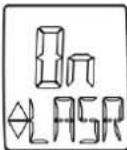 |
| “EMIS”IRT Emissivity[10..100]Default: 95 |  |
| “AHLD”Auto Hold function for penetration probe[ON / OFF]Default: ON |  |
| “LCDR”LCD rotation setting[ON / OFF]Default: ON | 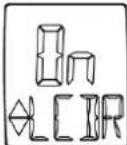 |
| “BLKL”Backlight[ON / OFF]Default: ON |  |
| Only available at TLC 750 NFC device:“NFC”NFC reader functionality[ON / OFF]Default: ON |  |
6. What to do if...
| Failure | Cause, Troubleshooting |
 | Temperature to be measured above + 250 °C. |
 | Temperature to be measured below -50 °C. |
| Device can not be switched on: | Battery empty. Charge the battery.If still not working with charged battery, contact the ebro service team |
7. Battery indicator and charge
The battery of the device can be charged via the USB port or wirelessly using the base station IF 50.
Attention! When using a power supply, make sure the power supply and the cable are working flawlessly! Only power supplies with Limited Power may be used. Loading may only be done under attendance. There must be no mechanical stress on the USB cable when it is attached. When recharging, both the device and the cable must be placed so that there is no mechanical stress. Make sure heat build-up can't occur, e.g. due to a covered device. In case you realize the device changing in appearance, stop the charging process immediately.
Before recharging via the USB port, make sure it is clean and dry.
In order to achieve a long life time of the battery and to prevent a deep discharge, the battery must be fully charged at least once every 180 days.
| Charging indicator | Description |
 | Battery fully chargedCharging completed |
 | Battery partially discharged |
 | Battery almost empty |
 | Charging active |
8. Care and Maintenance
Clean the lens
Blow loose particles with clean compressed air. Then carefully remove impurities with a soft brush. Gently wipe the surface with a damp cotton ball. Moisten the cotton ball only with clear water! DO NOT use solvents to clean the lens.
Clean housing
Clean the device with soap solution and a damp cloth. Before you do, make sure the lash covering the USB interface is closed. DO NOT immerse the device in the water. DO NOT use solvents such as acetone!
9. Disposal

If the device has become unusable, it must be disposed of in a way that is appropriate for the environment. Do not dispose of the device with household waste, but do it according to the specific national requirements legislation regarding recycling.
10. Technical specifications *
| Measuring Range | -50 ... +250 °C |
| Accuracy (at +23°C ± 1°C) | Infrared:-50°C ... -30.1 °C ±4.0 °C-30°C ... -18.1 °C ±2.5 °C-18°C ... -0.1 °C ±1.5 °C0°C ... +64.9 °C ±1.0 °C65°C ... +250 °C ±2.0 °C or 2% (the larger value applies)Penetration probe:± 0.5 °C in a measuring range -30.0 ... +99 °C;otherwise ±1.0 °C or 1% (the larger value applies) |
| Sample rate | 1s |
| Resolution | 0.1 °C |
| Emissivity | 0,95, adjustable |
| IR optics | 8:1 |
| Laser | Dual Laser to display the measuring surface |
| Working temperature: | Measuring: -20°C ... +50 °CCharging: 0 ... +40°C |
| Storage temperature | -20 ... +55 °C |
| Weight | 140 g |
| Dimensions | L x B x T 169.5 x 44 x 23 mm |
| Protection class | IP65; only with closed and faultless USB flap |
| Battery operating time | typical 8h at continuous use |
| Battery type | 3.7V Lithium Polymer |
| Battery charging | USBRequirements for the external Power supply unit:-Limited Power Source according IEC60950-1 orPS2 classified IEC62368-1- Short-circuit current < 8AWireless (WPT) by means of IF 50 |
| Battery recharge time | typically 3h |
| Interfaces | USB 2.0 (USB C)Bluetooth 4.0 Low Energy (BLE)TLC 750 NFC: NFC Reader 13.56 MHz (ISO 14443 A) |
| Temperature measurements storage size | 200 |
| List storage size | 100 |
| NFC tag data storage size | TLC 750 NFC: 100 |
* technical changes reserved
11. Standards
This product meets the requirements of the standard DIN EN 13485:2002
Medium: air, product
Suitability: S (storage)
Environment: E
Accuracy class: 0.5
According to DIN EN 13486 is a regular check and calibration of the meter necessary.
12. Regulatory information
General

This device is tested according to ETSI EN. It meets the requirements of ETSI EN
Radio approvals
RED
EN 61000-4-2
EN 61000-4-3
EN 61326-1:2021
EN 62368-1:2014
EN 62311
ETSI EN 300 330
ETSI EN 303 ETSI EN 300 328 V 2.2.2
ETSI EN 301 489-1 V 2.2.3
EN 301 489-3
EN 301 489-17
LVD
62368-1:2014
FCC
FCC ID: VQ5-TLC750NFC
This device contains FCC ID: QOQBGM113
This device complies with Part 15 of the FCC Rules. Operation is subject to the following two conditions:
(1) this device may not cause harmful interference, and
(2) this device must accept any interference received, including interference that may cause undesired operation.
The Federal Communications Commission (FCC) warns the users that changes or modifications to the unit not expressly approved by the party responsible for compliance could void the user's authority to operate the equipment.
FCC §15.105 (b):
Note: This equipment has been tested and found to comply with the limits for a Class B digital device, pursuant to part 15 of the FCC Rules. These limits are designed to provide reason-able protection against harmful interference in a residential installation. This equipment generates, uses and can radiate radio frequency energy and, if not installed and used in accordance with the instructions, may cause harmful interference to radio communications. However, there is no guarantee that interference will not occur in a particular installation. If this equipment does cause harmful interference to radio or television reception, which can be deter-mined by
turning the equipment off and on, the user is encouraged to try to correct the interference by one or more of the following measures:
- Reorient or relocate the receiving antenna.
- Increase the separation between the equipment and receiver.
- Connect the equipment into an outlet on a circuit different from that to which the Receiver is connected.
- Consult the dealer or an experienced radio/TV technician for help.
IC
IC: 7412A-TLC750NFC
This device contains IC: 5123A-BGM113
This device complies with Industry Canada's license-exempt RSSs. Operation is subject to the following two conditions:
(1) This device may not cause interference; and
(2) This device must accept any interference, including interference that may cause undesired operation of the device.
Changes of any kind on the device lead to the expiry of the operating license. Information, operating instructions and declarations of conformity can be found at www.ebro.com.
13. Service information
Xylem Analytics Germany Sales GmbH & Co. KG ebro
Am Achalaich 11
82362 Weilheim
Germany
Telefon: +49.(0)841.954.78.0
Fax: +49.(0)841.954.78.80
Internet: www.ebro.com
E-Mail: ebro@xylem.com
14. Manufacturer information
Xylem Analytics Germany GmbH
Am Achalaich 11
82362 Weilheim
Germany

- BEFORE WORKING WITH THE DEVICE
- OVERVIEW
- SAFETY INSTRUCTIONS
- PRECAUTIONS
- DEVICE OPERATION
- 5.1 SWITCHING ON
- 5.2 SWITCHING OFF
- 5.3 PENETRATION PROBE TEMPERATURE MEASUREMENTS
- 5.4 INFRARED TEMPERATURE MEASUREMENTS
- 5.5 LOGGING MODES
- 5.5.1 ADHOC LOGGING MODE
- 5.5.2 LIST LOGGING MODE
- 5.6 SETTINGS MENU
- 5.6.1 SETTINGS MENU ENTER
- 5.6.2 SETTINGS MENU OPERATION
- 5.6.3 SETTINGS MENU ENTRIES
- WHAT TO DO IF
- BATTERY INDICATOR AND CHARGE
- CARE AND MAINTENANCE
- CLEAN THE LENS
- CLEAN HOUSING
- DISPOSAL
- TECHNICAL SPECIFICATIONS
- STANDARDS
- REGULATORY INFORMATION
- GENERAL
- RADIO APPROVALS
- RED
- LVD
- 62368-1:2014
- FCC
- FCC §15.105 (B)
- SERVICE INFORMATION
- MANUFACTURER INFORMATION
Brand : Ebro
Model : TLC 750 NFC
Category : Thermometer