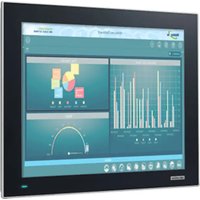
TPC-317 EHL - Ordinateur industriel tactile Advantech - Free user manual and instructions
Find the device manual for free TPC-317 EHL Advantech in PDF.


Pick your language and provide your email: we'll send you a specifically translated version.
| Product Type | Industrial Panel PC |
| Display Size | 17 inches |
| Resolution | 1280 x 1024 (SXGA) |
| Processor | Intel Celeron J6412 (Elkhart Lake) |
| Touchscreen | Projected capacitive (P-Cap) |
| Operating System | Windows 10 IoT Enterprise or Linux ready |
| Dimensions (W x H x D) | 420 x 340 x 60 mm |
| Weight | 6.0 kg |
| Power Supply | 12–24 V DC, typical 60 W |
| Front Panel Protection | IP65 (NEMA 4) |
| Operating Temperature | 0°C to 50°C |
| Main Functions | HMI, industrial automation, data acquisition, visualization |
| Maintenance | Clean with a soft, dry cloth; avoid abrasive cleaners |
| Safety | Use certified power supply; ensure proper grounding; follow installation manual |
| Spare Parts & Repairability | Authorized service only; contact Advantech for replacement parts |
| Mounting | Panel mount (cutout: 389 x 309 mm) |
| Cooling | Fanless design |
| Certifications | CE, FCC Class A |
Frequently Asked Questions - TPC-317 EHL Advantech
How do I install the TPC-317 EHL into a panel cutout?
Prepare a cutout of 389 x 309 mm. Insert the unit from the front, attach the mounting brackets from the rear, and tighten the screws evenly. Ensure the gasket seals properly for IP65 protection.
Which power supply should I use?
Use a regulated DC power supply with output between 12 and 24 volts and at least 60 watts capacity. The connector is a 3-pin terminal block. Observe polarity: V+, V-, and FG (ground).
Can I install Windows 10 on the TPC-317 EHL?
Yes, the system is compatible with Windows 10 IoT Enterprise and other Windows 10 editions. Drivers are available from Advantech's support website. Linux distributions like Ubuntu are also supported.
How do I clean the touchscreen?
Power off the device. Use a soft, lint-free cloth slightly dampened with water or isopropyl alcohol (max 50%). Gently wipe the screen. Do not use abrasive cleaners or apply excessive pressure.
What is the default BIOS password?
The default BIOS password is often empty or set to '0000'. Refer to the manual for your specific unit. It can be changed in the BIOS setup menu.
How can I adjust the brightness or contrast?
Brightness can be adjusted via the on-screen display (OSD) buttons typically located on the bezel, or using the provided utility in Windows. Press the MENU button to access OSD controls.
What should I do if the touchscreen is not responding?
First, calibrate the touchscreen via the operating system's touch settings. If the issue persists, check the USB cable connection to the touch controller. Reinstall the touch driver from the Advantech website.
Is the TPC-317 EHL fanless?
Yes, it features a fanless design for silent operation and increased reliability in dusty environments. Ensure adequate ventilation around the unit for heat dissipation.
How do I reset the system to factory defaults?
To reset hardware settings, enter BIOS (press DEL during boot) and select 'Load Optimized Defaults'. For OS reinstallation, use the recovery image provided by Advantech or reinstall from scratch using known-good media.
Where can I find the latest drivers and manuals?
Visit the Advantech official website at www.advantech.com, search for 'TPC-317 EHL', and navigate to the Downloads section. You will find drivers, user manuals, and technical drawings.
User questions about TPC-317 EHL Advantech
0 question about this device. Answer the ones you know or ask your own.
Ask a new question about this device
No questions yet. Be the first to ask one.
Download the instructions for your Ordinateur industriel tactile in PDF format for free! Find your manual TPC-317 EHL - Advantech and take your electronic device back in hand. On this page are published all the documents necessary for the use of your device. TPC-317 EHL by Advantech.
USER MANUAL TPC-317 EHL Advantech

Manual assistant
Powered by Anthropic
Waiting for your message
Product information
Brand : Advantech
Model : TPC-317 EHL
Category : Ordinateur industriel tactile