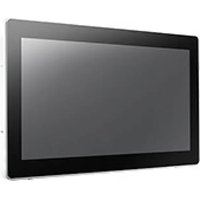
UTC-318G - Touchscreen Computer Advantech - Free user manual and instructions
Find the device manual for free UTC-318G Advantech in PDF.


Pick your language and provide your email: we'll send you a specifically translated version.
| Product Type | Industrial Panel PC / Touch Computer |
| Display Size | 18.5 inches |
| Display Resolution | 1366 x 768 (HD) |
| Touch Technology | Projected Capacitive 10-point multi-touch |
| Processor | Intel Celeron J1900 (quad-core, up to 2.0 GHz) |
| Memory | 4 GB DDR3L (expandable) |
| Storage | 64 GB mSATA SSD |
| Operating System | Windows 10 IoT Enterprise (optional) |
| Power Input | 12 V DC, 5.41 A (external adapter) |
| Power Consumption | 65 W (typical) |
| Dimensions (W x H x D) | 472 x 304 x 49.5 mm |
| Weight | Approx. 5.2 kg |
| Ingress Protection (Front) | IP65 (dust and water jets) |
| Operating Temperature | 0°C to 40°C |
| Relative Humidity | 10% to 90% (non-condensing) |
| Interfaces | 2 x USB 2.0, 2 x USB 3.0, 1 x RS-232, 1 x HDMI, 1 x VGA, 1 x Gigabit LAN, 1 x Audio |
| Mounting | Panel mount, VESA 75/100 |
| Certifications | CE, FCC, RoHS |
| Cleaning | Wipe with soft dry cloth; use mild detergent if needed |
| Safety | Overvoltage protection, short-circuit protection |
| Spare Parts / Repairability | Available through Advantech service centers; replaceable SSD, RAM, fan |
Frequently Asked Questions - UTC-318G Advantech
How do I clean the UTC-318G touchscreen?
Use a soft, lint-free cloth slightly dampened with water or a mild glass cleaner. Avoid abrasive cleaners or spraying liquid directly onto the screen.
What operating systems are supported?
The UTC-318G supports Windows 10 IoT Enterprise and Linux (Ubuntu). Drivers are provided for these platforms.
Can I mount the device on a wall?
Yes, the UTC-318G supports VESA 75/100 mounting. A compatible mount arm or bracket can be used.
What is the power supply requirement?
It requires a 12 V DC, 5.41 A power adapter (included). The input range is 12-24 V DC with optional adapter.
How do I perform a factory reset?
Press and hold the reset button (located on the bottom panel) for 10 seconds while powering on. This will restore default BIOS settings.
Is the screen waterproof?
The front panel is rated IP65, meaning it is protected against dust and low-pressure water jets. The back is not sealed.
Can I upgrade the RAM?
Yes, the RAM is upgradeable. It uses a single SO-DIMM DDR3L slot, supporting up to 8 GB.
What is the maximum operating temperature?
The recommended operating temperature range is 0°C to 40°C (32°F to 104°F). For extended range, contact Advantech.
How do I connect a barcode scanner?
Connect a USB barcode scanner to any USB port. It will be recognized as a keyboard input device without additional drivers.
Where can I find spare parts?
Spare parts such as the touch panel, power board, and fan are available through Advantech's service network. Contact your local distributor.
User questions about UTC-318G Advantech
0 question about this device. Answer the ones you know or ask your own.
Ask a new question about this device
No questions yet. Be the first to ask one.
Download the instructions for your Touchscreen Computer in PDF format for free! Find your manual UTC-318G - Advantech and take your electronic device back in hand. On this page are published all the documents necessary for the use of your device. UTC-318G by Advantech.
USER MANUAL UTC-318G Advantech


Manual assistant
Powered by Anthropic
Waiting for your message
Product information
Brand : Advantech
Model : UTC-318G
Category : Touchscreen Computer