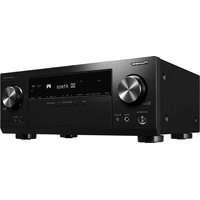
VSX-935 - Receiver KLIPSCH - Free user manual and instructions
Find the device manual for free VSX-935 KLIPSCH in PDF.


Pick your language and provide your email: we'll send you a specifically translated version.
| Brand | Klipsch |
| Model | VSX-935 |
| Product Type | Home Theater Receiver |
| Channels | 7.2 |
| Power Output | 150W per channel (6 ohms, 1 kHz, 1% THD) |
| Dimensions (W x H x D) | 435 x 173 x 380 mm |
| Weight | 10.5 kg |
| Power Consumption | 600W (standby: 0.15W) |
| Audio Formats | Dolby Atmos, DTS:X, Dolby TrueHD, DTS-HD Master Audio |
| HDMI Inputs | 6 (including 1 front) |
| HDMI Outputs | 2 (main and sub/zone 2) |
| Bluetooth | Yes (version 4.2) |
| Wi-Fi | Yes (802.11 a/b/g/n/ac) |
| Streaming Services | Spotify, Tidal, Deezer, Amazon Music HD |
| Multi-room Audio | Yes (DTS Play-Fi, FlareConnect) |
| AM/FM Tuner | Yes |
| Phono Input | Yes (MM) |
| USB Input | Yes (front panel) |
| Speaker Impedance | 6 - 16 ohms |
| Remote Control | Yes (included) |
| Cleaning Instructions | Wipe with dry cloth; do not use liquids or aerosols. |
| Safety Certifications | CE, FCC, RoHS |
| Repairability | Refer to service manual; some parts available through authorized dealers. |
Frequently Asked Questions - VSX-935 KLIPSCH
How do I connect my TV to the VSX-935 receiver?
Use an HDMI cable to connect the TV's ARC/eARC port to the receiver's HDMI OUT (ARC) port. Ensure HDMI CEC is enabled on both devices.
How can I update the firmware on my Klipsch VSX-935?
Connect the receiver to the internet via Wi-Fi or Ethernet. Go to Setup > System Update > Update via Network. Alternatively, download the firmware from the Klipsch support site and use a USB drive.
Why is there no sound from my speakers?
Check that the speakers are properly connected and the receiver is set to the correct input. Ensure the volume is not muted and that the source is playing audio. Also verify that the speaker impedance matches the receiver's settings.
Does the VSX-935 support Dolby Atmos?
Yes, it supports Dolby Atmos and DTS:X for immersive 3D sound.
How do I set up multi-room audio with DTS Play-Fi?
Install the DTS Play-Fi app on your mobile device. Connect the receiver to the same Wi-Fi network. In the app, add the VSX-935 and other compatible speakers to create a multi-room group.
What is the maximum power output of the receiver?
It delivers up to 150 watts per channel (6 ohms, 1 kHz, 1% THD) with one channel driven.
Can I use a turntable with the VSX-935?
Yes, the receiver has a dedicated phono input (MM) for turntables with a moving magnet cartridge.
How do I reset the receiver to factory settings?
Turn off the receiver, then press and hold the 'Tuner' button on the front panel while turning it back on. Continue holding until 'Reset' appears on the display.
What streaming services are available on the VSX-935?
It supports Spotify, Tidal, Deezer, Amazon Music HD, and internet radio via the built-in Wi-Fi.
How do I calibrate the speakers for optimal sound?
Use the built-in MCACC (Multi-Channel Acoustic Calibration) system. Connect the included microphone to the receiver and follow the on-screen prompts to measure and adjust speaker levels, distances, and equalization.
User questions about VSX-935 KLIPSCH
0 question about this device. Answer the ones you know or ask your own.
Ask a new question about this device
No questions yet. Be the first to ask one.
Download the instructions for your Receiver in PDF format for free! Find your manual VSX-935 - KLIPSCH and take your electronic device back in hand. On this page are published all the documents necessary for the use of your device. VSX-935 by KLIPSCH.
USER MANUAL VSX-935 KLIPSCH


Manual assistant
Powered by Anthropic
Waiting for your message
Product information
Brand : KLIPSCH
Model : VSX-935
Category : Receiver