
TIRELIRE MAGIQUE INTYERACTIVE BARBIE - Interactive piggy bank LEXIBOOK - Free user manual and instructions
Find the device manual for free TIRELIRE MAGIQUE INTYERACTIVE BARBIE LEXIBOOK in PDF.


| Product type | Interactive educational piggy bank |
| Brand | LEXIBOOK |
| Model | BARBIE MAGIC INTERACTIVE PIGGY BANK (RPB1500) |
| Power supply | 3 alkaline 1.5V AA/LR6 batteries (not included) |
| Main functions | Deposit coins and bills, withdraw money, bank card with secret code, savings threshold, calculator, music mode (9 songs), game mode (9 educational games), LCD screen with butterfly lid, cash drawer, sound and light effects |
| Package contents | 1 piggy bank, 1 bank card, 40 fake coins, 20 fake bills, 1 instruction manual |
| Material | Plastic (not specified) |
| Dimensions | Approximately 25 cm height, 20 cm width, 15 cm depth (approx.) |
| Weight | Approximately 500 g (approx.) |
| Safety | Not suitable for children under 36 months (small detachable parts). Remove plastic films and ribbons before use. |
| Care and cleaning | Wipe with a slightly damp cloth (no detergent). Do not expose to moisture or heat. |
| Warranty | 2 years (contact retailer with proof of purchase). |
| Repairability and spare parts | Not specified. Do not disassemble. Contact consumer service. |
| General information | Designed and developed in Europe, made in China. Registered trademark LEXIBOOK®. |
Frequently Asked Questions - TIRELIRE MAGIQUE INTYERACTIVE BARBIE LEXIBOOK
User questions about TIRELIRE MAGIQUE INTYERACTIVE BARBIE LEXIBOOK
0 question about this device. Answer the ones you know or ask your own.
Ask a new question about this device
Download the instructions for your Interactive piggy bank in PDF format for free! Find your manual TIRELIRE MAGIQUE INTYERACTIVE BARBIE - LEXIBOOK and take your electronic device back in hand. On this page are published all the documents necessary for the use of your device. TIRELIRE MAGIQUE INTYERACTIVE BARBIE by LEXIBOOK.
USER MANUAL TIRELIRE MAGIQUE INTYERACTIVE BARBIE LEXIBOOK
- LCD screen with butterfly cover
- Bank card eject button
- Bank card slot
- Cash drawer
- Coin slot
- ON/OFF GEM button
- Banknote slot
- "Banknote deposit" knob
Image B
- Keyboard
- OK button
- CLEAR Button
- FINGERPRINT button
- WITHDRAWAL button
- SAVING GOAL button
- BALANCE button
- MUSIC mode button
- GAME mode button
Contents of the Packaging
1 Barbie interactive magic piggy bank
1 Bank card
40 fake coins
20 fake bills
1 instruction manual
WARNING: All packaging materials, such as tape, plastic sheets, wire ties and tags are not part of this toy and should be discarded for your child's safety.
Battery Information
The Barbie interactive magic piggy bank operates with 3 X 1,5V --- AA/LR6 alkaline type batteries (not included). Ask an adult to help you to find and install the correct batteries.
- Using a screwdriver, open the battery compartment cover located at the bottom of the piggy bank.
- Install the 3 AA/LR6 batteries, observing the polarity indicated at the bottom of the battery compartment, as per the diagram opposite.
- Close the battery compartment and tighten the screw.
Note:
- In order to keep your settings, when replacing the batteries, switch off the piggy bank before opening the battery door.
- During battery replacement, do not press any buttons.
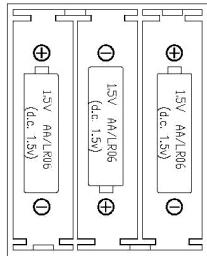
Non-rechargeable batteries are not to be recharged. Rechargeable batteries are to be removed from the toy before being charged. Rechargeable batteries are only to be charged under adult supervision. Different types of batteries or new and used batteries are not to be mixed. Only batteries of the same or equivalent type as recommended are to be used. Batteries are to be inserted with the correct polarity. Exhausted batteries are to be removed from the toy. The supply terminals are not to be short circuited. Do not throw batteries into a fire. Remove the batteries if you are not going to use the toy for a long period of time.
WARNING: Malfunction or loss of memory may be caused by strong frequency interference or electrostatic discharge. Should any abnormal function occur, reset the unit or remove the batteries and insert them again.
Using your Barbie interactive magic piggy bank
This section explains how to use your new Barbie interactive magic piggy bank. Read the following instructions to discover all its functions. Ask an adult to read and understand the safety instructions.
Switch your Barbie interactive magic piggy bank on/off
- To switch on your Barbie interactive magic piggy bank, press the ON/OFF GEM button. The butterfly cover will slide up to reveal the LCD screen and a welcome sound will play.
- To switch it off, press the ON/OFF GEM button.
Note:
- The piggy bank will go into sleep mode after 2 minutes of inactivity.
- If you hear a 'knocking on the door' sound, the piggy bank is asking you to take action and press or
insert something into the machine.
- After being opened, the butterfly cover and the lid of the special feature buttons must be closed back manually.
Barbie bank card
- Put the bank card into the corresponding slot and enter your special code by selecting 4 numbers on the keypad. Then press the FINGERPRINT button to confirm.
- For the first time, you will need to put the code in twice and press the FINGERPRINT button to confirm.
- When you have successfully entered your code, the lid will pop up to reveal Barbie's piggy bank 5 special feature buttons.
- Eject the bank card by pressing the bank card eject button.
- If you lose your bank card, press and hold the FINGERPRINT button for a few seconds to access the "Enter code" screen. Then the lid of the special feature buttons must be opened manually.
Depositing coins into your piggy bank
- Put a coin in the coin slot then use the "4/LEFT" and "6/RIGHT" keys on the keyboard to find the correct value. Press the FINGERPRINT or OK button to deposit the money.
- If a value appears but you have not put any coins in the piggy bank, press the CLEAR button to cancel the operation.
Note: You must confirm each coin as you put it in or the piggy bank will not add it to your savings.
Depositing banknotes into your piggy bank
- Put a banknote in the banknote slot and turn the "Banknote deposit" knob while feeding the money into the piggy bank.
- Use the keypad to enter the note's value and press OK or FINGERPRINT. The new balance will be displayed automatically.
- Press CLEAR to delete an error.
- If you had set a saving goal, Barbie says 'WOW!' when you have reached it.
Note:
- You must insert one banknote at a time.
- You can deposit money without the bank card or code being inserted.
Withdrawing money
- Press WITHDRAWAL and enter the withdrawal amount using the keypad.
- Press OK or FINGERPRINT and the drawer will pop open and your account balance will display.
- If the drawer does not open, put in a new amount that is less than your total savings.
- When you have finished, push the drawer back in.
Your saving goal
- Press SAVING GOAL and the total at the bottom of the screen will tell you if you have reached or exceeded your saving goal.
- If you have not yet set your saving goal, use the keypad to enter the amount and press OK or FINGERPRINT. Press CLEAR to delete an error. It is better to not make your saving goal too high because you can only put in a new saving goal when you have reached the last one!
- If you have reached your goal, you can set a new saving goal using the keypad and press OK or FINGERPRINT. Try setting a higher goal otherwise Barbie will keep saying 'WOW!' every time you put money in.
Checking your balance
- Press BALANCE and your total savings will appear.
Using the calculator
- You can use the calculator function at any time except when playing music or games.
- Use the keypad to do calculations and press OK or FINGERPRINT to get the answer.
- To clear the screen, press CLEAR.
Playing music
- Press MUSIC and the number of the tune will display on the screen.
- Press "4/LEFT" or "6/RIGHT" to choose 1 of the 9 tunes and press OK or FINGERPRINT.
Playing games
Press GAME. Use "4/LEFT" or "6/RIGHT" to select 1 of the 9 exciting games and press OK or FINGERPRINT.
When you make a wrong move, Barbie will let will let you know by saying 'Uh-oh!.' When you complete a game, Barbie will say 'WOW!' The heart shape with a tick or cross next to it will light up to tell you if you have got the answer right or wrong.
Game 1 - Matching Shoes
Help Barbie find matching shoes.
Game 2 - Butterfly Net
Use the net to catch as many butterflies as you can.
Game 3 - The Make-up Race
Catch lipsticks and perfume bottles in your trolley but avoid the paint pots.
Game 4 - Make a Necklace
Make a beautiful necklace by catching the pearl that matches the pearl shown at the bottom of the screen.
Game 5 - Shop 'Til You Drop
Find the shopping item that costs the same amount of money that is shown in the purse at the bottom of the screen.
Game 6 - Shopping Trolley Race
Race your shopping trolley to the finish line without hitting any cans on the floor.
Game 7 - Sorting Coins
Sort the coins by dropping the matching coin into the safe at the bottom of the screen.
Game 8 - Account Manager
Quickly memorise the objects and then try and put the correct total number next to each object.
Game 9 - Break the Secret Code
Replace the questions marks with numbers to break the secret code. If you see: A FULL HEART = you have the correct number in the correct position – well done An EMPTY HEART = you have the correct number but it is not in the correct posit
An EMPTY CIRCLE = this number is not in the code - try again!
Resetting the machine and currency selection
If your machine is not working properly or is not showing your preferred currency on the screen, ask an adult to help you reset the unit.
To reset the machine
Insert the tip of a ballpoint pen into the reset hole located at the bottom of the machine, near the battery compartment. All your settings and stored information will be removed.
To reset the special code
Using a screwdriver, open the battery compartment cover located at the bottom of the machine. Insert the tip of a ballpoint pen into the special code reset hole. All your settings except the special code will be kept.
To select your preferred currency
Slide the currency selector switch to select between fake money, US dollars, Sterling and Euros.
Maintenance and Warranty
Only use a soft, slightly damp cloth to clean the unit. Do not use detergent. Do not to expose the unit to direct sunlight or any other heat source. Do not immerse the unit in water. Do not dismantle or drop the unit. Do not try to twist or bend the unit.
NOTE: Please keep this instruction manual, it contains important information.
This product is covered by our 2-year warranty.
For any claim under the warranty or after sale service, please contact your distributor and present a valid proof of purchase. Our warranty covers any manufacturing material and workmanship defect, with the exception of any deterioration arising from the non-observation of the instruction manual or from any careless action implemented on this item (such as dismantling, exposition to heat and humidity, etc.). It is recommended to keep the packaging for any further reference. Not suitable for children under 36 months old, as it contains small detachable elements which could be swallowed.
In a bid to keep improving our services, we could implement modification on the colours and the details of the product shown on the packaging.
Reference: RPB1500
Designed and developed in Europe - Made in China
©2009 LEXIBOOK®
Lexibook UK Ltd,
Unit 10 Petersfield Industrial Estate,
Bedford Road, Petersfield,
Hampshire, GU32 3QA
United Kingdom.
Helpline: 0808 1003015.
www.lexibook.com

Environmental Protection:
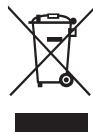
Unwanted electrical appliances can be recycled and should not be discarded along with regular household waste! Please actively support the conservation of resources and help protect the environment by returning this appliance to a collection centre (if available).
Lexibook Ibérica S.L.
Paiybi 6-ByeC TpWtn μe to KApOToI Oou
TpEe ME TO KAPOTOI OOU MEXPI T N Ypaun TEPaTIOO u Xwpi v a pEic TIC KovOePbEs Tou Eivai OTI pTaWja.
Paiyib 9-2TaoE TO MUOTIKo KWDIko
Avtikataotnoe ta eopntmuikacpeioguc yia va otaoei t o uotiko Kwoikó. Av 6