
IG750FE - Video game accessory LEXIBOOK - Free user manual and instructions
Find the device manual for free IG750FE LEXIBOOK in PDF.


| Brand | LEXIBOOK |
| Model | IG750FE |
| Product type | Ferrari interactive steering wheel for video games |
| Power supply | 4 AA/LR6 1.5 V batteries (not included) |
| Number of built-in games | 10 |
| Connectivity | A/V connection to TV (cables included) |
| Controls | Steering wheel, accelerator (A) and brake (B) buttons, left/right paddle shifters, START button, RESET button |
| Fastening strap | Integrated velcro strap to attach around a leg |
| Manual languages | French, English, German, etc. (downloadable) |
| Maintenance | Slightly damp cloth, no detergent |
| Safety | Epilepsy warning, not suitable for children under 36 months |
| Used batteries | Remove if not used for a long time, do not throw into fire |
| Reset | RESET button or remove/reinsert batteries if malfunctioning |
| Dimensions (estimated) | Approximately 25 x 20 x 10 cm |
| Weight (estimated) | Approximately 500 g (with batteries) |
| Manufacturing | Designed in Europe, made in China |
| License | ©2009 Ferrari S.p.A. |
Frequently Asked Questions - IG750FE LEXIBOOK
User questions about IG750FE LEXIBOOK
0 question about this device. Answer the ones you know or ask your own.
Ask a new question about this device
Download the instructions for your Video game accessory in PDF format for free! Find your manual IG750FE - LEXIBOOK and take your electronic device back in hand. On this page are published all the documents necessary for the use of your device. IG750FE by LEXIBOOK.
USER MANUAL IG750FE LEXIBOOK
In the following section you will find all the necessary information regarding the initialization and use of the Ferrari interactive wheel. It is strongly recommended that you read the user guide in its entirety to take note of all the enclosed instructions and safety precautions.
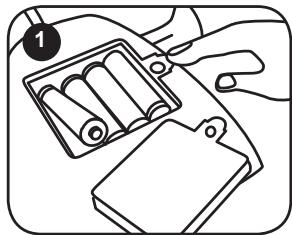
Using a screwdriver, open the battery compartment located under the steering wheel. Install the 4 × LR6/AA 1,5V --- type batteries (not included). Close back the battery compartment and tighten the screw.
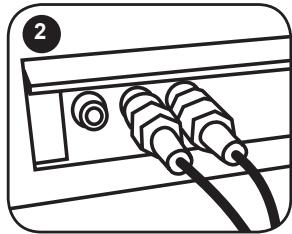
Connect the cables found at the front of the steering wheel into the A/V outlets of your television by matching the corresponding colours of the cables and A/V outlets.
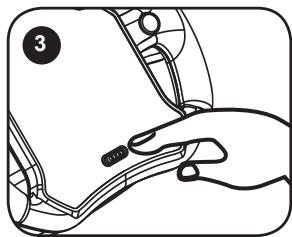
Switch on the television and select the correct input source. Slide the ON/OFF switch on the steering wheel to the ON position to turn on the Interactive Ferrari wheel.
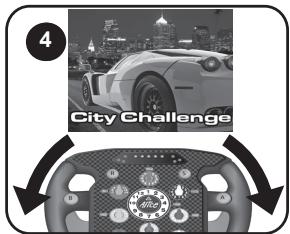
Turn the steering wheel to select one of the ten games available.
Turn the wheel to the right to display the next game, or to the left to display the previous game. Press the "S" (start) key to launch the game. Use the steering wheel, the "A" (accelerate), "B" (brake) keys, the right and left gear shifts to play the games.
To return to the game list, press the "S" key to pause the game, then use the steering wheel to select the option "QUIT". Press the "A" key to confirm
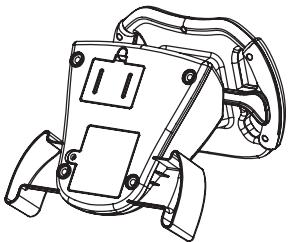
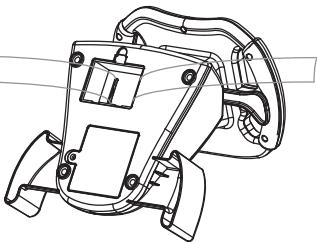
IMPORTANT: to ensure maximum security when using the toy, it is recommended to use the Velcro loop located in the compartment under the wheel to strap it to one leg.
Contents of the packaging
- 1 x Ferrari interactive wheel
- 1 x instruction manual
WARNING: All packaging materials, such as tape, plastic sheets, wire ties and tags are not part of this toy and should be discarded for your child's safety.
Battery information
The Ferrari interactive wheel operates with 4 × 1.5 ~V = -AA / LR6 type batteries (not included).
- Use a screwdriver to open the battery compartment located under the steering wheel.
- Install the 4 x LR6/AA type batteries (not included) observing carefully the polarity indicated at the bottom of the battery compartment and as per the diagram shown opposite.
- Close back the battery compartment and tighten the screw.
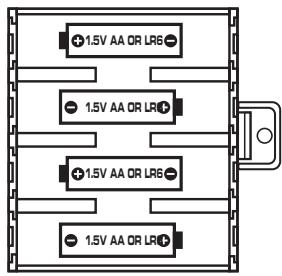
Non rechargeable batteries are not to be recharged. Rechargeable batteries are to be removed from the toy before being charged. Rechargeable batteries are only to be charged under adult supervision. Different types of batteries or new and used batteries are not to be mixed. Only batteries of the same or equivalent type as recommended are to be used. Batteries are to be inserted with the correct polarity. Exhausted batteries are to be removed from the toy. The supply terminals are not to be short circuited. Do not throw batteries into a fire. Remove the batteries if you are not going to use the game for a long period of time.
WARNING: Mal-function or loss of memory may be caused by strong frequency interference or electrostatic discharge. Should any abnormal function occur, press the RESET key or remove the batteries and insert them again.
Discover the Ferrari interactive wheel

ON/OFF slide switch: slide the ON/OFF switch to the ON position to turn on the game. Slide it to the OFF position to switch off the toy.
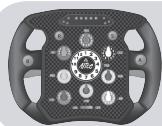
Steering wheel: turn the steering wheel to select one of the ten games available and to drive your car in the games.

START key: to access an activity, to play another round of the game, to pause the game. During a game, press once to pause the game, turn the steering wheel to the right and to the left to select "RESUME" (to resume the game) or "QUIT" to go back to the game list). Press the A key to confirm your choice.

RESET key: press this key at any time to return to the game list.


ACCELERATE key: press and hold this key to accelerate or move forward (you can will slow down and stop when you release the key).
BRAKE key: press this key to brake.
RIGHT GEAR SHIFT: hold the A key and pull the right gear to shift to second gear.
LEFT GEAR SHIFT: hold the key and pull the left gear to shift to first gear.
Game list
Turn the steering wheel to make your Ferrari go left or right. Press and hold A to make it move forward, press B to break. The arrows indicate that you are coming up to a big bend in the road (there are no arrows displayed for game 6).
Game 1 - City Challenge
Race your Enzo Ferrari towards the city by night against 2 competitors. Look out for construction signs on the road. Arrive first at the finish line!
Game 2 - Ferrari Team Race
Now, you are in a Formula 1 Ferrari and must overtake 5 competitors. Try to finish first in each race!
Game 3 - Ferrari Race
Race your GT Ferrari on a race track against 3 competitors. Arrive first at the finish line!
Game 4 - FXX Road Race
Race under a red sky! Drive your FXX Ferrari on a race track against 5 competitors. Look out for rocks on the road. Arrive first at the finish line!
Game 5 - Formula Ferrari
Race your Formula 1 Ferrari on the race track towards the sea! Race against 4 competitors and finish first in each race!





Game 6 - Slalom Contest
Race your Ferrari against 3 competitors. Look out for other cars on the road. Arrive first at the finish line!
Game 7 - Storm Racer
Rain can't stop you as you drive your Ferrari F1 against 3 competitors under a stormy weather. Arrive first at the finish line!
Game 8 - Alpine Battle
Race your GT Ferrari against 3 competitors through the mountains. Look out for rocks on the road and arrive first at the finish line!
Game 9 - Downtown Pursuit
Hop in your Enzo Ferrari and race against 5 competitors. Look out for wooden crates on the road and try your best to arrive first at the finish line!
Game 10 - Night Race
Get ready for an exciting night race! Drive your F1 and try to cross the finish line before 4 other cars.





Epilepsy warning
To be read before attempting to use a video game, either by you or your child. Some people are susceptible to suffer epileptic seizures or to loose consciousness when looking at certain types of flashing lights or elements commonly present in our everyday environment. These people are exposed to seizures when watching certain images on television or when they play some video games. This phenomenon can become apparent even if the person has no previous medical history of such, or has never suffered an epileptic fit. If you or a member of your family has shown in the past any symptom linked to epilepsy (either a seizure or loss of consciousness) when exposed to "luminous" stimulation, please consult with your doctor prior to any attempt to use this game. We warn parents to be vigilant with their children while they play with video games. If you or your child experience any of the following symptoms: dizziness, altered vision, eye or muscle twitches, loss of awareness, disorientation or involuntary movement or convulsions, stop immediately playing the game and consult a doctor.
Precautions to take in any case while using a video game
When you use a video game which can be connected to a TV screen, stand or sit relatively far from the TV screen and as far as the connection cable allows it. Use preferably video games which have a small screen. Avoid playing video games if you are tired or lack some sleep. Make sure to play in room which is well lit. While playing video games, take 10 to 15 minute breaks every hour.
Maintenance
Only use a soft, slightly damp cloth to clean the unit. Do not use detergent. Do not to expose the unit to direct sunlight or any other heat source. Do not immerse the unit in water. Do not dismantle or drop the unit. Do not try to twist or bend the unit.
NOTE: please keep this instruction manual, it contains important information.
It is recommended to keep the packaging for any further reference. Not suitable for children under 36 months old, as it contains small detachable elements which could be swallowed. In a bid to keep improving our services, we could implement modification on the colours and the details of the product shown on the packaging.
Reference: IG750FE
Designed and developed in Europe - Made in China
©2009 LEXIBOOK®
©2009 Ferrari S.p.A
Lexibook UK Ltd,
Wimbledon Village, Business Centre Ltd,
Thornton House, Thornton Road,
Wimbledon,
London SW19 4NG
Tel: 44 (0) 20 8405 6432,
http://www.lexibook.com
CE
Environmental Protection
Unwanted electrical appliances can be recycled and should not be discarded along with regular household waste! Please actively support the conservation of resources and help protect the environment by returning this appliance to a collection centre (if available).

Lexibook Ibérica S.L.
Jogo 8 – Alpine Battle
Jogo 9 - Downtown Pursuit
Very satisfactory/Très satisfaisant Satisfactory/Satisfaisant
Disappointing/Decevant
- Contents of the packaging
- Battery information
- Discover the Ferrari interactive wheel
- Game list
- Game 1 - City Challenge
- Game 2 - Ferrari Team Race
- Game 3 - Ferrari Race
- Game 4 - FXX Road Race
- Game 5 - Formula Ferrari
- Game 6 - Slalom Contest
- Game 7 - Storm Racer
- Game 8 - Alpine Battle
- Game 9 - Downtown Pursuit
- Game 10 - Night Race
- Epilepsy warning
- Precautions to take in any case while using a video game
- Maintenance
- CE
- Environmental Protection
- Jogo 8 – Alpine Battle
- Jogo 9 - Downtown Pursuit
Brand : LEXIBOOK
Model : IG750FE
Category : Video game accessory