
Radius 3000 - Professional audio player American Audio - Free user manual and instructions
Find the device manual for free Radius 3000 American Audio in PDF.


Pick your language and provide your email: we'll send you a specifically translated version.
| Product Type | Professional DJ Controller / Mixer |
| Brand | American Audio |
| Model | Radius 3000 |
| Dimensions (W x D x H) | 320 x 250 x 60 mm |
| Weight | 2.5 kg |
| Power Supply | USB bus powered or 5V DC adapter |
| Power Consumption | 2.5 W |
| Audio Outputs | 2 x RCA (Master), 1 x 1/4" (Headphone) |
| Audio Inputs | 2 x RCA (Line), 1 x 1/4" (Mic) |
| USB Port | 1 x USB Type B |
| Supported Software | Virtual DJ, Serato DJ Lite, Traktor Pro |
| Channel Strips | 2 channels with 3-band EQ and gain |
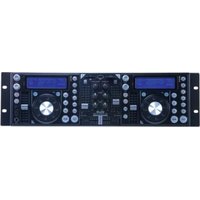
| Jog Wheels | 2 x capacitive touch jog wheels |
| Performance Pads | 8 hot cue, loop, and sampler pads per deck |
| Crossfader | Replaceable smooth crossfader |
| Effects | Built-in echo, flanger, filter, and more |
| Display | 2 x 2-line LED displays for track info |
| Construction | Durable plastic body with metal faceplate |
| Cleaning | Wipe with dry cloth; avoid solvents |
| Safety | Use only included power supply; keep dry |
| Spare Parts | Available crossfader, knobs, and power adapter |
| Reparability | Modular design; user-serviceable parts |
| Warranty | 1 year limited warranty |
Frequently Asked Questions - Radius 3000 American Audio
How do I connect the Radius 3000 to my computer?
Use the provided USB cable to connect the USB Type B port on the controller to a USB port on your computer. The device will be recognized automatically; you may need to install drivers if prompted.
Can I use the Radius 3000 with Serato DJ?
Yes, the Radius 3000 is compatible with Serato DJ Lite and Virtual DJ. For Serato DJ Pro, you may need a license or additional hardware.
How do I assign effects to the pads?
Effects are typically controlled via the software. In Virtual DJ, you can map effects to the FX pads by selecting the desired effect in the software interface and then pressing the pad you want to assign.
What power supply does the Radius 3000 need?
The controller can be powered via USB (bus power) from your computer. For stable operation, especially when using additional USB devices, use the optional 5V DC power adapter (center positive, 2.1mm barrel).
Why is my crossfader not working?
Ensure the crossfader is not locked in the software settings. Check the crossfader curve settings. If the issue persists, the crossfader may need cleaning or replacement; it is user-replaceable.
How can I clean the jog wheels?
Use a soft, dry microfiber cloth to gently wipe the jog wheels. Do not use liquids or abrasive cleaners. For stubborn dirt, slightly dampen the cloth with water.
Does the Radius 3000 work with Mac and Windows?
Yes, it is compatible with both Windows (7, 8, 10, 11) and macOS (10.12 and higher). No additional drivers are required for most DJ software.
How do I update the firmware?
Firmware updates are available on the American Audio website. Download the update tool, connect the controller, and follow the instructions. Keep the device powered via USB during the update.
Can I use the Radius 3000 as a standalone mixer?
No, the Radius 3000 is a controller that requires a computer and DJ software to function. It does not have internal audio processing for standalone mixing.
Where can I find replacement knobs?
Replacement knobs and other spare parts can be ordered from the American Audio website or authorized dealers. Check the spare parts section of the manual for part numbers.
User questions about Radius 3000 American Audio
0 question about this device. Answer the ones you know or ask your own.
Ask a new question about this device
No questions yet. Be the first to ask one.
Download the instructions for your Professional audio player in PDF format for free! Find your manual Radius 3000 - American Audio and take your electronic device back in hand. On this page are published all the documents necessary for the use of your device. Radius 3000 by American Audio.
USER MANUAL Radius 3000 American Audio

Manual assistant
Powered by Anthropic
Waiting for your message
Product information
Brand : American Audio
Model : Radius 3000
Category : Professional audio player