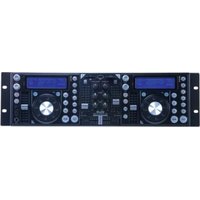
SDJ2 - Professional audio player American Audio - Free user manual and instructions
Find the device manual for free SDJ2 American Audio in PDF.


Pick your language and provide your email: we'll send you a specifically translated version.
| Product Type | DJ Controller |
| Brand | American Audio |
| Model | SDJ2 |
| Dimensions (W x D x H) | Approximately 12.6 x 8.3 x 2.4 inches |
| Weight | Approximately 3.5 lbs |
| Power Supply | USB bus-powered or 5V DC adapter |
| Channels | 2-channel mixer |
| Audio Outputs | RCA master output, headphone jack |
| Audio Inputs | Two stereo RCA line inputs |
| Built-in Effects | EQ, crossfader, cue |
| Controls | Rotary knobs, faders, push buttons |
| Compatibility | Windows and Mac OS, works with DJ software |
| USB Connection | USB Type-B port |
| Sample Rate | 44.1 kHz / 48 kHz |
| Bit Depth | 16-bit |
| Cleaning | Wipe with a dry, soft cloth |
| Safety Precautions | Keep away from liquids and extreme temperatures |
| Included Accessories | USB cable, user manual |
| Spare Parts Availability | Contact manufacturer for replacement parts |
| Repairability | Service by qualified technician recommended |
Frequently Asked Questions - SDJ2 American Audio
How do I connect the American Audio SDJ2 to my computer?
Connect the controller to your computer using the provided USB cable. The device is USB bus-powered, so no external power adapter is needed unless required by your setup. Install any necessary drivers if prompted, then launch your DJ software and select the SDJ2 as the audio device.
What DJ software is compatible with the SDJ2?
The SDJ2 is compatible with most popular DJ software that supports MIDI controllers, such as Serato DJ Lite, Virtual DJ, and Traktor. It may also work with other software that allows MIDI mapping.
Why is there no sound coming from the headphones?
Ensure the headphone jack is fully inserted and the headphone volume knob is turned up. Check that the cue buttons are pressed for the desired channel. Also, verify that your computer's audio output is set to the SDJ2 and that the master volume is not muted.
How do I clean and maintain my SDJ2 controller?
Turn off the device and disconnect it from power. Use a soft, dry cloth to gently wipe the surface. Avoid using liquids or abrasive cleaners. For stubborn dirt, slightly dampen the cloth with water and wring it out well before wiping.
Can I use the SDJ2 as a standalone mixer without a computer?
No, the SDJ2 requires a computer connection to function. It does not have internal audio processing capabilities and relies on DJ software running on a connected computer to mix audio.
What should I do if the crossfader is not working properly?
First, check that no effects or settings are interfering. You can recalibrate or reassign the crossfader in your DJ software. If the issue persists, the crossfader may be dirty or faulty; cleaning with contact cleaner or consulting a technician may help.
How do I change the cue volume on the SDJ2?
Use the 'Cue Volume' knob, usually located near the headphone jack. Turn it clockwise to increase the cue volume or counterclockwise to decrease. Ensure the cue mix is set appropriately using the 'Cue Mix' knob if available.
Is the SDJ2 compatible with Mac OS?
Yes, the SDJ2 is compatible with Mac OS. Typically, no additional drivers are needed for Mac. Simply connect the controller and it should be recognized by your DJ software. Check the manufacturer's website for any specific driver information.
What power adapter does the SDJ2 require?
The SDJ2 is primarily USB bus-powered, but it can also be powered using a 5V DC adapter with a center-positive tip (2.1mm). Use only the adapter specified by the manufacturer to avoid damage.
How can I reset the SDJ2 to factory settings?
The SDJ2 does not have a physical reset button. To reset settings, you can reinstall the drivers or reset your DJ software's MIDI mapping. Some software may have a 'reset to defaults' option for the controller.
User questions about SDJ2 American Audio
0 question about this device. Answer the ones you know or ask your own.
Ask a new question about this device
No questions yet. Be the first to ask one.
Download the instructions for your Professional audio player in PDF format for free! Find your manual SDJ2 - American Audio and take your electronic device back in hand. On this page are published all the documents necessary for the use of your device. SDJ2 by American Audio.
USER MANUAL SDJ2 American Audio


Manual assistant
Powered by Anthropic
Waiting for your message
Product information
Brand : American Audio
Model : SDJ2
Category : Professional audio player