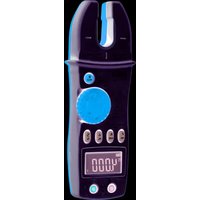
CL3000 - Measuring equipment Klein Tools - Free user manual and instructions
Find the device manual for free CL3000 Klein Tools in PDF.


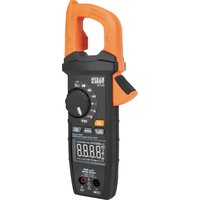
| Product Type | Clamp Meter |
| Brand | Klein Tools |
| Model | CL3000 |
| Measurement Functions | AC/DC Voltage, AC/DC Current, Resistance, Continuity, Capacitance, Frequency, Diode Test, Temperature |
| AC Current Range | 0.1 A to 400 A |
| DC Current Range | 0.1 A to 400 A |
| AC Voltage Range | 0.1 V to 600 V |
| DC Voltage Range | 0.1 V to 600 V |
| Resistance Range | 0.1 Ω to 40 MΩ |
| Capacitance Range | 1 nF to 4000 μF |
| Frequency Range | 1 Hz to 10 MHz |
| Jaw Opening | 1.25 inches (32 mm) |
| Display | Digital LCD with backlight |
| True RMS | Yes |
| Auto-Ranging | Yes |
| Data Hold | Yes |
| Safety Rating | CAT III 600V |
| Power Supply | 2 x AAA batteries (not included) |
| Dimensions | 8.6 x 2.3 x 1.3 inches (218 x 58 x 33 mm) |
| Weight | 8.8 oz (250 g) including batteries |
| Operating Temperature | 32°F to 122°F (0°C to 50°C) |
| Storage Temperature | -4°F to 140°F (-20°C to 60°C) |
| Included Accessories | Test leads, temperature probe, carrying case, user manual |
| Maintenance | Clean with damp cloth, no solvents; replace batteries promptly when low |
| Safety Compliance | EN 61010-1, EN 61010-2-033 |
Frequently Asked Questions - CL3000 Klein Tools
User questions about CL3000 Klein Tools
0 question about this device. Answer the ones you know or ask your own.
Ask a new question about this device
Download the instructions for your Measuring equipment in PDF format for free! Find your manual CL3000 - Klein Tools and take your electronic device back in hand. On this page are published all the documents necessary for the use of your device. CL3000 by Klein Tools.
USER MANUAL CL3000 Klein Tools
KLEIN TOOLS®
www.kleintools.com

For Professionals...Since 1857®
ENGLISH
CL3000 Instruction Manual
GENERAL SPECIFICATIONS
The Klein Tools CL3000 is a multi-function fork meter. It measures AC/DC voltage, AC current, resistance, capacitance, frequency, and duty cycle. It can also test diodes and continuity.
• Operating Altitude: 2000 meters
• Relative Humidity: 75% max
• Operating Temperature: 0°C /32°F to 40°C /104°F
• Storage Temperature: -10°C/14°F to 50°C/122°F
• Accuracy Temperature: 18°C/64°F to 28°C/2°F
- Beyond Accuracy Temperature: 0.1 * (specified accuracy) / °C
• Sampling Frequency: 3 samples per second
- Jaw size: 12mm max conductor size
• Dimensions: 7.5' x 2.7' x 1.7'
• Weight: 7.4 oz.
• Calibration: Accurate for one year
• CAT Rating: CAT III 600V
• Accuracy: ± (% of reading + # of least significant digits)
▲ WARNINGS
To ensure safe operation and service of the tester, follow these instructions. Failure to observe these warnings can result in severe injury or death.
- Before each use, verify meter operation by measuring a known voltage or current.
- Never use the meter on a circuit with voltages that exceed the category based rating of this meter.
- Do not use the meter during electrical storms, or in wet weather.
- Do not use the meter or test leads if they appear to be damaged.
- Ensure meter leads are fully seated, and keep fingers away from the metal probe contacts when making measurements.
- Do not open the meter to replace batteries while the probes are connected.
- Use caution when working with voltages above 60V DC, or 25V AC RMS. Such voltages pose a shock hazard.
- To avoid false readings that can lead to electrical shock, replace batteries if a low battery indicator appears.
- Unless measuring voltage or current, shut off and lock out power before measuring resistance or capacitance.
- Always adhere to local and national safety codes. Use individual protective equipment to prevent shock and arc blast injury where hazardous live conductors are exposed.
SYMBOLS

AC Alternating Current

Warning or Caution

DC Direct Current

Dangerous levels

DC/AC Voltage or Current

Double Insulated Class II

Ground

AC Source
FEATURE DETAILS
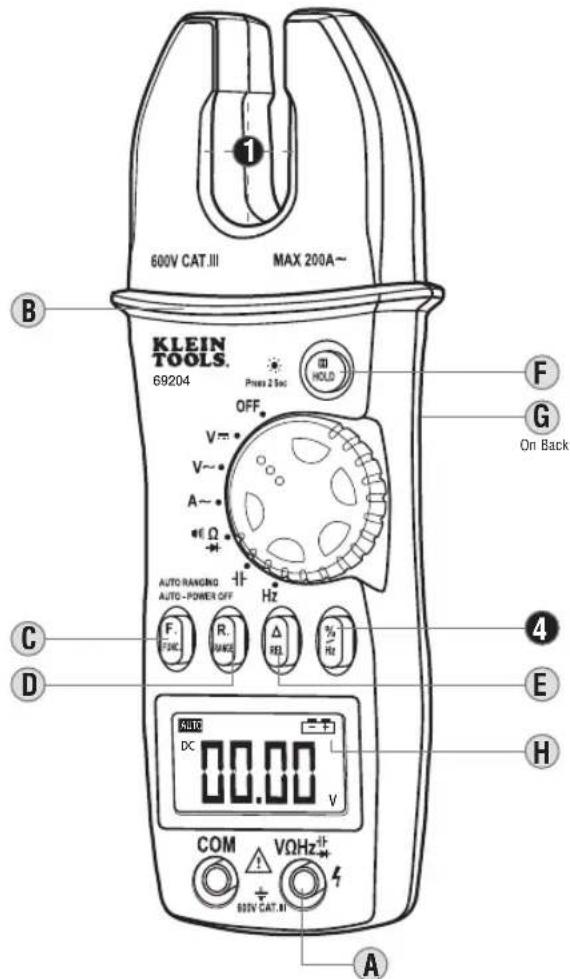
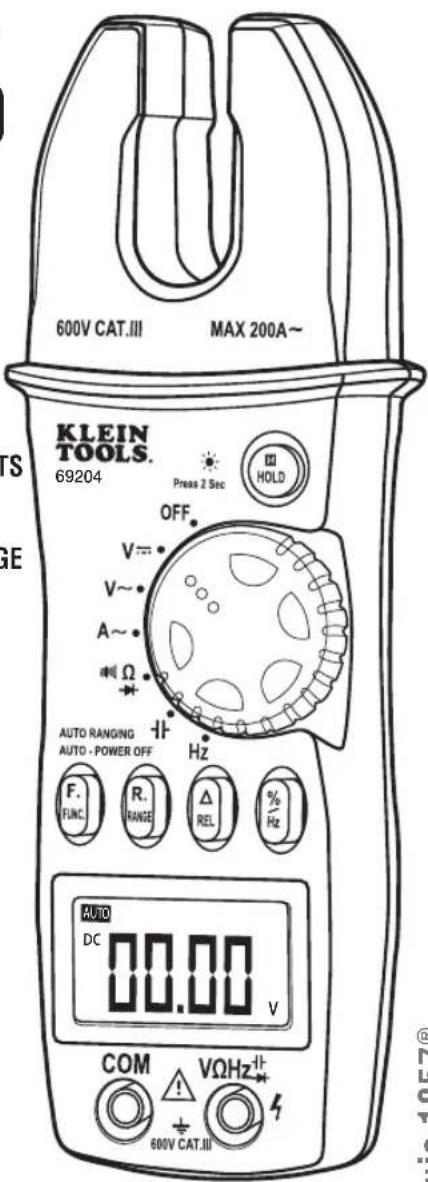
A. Use CAT III rated leads or higher.
Do not attempt to measure more than 750V AC or 1000V DC or any current on lead input.
B. Keep hands below line when measuring high current levels.
C. Functionality Button
- Switch between AC and DC.
- Switch between, Ω , and →
D. Auto / Manual Range
- Press repeatedly to cycle through manual ranges.
- Hold for 2 seconds to return to auto ranging mode.
• AUTO is displayed on LCD only during auto ranging mode.
E. Relative Reading Mode
- Press to store current value.
- Display will now show the difference between the stored and live readings.
- Press again to return to live reading.
F. Data Hold / Backlight
- Press to hold current value on display.
- Press again to return to live reading.
- Press button for 2 seconds to activate or deactivate backlight.
• Using light drains the battery significantly.
• Backlight turns off automatically after 15 seconds.
G.H. Battery Replacement (1 x 9V)
- When - + indicator is displayed on the LCD, battery must be replaced.
- Remove the back screw and replace the single 9V battery observing polarity.
• Turn off device before removing back cover.
Auto Power-Off
• Device will power off after 30 minutes non-use.
• Turn the dial or press a button to wake.
FUNCTION INSTRUCTIONS

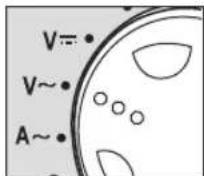
- AC Current: <200A
Features: REL HOLD RANGE

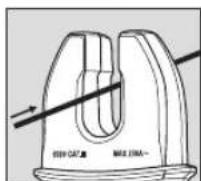

• Center wire in guides for best accuracy.
- Opposing currents cancel (use line-splitter when necessary).
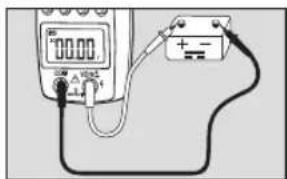
- DC Voltage: < 1000V DC
Features: REL HOLD RAGE

- AC Voltage: <750V AC
Features: REL HOLD RANGE

ENGLISH
4. Frequency / Duty Cycle
Features: HOLD


- Input Voltage should be between 1V-10V RMS for listed accuracy.
5. Resistance /Diode /Continuity
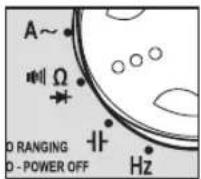

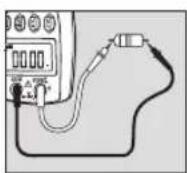
Resistance Features:
HOLD RANGE
• ADo not measure resistance on a live circuit.
- Ω < 40MΩ

Diode Features:
HOLD
Display shows:
• Forward voltage drop if forward biased.
- "O.L." if reverse biased.

Continuity Features:
HOLD
• Display shows resistance.
• Buzzer sounds if less than 30Ω
6. Capacitance: < 40μF
Features: REL HOLD


• ? Safely discharge capacitor before measurement.
• Wait up to 60 seconds for reading.
SYMBOLS USED ON LCD

AC Measurement DC Measurement

Negative DC Value REL Relative Mode

Low Battery H Hold Active

Auto Range Active V Voltage Measurement

Duty Cycle Mode Frequency Mode

Current in Amps Ω Resistance in Ohms

Diode Test Continuity Test

Capacitance in Farads n Nano 10 -9

Micro 10-6 m Milli 10-3

Kilo 10 3 M Mega 10 6
ELECTRICAL SPECIFICATIONS
DC Voltage Measurement
| Range Resolution Accuracy | ||
| 4V 0.001V | ± (0.7% + 2 digits) | |
| 40V | 0.01V | |
| 400V | 0.1V | |
| 1000V | 1V | ± (0.8% + 3 digits) |
Overload Protection: 1000V DC / 750V AC RMS Input Impedance: 10MΩ
AC Voltage Measurement
| Range | Resolution | Accuracy |
| 4V | 0.001V | ± (0.8% + 5 digits) |
| 40V | 0.01V | |
| 400V | 0.1V | |
| 750V | 1V | ± (1.0% + 10 digits) |
Overload Protection: 1000V DC / 750V AC RMS
Frequency: 50 to 60Hz
Input Impedance: 10MΩ
Response: Averaging
AC Current Measurement
| Range | Resolution | Accuracy |
| 200A | 0.1A | ± (3.0% + 3 digits) |
Overload Protection: 240A for 60 sec.
Frequency Response: 50 to 400Hz
Response: Averaging
Resistance Measurement
| Range Resolution Accuracy | ||
| 400Ω 0.1Ω | ± (1.2% + 1 digit) | |
| 4kΩ 0.001kΩ | ||
| 40kΩ 0.01kΩ | ||
| 400kΩ 0.1kΩ | ||
| 4MΩ 0.001MΩ | ||
| 40MΩ 0.01MΩ ± (2.0% + 3 digits) | ||
Overload Protection: 250V DC / AC RMS
Capacitance Measurement
| Range Resolution Accuracy | ||
| 40nF 0.01nF | ± (4.0% + 10 digits) | |
| 400nF 0.1nF | ||
| 4μF 0.001μF | ||
| 40μF 0.01μF | ||
Overload Protection: 250V DC / AC RMS
Frequency Measurement
| Range Resolution Accuracy | |
| 40Hz 0.01Hz | |
| 400Hz 0.1Hz | |
| 4kHz 0.001kHz | |
| 40kHz 0.01kHz | |
| 100kHz 0.1kHz ± (10% + 10 digits) |
Measurement Voltage Range: 1V to 10V RMS
Minimum Frequency: 10Hz
Duty Cycle Measurement
| Range Resolution Accuracy | ||
| 0.1 ~ 99.9% | 0.1% | ± (1.0% + 0 digits) |
Overload Protection: 600V DC / AC Peak
Diode Test
| Overload Protection | Forward DC Current | Reverse DC Voltage |
| 250V RMS | 0.6mA | 1.5V |
Continuity Test
| Overload Protection | Open Circuit Voltage |
| 250V RMS | 0.4V |
WARRANTY
This product is warranted to be free from defects in materials and workmanship for a period of two years from the date of purchase. During this warranty period, Klein Tools has the option to repair or replace or refund the purchase price of any unit which fails to conform to this warranty under normal use and service. This warranty does not cover damage which occurs in shipment or failure which results from alteration, tampering, accident, misuse, abuse, neglect, or improper maintenance. Batteries and damage resulting from failed batteries are not covered by warranty. A purchase receipt or other proof of original purchase date will be required before warranty repairs will be rendered.
Any implied warranties, including but not limited to implied warranties of merchantability and fitness for a particular purpose, are limited to the express warranty. Klein Tools shall not be liable for loss of use of the instrument or other incidental or consequential damages, expenses, or economic loss, or for any claim or claims for such damage, expenses or economic loss.
Some states or countries laws vary, so the above limitations or exclusions may not apply to you. This warranty gives you specific legal rights, and you may also have other rights which vary from state to state. If your Klein product requires repair or for information on how to exercise your rights under the terms of this warranty, please contact Klein Tools at 1-877-775-5346.
CLEANING
Turn instrument off and disconnect test leads. Clean the instrument by using a damp cloth. Do not use abrasive cleaners or solvents.
STORAGE
Remove the batteries when instrument is not in use for a prolonged period of time. Do not expose to high temperatures or humidity. After a period of storage in extreme conditions exceeding the limits mentioned in the Specifications section, allow the instrument to return to normal operating conditions before using it.
DISPOSAL / RECYCLE

Caution: This symbol indicates that equipment and its accessories shall be subject to a separate collection and correct disposal.
CUSTOMER SERVICE
KLEIN TOOLS, INC.
450 Bond Street
Lincolnshire, IL 60069
1-877-775-5346
www.kleintools.com
139563T

ESPAÑOL
3. Tensión de CA: < 750 V CA
INSTRUCTIONS RELATIVES AUX FONCTIONS

- Courant c.a.: < 200 A
Features: REL HOLD RANGE


FRANÇAIS
- Tension c.a.: < 750 V c.a.



- KLEIN TOOLS®
- ENGLISH
- CL3000 INSTRUCTION MANUAL
- GENERAL SPECIFICATIONS
- ▲ WARNINGS
- SYMBOLS
- AUTO POWER-OFF
- FREQUENCY / DUTY CYCLE
- RESISTANCE /DIODE /CONTINUITY
- RESISTANCE FEATURES
- HOLD RANGE
- DIODE FEATURES
- HOLD
- CONTINUITY FEATURES
- CAPACITANCE: < 40ΜF
- SYMBOLS USED ON LCD
- ELECTRICAL SPECIFICATIONS
- WARRANTY
- CLEANING
- STORAGE
- DISPOSAL / RECYCLE
- CUSTOMER SERVICE
- ESPAÑOL
- TENSIÓN DE CA: < 750 V CA
- FRANÇAIS
Brand : Klein Tools
Model : CL3000
Category : Measuring equipment