
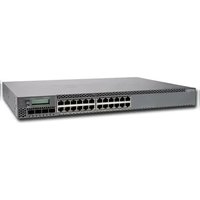
EX3400 - Switch Juniper - Free user manual and instructions
Find the device manual for free EX3400 Juniper in PDF.


Pick your language and provide your email: we'll send you a specifically translated version.
| Product Type | Access Switch |
| Brand | Juniper Networks |
| Model | EX3400 |
| Form Factor | 1U Rackmount |
| Ports | 24 or 48 Gigabit Ethernet (10/100/1000BASE-T), PoE+ (optional) |
| Uplink Ports | 4 SFP+ (1/10 Gbps) |
| Switching Capacity | Up to 176 Gbps (model dependent) |
| Forwarding Rate | Up to 131 Mpps |
| Dimensions (W x D x H) | 17.4 x 16.5 x 1.7 in (44.2 x 41.9 x 4.3 cm) |
| Weight | Approximately 12.6 lb (5.7 kg) |
| Power Supply | Internal AC (100-240 V, 50/60 Hz), dual redundant optional |
| Power Consumption | 120 W (typical) |
| Operating Temperature | 32°F to 104°F (0°C to 40°C) |
| Relative Humidity | 10% to 85% (non-condensing) |
| Layer Support | Layer 2 and Layer 3 (static routing, RIP, OSPF) |
| VLAN Support | Up to 4096 VLANs |
| Features | Link Aggregation, Spanning Tree, IGMP Snooping, QoS, ACLs |
| Management | CLI (SSH/Telnet), SNMP, Web GUI (J-Web), Junos OS |
| PoE Budget (if PoE model) | Up to 740W |
| Cooling | Fan-cooled (reversible airflow optional) |
| Cleaning | Use a soft, dry cloth. Do not use liquid cleaners. |
| Safety | Follow ESD precautions; ensure proper grounding. |
| Spare Parts & Repairability | Field-replaceable power supply and fans; optional SFP+ modules. Contact Juniper for repair. |
| Warranty | Standard 1-year hardware warranty |
Frequently Asked Questions - EX3400 Juniper
How do I perform a factory reset on the Juniper EX3400?
To factory reset, press and hold the Config button on the front panel for more than 15 seconds until the status LED blinks amber. Alternatively, use the CLI command:
request system zeroize.What type of SFP+ transceivers are supported?
The EX3400 supports Juniper-certified SFP+ transceivers for 1 Gbps and 10 Gbps connections. Use only approved optics to ensure compatibility and performance.
Can I stack multiple EX3400 switches?
Yes, EX3400 supports Virtual Chassis technology, allowing up to 10 switches to be stacked using the SFP+ uplink ports. This provides a single management interface.
How do I access the web interface (J-Web)?
Ensure your computer is on the same subnet as the switch. Use a web browser to navigate to the switch's IP address (default: 192.168.1.1). Login with the default credentials (root with no password) and set a new password.
What is the default username and password?
The default username is root with no password. For security, you should configure a password immediately using the CLI command
set system root-authentication plain-text-password.How do I configure VLANs on the EX3400?
Use CLI commands:
set vlans [vlan-name] vlan-id [id], then assign interfaces: set interfaces [interface] unit 0 family ethernet-switching vlan members [vlan-name]. Apply with commit.Does the EX3400 support PoE?
Some models (e.g., EX3400-24P, EX3400-48P) support PoE+ with up to 740W budget. Check your model label to confirm.
How do I update the Junos OS firmware?
Download the firmware from Juniper support. Use CLI:
request system software add [filename] (via FTP or local), then request system reboot. Ensure you have a backup.What is the expected lifespan of the switch?
With proper cooling and environmental conditions, the EX3400 can operate reliably for 5-7 years. Regular firmware updates extend functionality.
How do I troubleshoot a port not working?
Check the port status via CLI:
show interfaces [interface]. Ensure the cable is not damaged. Verify speed/duplex settings. Use monitor interface traffic to see activity.User questions about EX3400 Juniper
0 question about this device. Answer the ones you know or ask your own.
Ask a new question about this device
No questions yet. Be the first to ask one.
Download the instructions for your Switch in PDF format for free! Find your manual EX3400 - Juniper and take your electronic device back in hand. On this page are published all the documents necessary for the use of your device. EX3400 by Juniper.
USER MANUAL EX3400 Juniper


Manual assistant
Powered by Anthropic
Waiting for your message
Product information
Brand : Juniper
Model : EX3400
Category : Switch