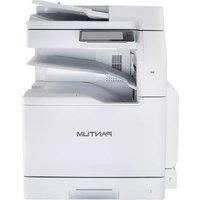
CM270ADN - Printer PANTUM - Free user manual and instructions
Find the device manual for free CM270ADN PANTUM in PDF.


Pick your language and provide your email: we'll send you a specifically translated version.
| Product Type | Color Laser Multifunction Printer |
| Brand | Pantum |
| Model | CM270ADN |
| Functions | Print, Copy, Scan, Fax (optional) |
| Print Technology | Laser |
| Print Color | Color |
| Maximum Print Speed (A4) | Up to 25 ppm (black & color) |
| Duplex Printing | Automatic |
| Paper Input Capacity | Standard 250 sheets |
| Paper Output Capacity | 150 sheets |
| Dimensions (W x D x H) | 420 x 410 x 380 mm |
| Weight | Approx. 22 kg |
| Power Supply | AC 220-240V, 50/60 Hz |
| Power Consumption (Typical) | 550 W (Printing), 35 W (Ready), <1 W (Sleep) |
| Connectivity | USB 2.0, Ethernet (10/100/1000), Wi-Fi (optional) |
| Display | 4.3 inch Color Touchscreen |
| Monthly Duty Cycle | Up to 80,000 pages |
| Recommended Monthly Print Volume | 2,000 - 5,000 pages |
| Cartridge Yields (Black/Color) | 3,000 pages (standard), 7,000 pages (high-capacity) |
| Cleaning and Maintenance | Clean exterior with soft cloth; use cleaning page for interior |
| Safety Certifications | CE, FCC, ENERGY STAR |
| Replaceable Parts | Toner cartridges, drum unit, fuser unit, transfer belt |
| Warranty | 1 year (extended options available) |
Frequently Asked Questions - CM270ADN PANTUM
How do I install the printer drivers for Pantum CM270ADN?
Download the latest drivers from the official Pantum website. Connect the printer via USB or Ethernet, then run the installer and follow on-screen instructions. For network setup, use the printer's touchscreen to configure Wi-Fi or wired LAN.
How can I clear a paper jam in the CM270ADN?
Open the front cover and carefully remove any jammed paper. Check the input tray, output tray, and duplex unit. If the jam is inside, open the rear cover. Pull paper in the direction of the paper path. Close all covers and press Resume on the touchscreen.
What toner cartridges are compatible with Pantum CM270ADN?
The CM270ADN uses Pantum CTL-300 series cartridges: black (CTL-300K), cyan (CTL-300C), magenta (CTL-300M), yellow (CTL-300Y). Standard yields are 3,000 pages; high-capacity versions yield 7,000 pages. Always use genuine Pantum toner for optimal quality.
How do I reset the drum unit counter on the CM270ADN?
After replacing the drum unit, the printer may prompt you to reset the counter. On the touchscreen, go to Settings > Maintenance > Replace Drum Unit and follow the steps. If not prompted, turn off the printer, hold the Back button while turning it on, then navigate to reset options.
Can I print from a mobile device to the Pantum CM270ADN?
Yes, via Wi-Fi Direct or network. Install the Pantum Print app (iOS/Android) or use AirPrint (iOS) and Mopria (Android). Ensure the printer is connected to the same network or use Wi-Fi Direct for direct connection.
How do I perform a factory reset on the CM270ADN?
Go to Settings > General > Factory Reset on the touchscreen. Confirm the reset. This will erase all customized settings, including network configurations. Alternatively, press the Home and Back buttons simultaneously while powering on to access service menu.
What should I do if the printer displays 'Toner Low' but the cartridge is new?
Remove the toner cartridge and shake it gently to redistribute the toner inside. Reinstall and run a test print. If the message persists, the cartridge may be defective. Replace with a genuine Pantum cartridge or contact support for a replacement.
How to connect the Pantum CM270ADN to a wireless network?
On the printer's touchscreen, go to Settings > Network > Wi-Fi Setup. Select your SSID, enter the password, and confirm. Alternatively, use the WPS method: press the WPS button on your router, then on the printer select WPS push button within 2 minutes.
How do I clean the scanner glass of the CM270ADN?
Open the scanner cover and wipe the glass with a lint-free cloth slightly dampened with water or a mild glass cleaner. Dry immediately with a dry cloth. Avoid using alcohol or abrasive cleaners to prevent damage.
Where can I find the user manual for Pantum CM270ADN in PDF?
The manual is available on the official Pantum website under Support > Downloads. Search for CM270ADN and select the language. Alternatively, you can download it from third-party manual sites like notice-facile.com.
User questions about CM270ADN PANTUM
0 question about this device. Answer the ones you know or ask your own.
Ask a new question about this device
No questions yet. Be the first to ask one.
Download the instructions for your Printer in PDF format for free! Find your manual CM270ADN - PANTUM and take your electronic device back in hand. On this page are published all the documents necessary for the use of your device. CM270ADN by PANTUM.
USER MANUAL CM270ADN PANTUM


Manual assistant
Powered by Anthropic
Waiting for your message
Product information
Brand : PANTUM
Model : CM270ADN
Category : Printer