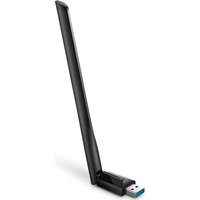
Archer T3U Plus - Network card / adapter TP-LINK - Free user manual and instructions
Find the device manual for free Archer T3U Plus TP-LINK in PDF.


Pick your language and provide your email: we'll send you a specifically translated version.
| Product Type | Wireless USB Adapter |
| Model Number | Archer T3U Plus |
| Brand | TP-Link |
| Wireless Standards | IEEE 802.11ac, 802.11a/b/g/n |
| Frequency Bands | 2.4 GHz and 5 GHz |
| Max Speed (5 GHz) | 867 Mbps |
| Max Speed (2.4 GHz) | 300 Mbps |
| Interface | USB 3.0 (backward compatible with USB 2.0) |
| Antenna | External high-gain antenna |
| Dimensions | 58 x 26 x 10 mm (2.3 x 1.0 x 0.4 in) |
| Weight | 30 g (1.1 oz) |
| Power Source | USB bus-powered |
| Operating Systems Supported | Windows 10/8.1/8/7, Linux, macOS |
| Security Features | WEP, WPA/WPA2, WPA-PSK/WPA2-PSK encryption |
| Maintenance | Keep dry and clean; avoid dust and moisture |
| Cleaning Instructions | Wipe with a soft, dry cloth; do not use liquids |
| Safety Precautions | Do not expose to extreme temperatures or water |
| Spare Parts | Not available; integrated design |
| Repairability | Not user-serviceable; contact support for issues |
Frequently Asked Questions - Archer T3U Plus TP-LINK
How do I install the TP-Link Archer T3U Plus on Windows 10?
Insert the adapter into a USB port. Windows 10 will automatically install the driver. If not, download the driver from TP-Link's official website (support.tp-link.com) and run the installer.
Is the Archer T3U Plus compatible with Linux?
Yes, it supports Linux kernels 3.x and above. You may need to install the driver from the TP-Link website or use the open-source driver 'rtl88x2bu'.
What is the maximum wireless speed of this adapter?
The Archer T3U Plus offers up to 867 Mbps on the 5 GHz band and up to 300 Mbps on the 2.4 GHz band, for a combined speed of 1167 Mbps.
Does the adapter support both 2.4 GHz and 5 GHz networks?
Yes, it is dual-band and can connect to either 2.4 GHz or 5 GHz Wi-Fi networks. You can select the preferred band in your network settings.
What is the range of the Archer T3U Plus?
The range depends on environmental factors. Typically, on 2.4 GHz you can expect up to 300 feet indoors, while 5 GHz has a shorter range (around 100-150 feet) but higher speed.
Does it have an external antenna?
Yes, it features a high-gain external antenna that can be adjusted for better signal reception.
Can I use this adapter with macOS?
Yes, it supports macOS 10.9 and later. You may need to install the driver from TP-Link's website for proper functionality.
How do I update the driver for my Archer T3U Plus?
Visit the TP-Link support page, search for 'Archer T3U Plus', and download the latest driver for your operating system. Run the installer to update.
Is the adapter secure for online banking?
Yes, it supports WPA2 and WPA3 encryption (depending on your router) to secure your connection. Always use a strong password for your Wi-Fi network.
What should I do if the adapter is not detected?
Try a different USB port, restart your computer, or reinstall the driver. If the issue persists, check Device Manager for errors or contact TP-Link support.
User questions about Archer T3U Plus TP-LINK
0 question about this device. Answer the ones you know or ask your own.
Ask a new question about this device
No questions yet. Be the first to ask one.
Download the instructions for your Network card / adapter in PDF format for free! Find your manual Archer T3U Plus - TP-LINK and take your electronic device back in hand. On this page are published all the documents necessary for the use of your device. Archer T3U Plus by TP-LINK.
USER MANUAL Archer T3U Plus TP-LINK


Manual assistant
Powered by Anthropic
Waiting for your message
Product information
Brand : TP-LINK
Model : Archer T3U Plus
Category : Network card / adapter