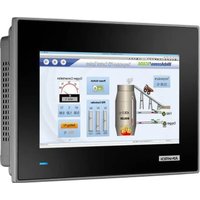
TPC-307W - Touchscreen Computer Advantech - Free user manual and instructions
Find the device manual for free TPC-307W Advantech in PDF.


Pick your language and provide your email: we'll send you a specifically translated version.
| Product Type | Industrial Touch Panel PC |
| Model | TPC-307W |
| Display Size | 7 inches |
| Touch Type | Projected Capacitive Touchscreen |
| Processor | Intel Atom E3900 Series or Celeron N3350 |
| Memory | 4GB DDR3L (up to 8GB) |
| Storage | 64GB M.2 SSD (expandable) |
| Operating System | Windows 10 IoT Enterprise or Linux |
| Dimensions (W x H x D) | 200 x 140 x 45 mm (approx.) |
| Weight | 1.2 kg (approx.) |
| Power Supply | 12~24V DC, 30W typical |
| Power Consumption | 15W (max 25W) |
| Operating Temperature | 0°C to 50°C |
| Ingress Protection | IP65 (front panel) |
| Connectivity | 2x Gigabit Ethernet, 2x USB 2.0, 2x USB 3.0, 1x RS-232, 1x RS-485, HDMI, Audio |
| Expansion Slots | 1x Mini PCIe, 1x SIM card slot |
| Mounting | Panel mount, VESA 75x75 |
| Main Functions | Human-Machine Interface (HMI), data acquisition, industrial control, visualization |
| Care & Cleaning | Wipe with soft dry cloth; avoid solvents; clean vent holes regularly |
| Safety | CE, FCC Class A; use only provided power adapter |
| Spare Parts & Repairability | Battery, SSD, fan (if any) replaceable; contact Advantech support |
| General Information | Fanless design, wide voltage input, industrial grade |
Frequently Asked Questions - TPC-307W Advantech
How to reset the TPC-307W to factory defaults?
Power off the device, press and hold the reset button (located near the I/O ports) while powering on, and release after 10 seconds. The device will boot into recovery mode. Follow the on-screen instructions to restore defaults.
Can I replace the SSD?
Yes, the TPC-307W has a removable M.2 SSD. Open the bottom cover, unscrew the SSD, and replace it with a compatible M.2 2242 SATA SSD. Ensure the system is powered off.
Why is the touchscreen not responding?
First, check if the screen is clean and dry. Restart the device. If still unresponsive, calibrate the touchscreen via the operating system's settings or reinstall the touch driver.
What power supply do I need?
The device accepts 12~24V DC input. Use the provided power adapter or a regulated DC supply with at least 30W capacity. Connect positive to V+ and negative to V- on the terminal block.
How to connect to Wi-Fi?
The TPC-307W does not have built-in Wi-Fi. You can add a Wi-Fi module via the Mini PCIe slot or use a USB Wi-Fi adapter.
The device overheats, what should I do?
Check that the cooling vents are clear of dust. Ensure the operating temperature is below 50°C. If overheating persists, reduce the processing load or add external cooling.
Can I mount the TPC-307W on a wall?
Yes, it supports VESA 75x75 mm mount. Use appropriate screws (M4) and ensure the wall can support the device weight.
How to install Windows 10 IoT?
Download the Windows 10 IoT image from Advantech's support site. Boot from a USB drive, follow the installation wizard, and install the required drivers from the device driver CD.
The display is showing artifacts, how to fix?
Check the display cable connection inside. Try an external monitor to isolate the issue. If artifacts persist, the LCD panel or graphics chip may be faulty; contact support.
How to update the BIOS?
Download the latest BIOS from Advantech's website. Copy the .bin file to a FAT32 USB drive. Boot the device and press F7 for boot menu, select the USB drive, then run the BIOS update utility.
User questions about TPC-307W Advantech
0 question about this device. Answer the ones you know or ask your own.
Ask a new question about this device
No questions yet. Be the first to ask one.
Download the instructions for your Touchscreen Computer in PDF format for free! Find your manual TPC-307W - Advantech and take your electronic device back in hand. On this page are published all the documents necessary for the use of your device. TPC-307W by Advantech.
USER MANUAL TPC-307W Advantech


Manual assistant
Powered by Anthropic
Waiting for your message
Product information
Brand : Advantech
Model : TPC-307W
Category : Touchscreen Computer