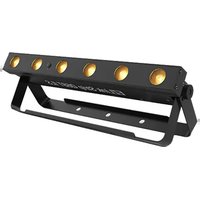
EZLink Strip Q6BT ILS - Lamp Chauvet - Free user manual and instructions
Find the device manual for free EZLink Strip Q6BT ILS Chauvet in PDF.


Pick your language and provide your email: we'll send you a specifically translated version.
| Product Type | Connected LED Strip |
| Brand | Chauvet |
| Model | EZLink Strip Q6BT ILS |
| Length | 2 meters |
| Color | RGBW (Red, Green, Blue, White) |
| Connectivity | Bluetooth and ILS (control system) |
| Power Supply | Power adapter included |
| Input Voltage | 24 V DC |
| Maximum Power Consumption | 24 W |
| Strip Dimensions | 2000 x 12 x 3 mm |
| Weight | 200 g |
| Color Temperature | 2700 K - 6500 K (adjustable) |
| Beam Angle | 120° |
| Mounting | Double-sided adhesive on back |
| Control | EZLink mobile app and ILS remote control |
| Compatibility | EZLink Master and other ILS devices |
| Protection Rating | IP20 (indoor use) |
| Warranty | 2 years |
| Certifications | CE, RoHS |
| Care and Cleaning | Clean with a soft, dry cloth. Do not immerse. |
| Spare parts and repairability | Not user serviceable. Contact Chauvet customer service. |
Frequently Asked Questions - EZLink Strip Q6BT ILS Chauvet
How to install the EZLink Strip Q6BT ILS LED strip?
Clean the surface, remove the protective film from the adhesive and attach the strip. Plug in the power adapter and turn it on via the app or remote control.
Which app to use to control the strip?
Download the EZLink app from the App Store or Google Play. Follow the Bluetooth pairing instructions.
Can I control multiple EZLink strips simultaneously?
Yes, you can group multiple compatible devices in the EZLink app or use the ILS function for advanced synchronization.
What to do if the strip does not turn on?
Check the power supply, cable connection, and ensure Bluetooth is enabled. Restart the app and try again.
Can the LED strip be cut to the desired length?
Yes, it can be cut at the cut marks (usually every 50 cm). The ends must be sealed with an appropriate connector (not included).
What is the Bluetooth range?
The Bluetooth range is about 10 meters indoors, without major obstacles.
Can I use the strip outdoors?
No, the IP20 rating limits it to dry indoor use. For outdoor use, protect it from moisture.
How to reset the LED strip?
Turn it off and on 3 times in a row. The lights will flash to confirm reset. Then re-pair via the app.
Is the strip compatible with Alexa or Google Home?
No, it is not natively. Use the EZLink app or the ILS remote control for control.
What to do in case of malfunction?
Check the full manual, reset the device. If the problem persists, contact Chauvet support.
User questions about EZLink Strip Q6BT ILS Chauvet
0 question about this device. Answer the ones you know or ask your own.
Ask a new question about this device
No questions yet. Be the first to ask one.
Download the instructions for your Lamp in PDF format for free! Find your manual EZLink Strip Q6BT ILS - Chauvet and take your electronic device back in hand. On this page are published all the documents necessary for the use of your device. EZLink Strip Q6BT ILS by Chauvet.
USER MANUAL EZLink Strip Q6BT ILS Chauvet
Manual assistant
Powered by Anthropic
Waiting for your message
Product information
Brand : Chauvet
Model : EZLink Strip Q6BT ILS
Category : Lamp