1713DSTE - Motion detector JUNG - Free user manual and instructions
Find the device manual for free 1713DSTE JUNG in PDF.


Pick your language and provide your email: we'll send you a specifically translated version.
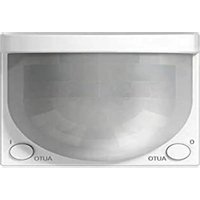
| Product Type | Motion Detector |
| Brand | JUNG |
| Model | 1713DSTE |
| Dimensions (H x W x D) | 120 x 80 x 50 mm |
| Weight | 150 g |
| Power Supply | 230 V AC, 50 Hz |
| Power Consumption (Standby) | < 0.5 W |
| Detection Method | Passive Infrared (PIR) |
| Detection Angle | 180° |
| Detection Range | 12 m (at 25°C) |
| Light Sensitivity | Adjustable, 5 lux to 2000 lux |
| Time Setting | 10 s to 15 min |
| Twilight Threshold | Adjustable |
| Protection Class | IP44 |
| Color | White (similar to RAL 9016) |
| Mounting Type | Wall or ceiling (surface or flush) |
| Operating Temperature | -20°C to +50°C |
| Functions | Automatic light control, adjustable twilight and time delay, walk-through function |
| Maintenance | Clean lens with a soft, dry cloth; avoid solvents |
| Safety | Disconnect power before installation; use according to local electrical codes |
| Spare Parts / Repairability | Not user-serviceable; contact qualified electrician for repairs |
Frequently Asked Questions - 1713DSTE JUNG
How do I adjust the detection range of the JUNG 1713DSTE?
The detection range is preset to approximately 12 m. To adjust, you can slightly rotate the sensor head or use the masking tape to cover part of the lens. Refer to the installation manual for detailed instructions.
Can I change the time setting after installation?
Yes, the time setting can be adjusted using the potentiometer on the device. Turn the time setting knob to select a duration from 10 seconds to 15 minutes. Ensure the device is powered on and observe the light response.
What does the twilight threshold control do?
The twilight threshold determines the ambient light level at which the detector becomes active. By adjusting the lux setting, you can choose whether the light turns on only at dusk/night or also during brighter conditions.
Why does my motion detector turn on during the day?
This usually indicates the twilight threshold is set too high. Turn the LUX potentiometer counterclockwise to increase the threshold (so it only activates in darker conditions). Test the setting at the desired light level.
How do I reset the JUNG 1713DSTE to factory settings?
There is no factory reset button. To restore default settings, turn the time setting to minimum and the lux setting to maximum, power cycle the device, then readjust to your preferences.
What is the maximum load this detector can switch?
The JUNG 1713DSTE is typically rated for 2300 W (resistive load) or 1000 W (inductive load) for incandescent and halogen lamps. For LED loads, reduce to 200 W. Check the product label for exact ratings.
Can I use this motion detector with LED lights?
Yes, but ensure the total LED load does not exceed the detector's rating for LEDs (usually 200 W). Some LEDs may cause flickering; adding a dummy load or using compatible LED drivers can help.
How do I clean the motion detector?
Use a soft, dry cloth to gently wipe the lens and housing. Do not use water or cleaning agents as they may damage the sensor. Avoid touching the lens directly.
What does the walk-through function do?
The walk-through function is an energy-saving feature. It reduces the light-on duration to a short time (e.g., 30 seconds) when movement is detected for a brief period, and increases it to the set time if continuous motion is detected.
Is the JUNG 1713DSTE suitable for outdoor use?
Yes, with an IP44 protection rating, it is splash-proof and can be used outdoors under eaves or in sheltered areas. Avoid direct exposure to rain or water jets.
User questions about 1713DSTE JUNG
0 question about this device. Answer the ones you know or ask your own.
Ask a new question about this device
No questions yet. Be the first to ask one.
Download the instructions for your Motion detector in PDF format for free! Find your manual 1713DSTE - JUNG and take your electronic device back in hand. On this page are published all the documents necessary for the use of your device. 1713DSTE by JUNG.
USER MANUAL 1713DSTE JUNG

Manual assistant
Powered by Anthropic
Waiting for your message
Product information
Brand : JUNG
Model : 1713DSTE
Category : Motion detector