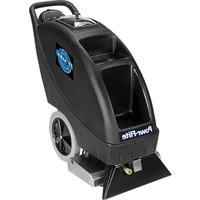
PFX900S - Carpet Cleaner Powr-Flite - Free user manual and instructions
Find the device manual for free PFX900S Powr-Flite in PDF.


Pick your language and provide your email: we'll send you a specifically translated version.
| Product Type | Floor Scrubber |
| Brand | Powr-Flite |
| Model | PFX900S |
| Dimensions (L x W x H) | 24 x 18 x 45 inches |
| Weight | 85 lbs |
| Power Supply | 120V AC, 60Hz |
| Motor Power | 1.5 HP |
| Pad Speed | 300 RPM |
| Solution Tank Capacity | 5 gallons |
| Recovery Tank Capacity | 4 gallons |
| Cleaning Path Width | 20 inches |
| Main Functions | Scrubbing, stripping, buffing, and drying |
| Maintenance | Regularly clean tanks, check brushes, and lubricate moving parts |
| Safety Features | Emergency stop switch, anti-tip design, and splash guard |
| Spare Parts Availability | Brushes, squeegees, wheels, and filters available |
| Repairability | Modular design; key components easily replaceable |
| Noise Level | 70 dB |
| Warranty | 1 year limited warranty |
Frequently Asked Questions - PFX900S Powr-Flite
How do I start the PFX900S floor scrubber?
Ensure the solution tank is filled, the power cord is plugged into a 120V outlet, and the emergency stop switch is pulled out. Then press the green start button.
What type of cleaning solution should I use?
Use a neutral pH floor cleaning solution diluted according to the manufacturer's instructions. Avoid harsh chemicals that may damage the machine.
How do I adjust the brush pressure?
Most PFX900S models have a lever or knob to adjust brush pressure. Turn clockwise to increase pressure for heavy soil, counterclockwise for lighter cleaning.
Why is the machine not picking up water?
Check the squeegee for damage or debris, ensure the vacuum motor is running, and that the recovery tank is not full. Also verify the drain hose is closed.
How often should I replace the brushes?
Brushes should be inspected monthly and replaced when bristles show wear (less than 1/2 inch long) or when cleaning performance declines.
Can I use this machine on carpet?
No, the PFX900S is designed for hard floor surfaces only. For carpets, use a dedicated carpet extractor.
How do I clean the machine after use?
Empty and rinse both tanks, wipe down the squeegee and brushes, and store the machine with the squeegee raised to prevent damage.
What does the emergency stop switch do?
The emergency stop switch immediately cuts power to the motor and drive wheels. Push it inward to stop, pull outward to reset.
Where can I find replacement parts?
Replacement parts such as brushes, squeegees, and filters are available from Powr-Flite dealers or online parts stores. Use the model number PFX900S.
Why does the machine vibrate excessively?
Excessive vibration may be due to unbalanced brushes, loose mounting hardware, or worn bearings. Inspect and tighten connections, and replace damaged components.
User questions about PFX900S Powr-Flite
0 question about this device. Answer the ones you know or ask your own.
Ask a new question about this device
No questions yet. Be the first to ask one.
Download the instructions for your Carpet Cleaner in PDF format for free! Find your manual PFX900S - Powr-Flite and take your electronic device back in hand. On this page are published all the documents necessary for the use of your device. PFX900S by Powr-Flite.
USER MANUAL PFX900S Powr-Flite
Manual assistant
Powered by Anthropic
Waiting for your message
Product information
Brand : Powr-Flite
Model : PFX900S
Category : Carpet Cleaner