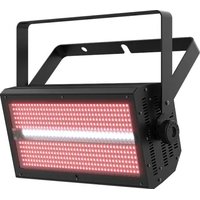
Shocker Panel FX - Lighting Chauvet - Free user manual and instructions
Find the device manual for free Shocker Panel FX Chauvet in PDF.


Pick your language and provide your email: we'll send you a specifically translated version.
| Product Type | LED Effect Light Panel |
| Brand | Chauvet |
| Model | Shocker Panel FX |
| Category | Lighting |
| Dimensions (L x W x H) | 15.0 x 10.0 x 5.0 in (38.1 x 25.4 x 12.7 cm) |
| Weight | 10.5 lb (4.8 kg) |
| Power Supply | 100-240 V AC, 50/60 Hz, 120 W |
| LED Type | 18 x 3W RGBW LEDs |
| DMX Channels | 7, 14, or 22 channels |
| Control Modes | DMX, Master/Slave, Sound-Active, Auto-Program |
| Beam Angle | 30 degrees |
| Strobe Rate | 0-20 Hz |
| Dimmer Curve | Linear, Square, Inverse Square, S-Curve |
| Maintenance | Clean lens with mild soap and water; avoid solvents. Check fans and vents regularly. |
| Safety Precautions | Ensure proper ventilation; do not operate without lens; use safety cable when mounting overhead. |
| Spare Parts & Repairability | Fuse, power supply, LED modules available from Chauvet. Repairs should be done by authorized service. |
| General Information | Designed for indoor use; IP20 rating; ambient temperature range 32-104°F (0-40°C). |
Frequently Asked Questions - Shocker Panel FX Chauvet
How do I connect the Shocker Panel FX to a DMX controller?
Use a 3-pin XLR cable to connect the DMX IN on the fixture to the DMX OUT of your controller. Set the DMX address via the control panel. You can choose between 7, 14, or 22 channel modes.
Can I link multiple units without a controller?
Yes, use Master/Slave mode. Set one unit as Master and others as Slave using the DMX menu. Connect them via XLR cables.
What is the maximum ambient temperature for safe operation?
The fixture is rated for ambient temperatures between 32°F and 104°F (0°C to 40°C). Avoid operating outside this range.
How do I clean the lens?
Disconnect power and let the fixture cool. Use a soft, damp cloth with mild soap and water. Wipe gently. Never use abrasive cleaners or solvents.
Which DMX channel mode should I use?
It depends on your needs. 7-channel is basic RGBW. 14-channel adds dimmer, strobe, and effects. 22-channel offers individual pixel control. Consult the manual for details.
Why is my Shocker Panel FX not responding to sound?
Ensure the microphone is not obstructed and the sensitivity is adjusted properly. Set the control mode to Sound-Active via the menu. If still not working, check the internal microphone connection.
Can I use this outdoors?
The fixture is rated IP20, meaning it is not waterproof. Use only indoors or in a dry, sheltered location.
How do I replace a blown fuse?
Disconnect power. Remove the fuse holder near the power input. Replace with a 1.6A, 250V fast-blow fuse of the same type. If it blows again, consult service.
What is the power consumption at full output?
The maximum power consumption is 120W. Ensure the power source can handle the total load of all connected fixtures.
How do I update the firmware?
Firmware updates are done via a USB-C port on the fixture using Chauvet’s firmware updater software. Download the latest firmware from the Chauvet website and follow the instructions.
User questions about Shocker Panel FX Chauvet
0 question about this device. Answer the ones you know or ask your own.
Ask a new question about this device
No questions yet. Be the first to ask one.
Download the instructions for your Lighting in PDF format for free! Find your manual Shocker Panel FX - Chauvet and take your electronic device back in hand. On this page are published all the documents necessary for the use of your device. Shocker Panel FX by Chauvet.
USER MANUAL Shocker Panel FX Chauvet
Manual assistant
Powered by Anthropic
Waiting for your message
Product information
Brand : Chauvet
Model : Shocker Panel FX
Category : Lighting