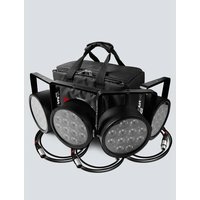
SlimPACK T12 USB - Lighting Chauvet - Free user manual and instructions
Find the device manual for free SlimPACK T12 USB Chauvet in PDF.


Pick your language and provide your email: we'll send you a specifically translated version.
| Product Type | LED Lighting Fixture |
| Model | SlimPACK T12 USB |
| Brand | Chauvet |
| Dimensions (L x W x H) | 12 x 2 x 2 inches (305 x 51 x 51 mm) |
| Weight | 1.5 lbs (0.68 kg) |
| Power Input | USB 5V DC, 1A max |
| Power Consumption | 5W max |
| Light Source | 12 x RGB LEDs |
| Beam Angle | 120° |
| Control Methods | USB-DMX, standalone (color macro, auto, sound-active) |
| DMX Channels | 3-channel (RGB) or 7-channel (RGB + effects) |
| Connectors | USB Type-A (power/data), RJ45 for DMX in/out (optional) |
| Housing Material | ABS plastic |
| Mounting | Magnetic back or included bracket |
| Cooling | Passive (no fan) |
| IP Rating | IP20 (indoor use only) |
| Operating Temperature | 32°F to 104°F (0°C to 40°C) |
| Maintenance | Clean with a dry, soft cloth |
| Safety | Low voltage, not designed for outdoor or wet locations |
| Spare Parts | USB cable, mounting brackets, power adapter (if needed) |
| Repairability | Not user-serviceable; contact Chauvet support |
| Included Accessories | USB cable, mounting bracket, quick reference guide |
Frequently Asked Questions - SlimPACK T12 USB Chauvet
How do I power the SlimPACK T12 USB?
Connect the fixture to any standard USB power source (5V, 1A) using the included USB cable. A computer USB port or USB wall adapter works.
Can I control multiple SlimPACKs together?
Yes, you can daisy-chain multiple fixtures via USB for power and data. For DMX control, use the RJ45 ports (if available) or a USB-to-DMX interface.
What DMX modes are supported?
The fixture supports 3-channel mode (RGB) and 7-channel mode (RGB plus dimmer, strobe, color macros, and auto programs).
How do I set the fixture to sound-active mode?
Press the Mode button until 'SoUn' appears on the display. The light will react to ambient music via the built-in microphone.
What should I do if the fixture does not turn on?
Check the USB connection and power source. Ensure the power adapter provides at least 1A. Try a different USB port or cable.
Can I mount the SlimPACK on a wall or ceiling?
Yes, use the included mounting bracket or the magnetic back to attach to ferromagnetic surfaces. Ensure secure mounting to prevent falls.
How do I clean the fixture?
Unplug the fixture. Wipe the exterior with a dry, soft cloth. Do not use water or cleaning solvents.
What is the maximum recommended cable length for USB?
For reliable power, keep USB cable length under 15 feet (5 meters). For longer runs, use a powered USB hub.
Is the SlimPACK T12 USB suitable for outdoor use?
No, it is rated IP20 for indoor use only. Keep away from rain, moisture, and direct sunlight.
How do I update the firmware?
Firmware updates are not user-serviceable. Contact Chauvet support or check their website for any updates available via USB connection.
User questions about SlimPACK T12 USB Chauvet
0 question about this device. Answer the ones you know or ask your own.
Ask a new question about this device
No questions yet. Be the first to ask one.
Download the instructions for your Lighting in PDF format for free! Find your manual SlimPACK T12 USB - Chauvet and take your electronic device back in hand. On this page are published all the documents necessary for the use of your device. SlimPACK T12 USB by Chauvet.
USER MANUAL SlimPACK T12 USB Chauvet
Manual assistant
Powered by Anthropic
Waiting for your message
Product information
Brand : Chauvet
Model : SlimPACK T12 USB
Category : Lighting