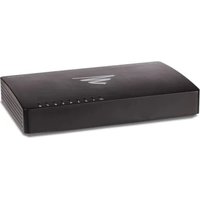
XGS-1008 - Switch Luxul - Free user manual and instructions
Find the device manual for free XGS-1008 Luxul in PDF.


Pick your language and provide your email: we'll send you a specifically translated version.
| Product Type | Gigabit Ethernet Switch |
| Brand | Luxul |
| Model | XGS-1008 |
| Category | Unmanaged Switch |
| Number of Ports | 8 |
| Port Type | 10/100/1000 Mbps RJ45 |
| Data Transfer Rate | 1000 Mbps (1 Gbps) per port |
| Switching Capacity | 16 Gbps |
| MAC Address Table Size | 8K entries |
| Jumbo Frame Support | Up to 9K bytes |
| Standards Compliance | IEEE 802.3, 802.3u, 802.3ab, 802.3x |
| LED Indicators | Power, Link/Activity per port |
| Dimensions (W x D x H) | 158 x 100 x 27 mm (6.2 x 3.9 x 1.1 in) |
| Weight | 300 g (0.66 lb) |
| Power Supply | External 5V DC, 1A adapter |
| Power Consumption | 5 Watts (max) |
| Operating Temperature | 0°C to 40°C (32°F to 104°F) |
| Storage Temperature | -10°C to 70°C (14°F to 158°F) |
| Humidity | 10% to 90% non-condensing |
| Mounting Type | Desktop or wall-mountable (hardware not included) |
| Fanless Design | Yes, silent operation |
| Plug and Play | Yes, no configuration required |
| Maintenance | Clean with a soft, dry cloth. Do not use liquids. |
| Safety | Keep away from water and heat sources. Use only supplied power adapter. |
| Spare Parts | No user-serviceable parts. Power adapter available as accessory. |
| Repairability | Not repairable; replace device if faulty. |
| Package Contents | Switch, power adapter, quick start guide |
| Warranty | Limited lifetime warranty |
Frequently Asked Questions - XGS-1008 Luxul
How do I set up the Luxul XGS-1008 switch?
Connect the power adapter to the switch and plug it into an outlet. Use Ethernet cables to connect your devices (computers, routers, etc.) to any of the 8 ports. The switch will automatically detect and configure the connections.
Does the XGS-1008 require configuration?
No, the XGS-1008 is an unmanaged switch and works plug-and-play. Simply connect devices and they will communicate automatically.
What do the LED indicators mean?
The Power LED lights solid when powered. Each port has a Link/Activity LED: solid green indicates a connection, blinking indicates data activity.
Can the XGS-1008 be wall mounted?
Yes, the switch has mounting holes for wall mounting. Use appropriate screws (not included) to secure it. Ensure proper ventilation.
What is the maximum cable length supported?
The switch supports Cat5e or better cables up to 100 meters (328 feet) per port.
Does the XGS-1008 support Power over Ethernet (PoE)?
No, the XGS-1008 does not support PoE. It only passes data; devices requiring power over Ethernet will need a separate PoE injector or a PoE switch.
Is the XGS-1008 compatible with all network devices?
Yes, it works with any 10/100/1000 Mbps device such as computers, routers, printers, game consoles, and smart TVs. It auto-negotiates speed and duplex.
How do I reset the switch to factory defaults?
The XGS-1008 is an unmanaged switch and has no reset button. If you experience issues, simply power cycle the switch by unplugging and reconnecting the power adapter.
What power adapter does the XGS-1008 use?
It uses an external 5V DC, 1A power adapter with a barrel connector. Use only the provided adapter or a compatible replacement.
Why is my device not getting a connection?
Check the Ethernet cable is securely connected. Verify the LED on the port is lit. Ensure the connected device is powered on and its network adapter is enabled. Try a different port or cable. Power cycle the switch.
User questions about XGS-1008 Luxul
0 question about this device. Answer the ones you know or ask your own.
Ask a new question about this device
No questions yet. Be the first to ask one.
Download the instructions for your Switch in PDF format for free! Find your manual XGS-1008 - Luxul and take your electronic device back in hand. On this page are published all the documents necessary for the use of your device. XGS-1008 by Luxul.
USER MANUAL XGS-1008 Luxul


Manual assistant
Powered by Anthropic
Waiting for your message
Product information
Brand : Luxul
Model : XGS-1008
Category : Switch