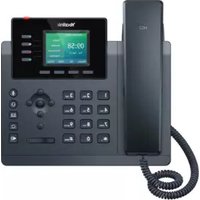
SIP-T34W - Telephone Yealink - Free user manual and instructions
Find the device manual for free SIP-T34W Yealink in PDF.


Pick your language and provide your email: we'll send you a specifically translated version.
| Product Type | IP Phone |
| Model | SIP-T34W |
| Brand | Yealink |
| Dimensions (W x H x D) | 240 x 210 x 150 mm |
| Weight | 0.85 kg |
| Power Supply | PoE (802.3af) or AC adapter (5V/2A) |
| Display | 4.3-inch 480x272 color LCD |
| Keypad | 24 programmable keys with LED indicators |
| Audio Features | HD voice, full-duplex speakerphone, echo cancellation |
| Network Connectivity | Dual 10/100/1000 Gigabit Ethernet ports, PoE support |
| Wireless Connectivity | Wi-Fi 802.11 a/b/g/n/ac, Bluetooth 4.2 |
| Supported Protocols | SIP (RFC3261), TCP/IP, UDP, RTP, RTCP |
| Main Functions | Call hold, transfer, forward, conference, DND, intercom, paging |
| Headset Compatibility | RJ9 handset, EHS support for wireless headsets |
| Maintenance | Clean with soft dry cloth; avoid liquids; regular firmware updates |
| Security | TLS, SRTP, 802.1X, HTTPS, secure boot |
| Spare Parts & Repairability | Replacement handset, power adapter, base stand; user-serviceable parts limited to external accessories |
| General Information | Desktop or wall-mountable; operating temperature 0-40°C; humidity 10-95% |
Frequently Asked Questions - SIP-T34W Yealink
How do I set up the Yealink SIP-T34W for the first time?
Connect the phone to your network via Ethernet or Wi-Fi. Ensure PoE or power adapter is connected. Wait for boot, then follow the on-screen setup wizard to configure SIP account credentials or provision automatically.
Can I use the SIP-T34W with a wireless headset?
Yes, the phone supports Bluetooth 4.2 for wireless headsets. Enable Bluetooth in settings, pair your headset, and select it as the audio device. For DECT headsets, use the RJ9 handset port with an EHS cable.
How do I connect the phone to Wi-Fi?
Go to Settings > Network > Wi-Fi. Enable Wi-Fi, scan for networks, select yours, and enter the password. The phone supports 2.4GHz and 5GHz bands.
What is PoE and do I need a separate power adapter?
Power over Ethernet (PoE) delivers power and data through a single Ethernet cable. If your switch supports PoE (802.3af), no AC adapter is needed. Otherwise, use the included 5V/2A adapter.
How can I program the DSS keys on the phone?
Press the 'OK' key to enter menu, go to Features > DSS Keys. Select a key, choose a function (e.g., speed dial, BLF, intercom), and assign a contact or extension.
Does the SIP-T34W support video calls?
No, the SIP-T34W is a voice-only IP phone. It does not have a camera or video codec support. It focuses on high-quality audio communication.
How do I transfer a call to another extension?
During an active call, press the 'Transfer' soft key. Enter the destination number, then press 'Transfer' again to complete blind transfer, or wait for answer then press 'Transfer' for attended transfer.
What should I do if the phone display shows 'No Service'?
Check Ethernet or Wi-Fi connection. Ensure the network provides DHCP or manually set IP. Verify SIP account settings (server, username, password). Contact your IT admin if issue persists.
How do I reset the phone to factory defaults?
Go to Settings > Advanced > Reset to Factory. Enter the admin password (default: admin). Confirm reset. The phone will reboot and erase all personal settings.
Can I mount the SIP-T34W on a wall?
Yes, the phone includes a wall-mount bracket. Detach the stand, attach the bracket to the wall with screws (not included), and snap the phone onto the bracket.
User questions about SIP-T34W Yealink
0 question about this device. Answer the ones you know or ask your own.
Ask a new question about this device
No questions yet. Be the first to ask one.
Download the instructions for your Telephone in PDF format for free! Find your manual SIP-T34W - Yealink and take your electronic device back in hand. On this page are published all the documents necessary for the use of your device. SIP-T34W by Yealink.
USER MANUAL SIP-T34W Yealink
Manual assistant
Powered by Anthropic
Waiting for your message
Product information
Brand : Yealink
Model : SIP-T34W
Category : Telephone