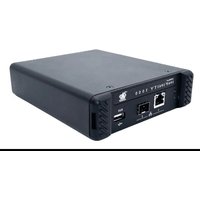
ADDERLink INFINITY 1102 - Switch Adder - Free user manual and instructions
Find the device manual for free ADDERLink INFINITY 1102 Adder in PDF.


Pick your language and provide your email: we'll send you a specifically translated version.
| Product Type | KVM Extender / Switch |
| Brand | Adder |
| Model | ADDERLink INFINITY 1102 |
| Video Support | Dual DVI or HDMI, up to 1920x1200 @ 60Hz |
| Audio Support | Analog stereo audio pass-through |
| USB Support | 4x USB 2.0 ports for peripherals |
| Transmission Type | Cat 5e/6 UTP cable, up to 100m |
| Dimensions (HxWxD) | 44 x 430 x 160 mm (1U rack mount) |
| Weight | 2.5 kg |
| Power Supply | External 12V DC, 2A |
| Power Consumption | < 10W |
| Main Functions | Extends and switches keyboard, mouse, video, audio over single Cat cable |
| Maintenance & Cleaning | Wipe with dry cloth; keep vents clear; avoid liquids |
| Safety | CE, FCC Class A; operate in 0-40°C, <80% humidity |
| Spare Parts & Repairability | Contact Adder support for spare power adapters and cable kits |
| General Information | Firmware upgradeable via web interface; supports TCP/IP control |
Frequently Asked Questions - ADDERLink INFINITY 1102 Adder
How do I connect the ADDERLink INFINITY 1102 to my computer?
Connect the transmitter (local) unit to your computer's DVI, USB, and audio outputs. Then link the transmitter to the receiver (remote) unit using a Cat 5e/6 cable up to 100m. Finally, connect your monitor, USB peripherals, and speakers to the receiver.
What video resolutions are supported?
The ADDERLink INFINITY 1102 supports dual DVI or HDMI video up to 1920x1200 @ 60Hz per channel.
Can I use the device over a network switch?
Yes, the INFINITY series can be used over a dedicated LAN with managed switches, but performance may vary. For best results, use point-to-point cabling.
How do I update the firmware?
Download the latest firmware from the Adder website. Access the web interface of the unit via its IP address, navigate to the firmware upgrade section, and upload the file.
What should I do if there is no video output?
Check all cable connections, ensure the power supply is plugged in, and verify that the monitor is powered on. Also, confirm the video source is set to the correct output.
Is the device rack-mountable?
Yes, the ADDERLink INFINITY 1102 is 1U high and includes rack-mount ears for installation in a standard 19-inch rack.
Can I extend USB 2.0 devices?
Yes, it supports up to 4 USB 2.0 devices (keyboard, mouse, storage) at the remote end.
What is the maximum cable length?
The maximum recommended cable length is 100 meters (328 feet) of Cat 5e/6 UTP cable.
Does it support audio?
Yes, it passes analog stereo audio from the local line-in to the remote line-out.
How do I reset the unit to factory defaults?
Press and hold the reset button on the front panel for 10 seconds using a paper clip. The device will restart with default settings.
User questions about ADDERLink INFINITY 1102 Adder
0 question about this device. Answer the ones you know or ask your own.
Ask a new question about this device
No questions yet. Be the first to ask one.
Download the instructions for your Switch in PDF format for free! Find your manual ADDERLink INFINITY 1102 - Adder and take your electronic device back in hand. On this page are published all the documents necessary for the use of your device. ADDERLink INFINITY 1102 by Adder.
USER MANUAL ADDERLink INFINITY 1102 Adder


Manual assistant
Powered by Anthropic
Waiting for your message
Product information
Brand : Adder
Model : ADDERLink INFINITY 1102
Category : Switch