AHSC-18P - Air Conditioning Airrex - Free user manual and instructions
Find the device manual for free AHSC-18P Airrex in PDF.


Pick your language and provide your email: we'll send you a specifically translated version.
| Product Type | Portable Air Conditioner |
| Brand | Airrex |
| Model | AHSC-18P |
| Cooling Capacity (BTU) | 18000 |
| Airflow (CFM) | 500 |
| Energy Efficiency Ratio (EER) | 10.5 |
| Noise Level (dB) | 55 |
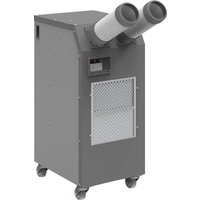
| Dimensions (H x W x D) | 30 x 18 x 15 inches |
| Weight | 65 lbs |
| Power Supply | 115V / 60Hz |
| Power Consumption (Cooling) | 1700W |
| Refrigerant | R-410A |
| Functions | Cooling, Dehumidification, Fan, Sleep Mode, Timer |
| Dehumidification Capacity | 2.5 L/h |
| Filter Type | Washable Mesh Filter |
| Maintenance | Clean filter every 2 weeks; drain condensate when full |
| Safety Features | Auto shut-off when water tank full, overload protection |
| Accessories Included | Remote control, window exhaust kit, drain hose |
| Reparability | Repairable by authorized service; spare parts available |
Frequently Asked Questions - AHSC-18P Airrex
How do I clean the air filter on the Airrex AHSC-18P?
Turn off and unplug the unit. Remove the filter cover, take out the mesh filter, and wash it with lukewarm water. Let it dry completely before reinstalling. Clean every two weeks for optimal performance.
How to set the timer on the AHSC-18P?
Press the Timer button on the remote or control panel. Use the + or - buttons to set the desired time (1-24 hours). The unit will automatically turn on or off after the set duration.
Why is my Airrex AHSC-18P not cooling properly?
Check if the air filter is dirty (clean it), ensure the exhaust hose is properly connected and not kinked, and verify that windows and doors are closed. Also, confirm the unit is in cooling mode with a set temperature lower than room temperature.
How do I drain excess water from the AHSC-18P?
The unit self-evaporates most moisture, but if the water tank fills up, an alarm will sound. Turn off the unit, remove the drain plug at the bottom, and drain water into a pan or hose. Alternatively, attach a drain hose for continuous drainage.
What does error code E1 mean on my Airrex AHSC-18P?
Error code E1 typically indicates a sensor malfunction. Turn off the unit and unplug it for 5 minutes, then restart. If the error persists, contact Airrex customer support for repair.
Can I use an extension cord with the AHSC-18P?
No, do not use an extension cord. Plug the unit directly into a grounded 115V outlet rated for at least 15 amps to avoid fire hazard.
How to switch between cooling and fan mode?
Press the Mode button repeatedly to cycle through Cool, Dry (dehumidify), and Fan modes. The indicator light shows the current mode.
Does the Airrex AHSC-18P have a remote control?
Yes, a remote control is included. It allows you to adjust temperature, fan speed, mode, and timer from a distance. Ensure batteries are installed correctly.
What are the dimensions and weight of the AHSC-18P?
The unit measures approximately 30 x 18 x 15 inches (H x W x D) and weighs about 65 lbs. Ensure your window and floor can support the weight.
How do I install the window exhaust kit?
Attach the exhaust hose to the back of the unit. Connect the other end to the window slide bar. Adjust the slide bar to fit your window, close the window to secure it. Ensure a tight seal to prevent hot air from entering.
User questions about AHSC-18P Airrex
0 question about this device. Answer the ones you know or ask your own.
Ask a new question about this device
No questions yet. Be the first to ask one.
Download the instructions for your Air Conditioning in PDF format for free! Find your manual AHSC-18P - Airrex and take your electronic device back in hand. On this page are published all the documents necessary for the use of your device. AHSC-18P by Airrex.
USER MANUAL AHSC-18P Airrex
Manual assistant
Powered by Anthropic
Waiting for your message
Product information
Brand : Airrex
Model : AHSC-18P
Category : Air Conditioning