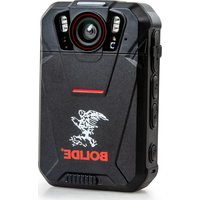
BV-BCAM 4G-2.0 - Action Camera Bolide - Free user manual and instructions
Find the device manual for free BV-BCAM 4G-2.0 Bolide in PDF.


Pick your language and provide your email: we'll send you a specifically translated version.
| Product Type | Action Camera with 4G LTE connectivity |
| Model | BV-BCAM 4G-2.0 |
| Brand | Bolide |
| Dimensions | Approximately 60 x 40 x 30 mm |
| Weight | Approximately 80 g (including battery) |
| Power Supply | Built-in rechargeable Li-ion battery, 1000 mAh |
| Charging | Micro USB or USB-C (typical), 5V/1A |
| Main Functions | Video recording, photo capture, 4G LTE data transmission, GPS tracking, live streaming |
| Video Resolution | Up to 1080p Full HD at 30 fps |
| Photo Resolution | Up to 12 MP |
| Connectivity | 4G LTE (SIM card slot), Wi-Fi, Bluetooth |
| Storage | MicroSD card slot (up to 64 GB) |
| Water Resistance | Not waterproof; use with care in dry conditions |
| Care and Cleaning | Wipe with a soft, dry cloth; avoid solvents |
| Safety Precautions | Do not disassemble, expose to heat, or immerse in water |
| Spare Parts | Available: batteries, charging cables, mounts, adhesive pads |
| Repairability | Repairs should be performed by authorized service centers |
| General Information | Designed for outdoor activities with 4G remote monitoring capability |
Frequently Asked Questions - BV-BCAM 4G-2.0 Bolide
How do I insert a SIM card into the BV-BCAM 4G-2.0?
Locate the SIM card slot on the side of the camera. Use a small tool to open the slot cover, insert the Nano SIM card with the gold contacts facing down, then close the cover securely.
Can I use the camera without a SIM card?
Yes, the camera can function in offline mode for local recording and photo capture. However, 4G features like live streaming and remote access require a SIM card with a data plan.
How do I charge the battery?
Connect the provided USB charging cable to the camera's charging port and plug it into a standard USB power adapter (5V/1A). The LED indicator will show charging status.
What is the maximum video resolution?
The camera supports video recording up to 1080p Full HD at 30 frames per second. Lower resolutions are available for longer recording times.
How much memory card capacity does it support?
The BV-BCAM 4G-2.0 supports microSD cards up to 64 GB. For optimal performance, use a Class 10 or UHS-I card.
Is the camera waterproof?
No, this camera is not waterproof. It should be kept away from water and moisture. Using it in rainy conditions without a waterproof housing may damage the device.
How do I connect the camera to my smartphone?
Download the Bolide app on your smartphone, enable Wi-Fi on the camera, and connect to the camera's Wi-Fi network. Then open the app to view live feed and adjust settings.
What should I do if the camera freezes or stops responding?
Try performing a reset by pressing and holding the power button for 10 seconds. If that doesn't work, remove and reinsert the battery (if removable) or use a paperclip to press the reset hole.
How long does the battery last?
Battery life depends on usage. Typically, it lasts about 60-90 minutes of continuous recording at 1080p with 4G enabled. Disabling 4G and Wi-Fi can extend battery life.
Can I use the camera while it is charging?
Yes, the camera can be used while connected to a power source, but this may affect battery health over time. It's recommended for long recording sessions.
User questions about BV-BCAM 4G-2.0 Bolide
0 question about this device. Answer the ones you know or ask your own.
Ask a new question about this device
No questions yet. Be the first to ask one.
Download the instructions for your Action Camera in PDF format for free! Find your manual BV-BCAM 4G-2.0 - Bolide and take your electronic device back in hand. On this page are published all the documents necessary for the use of your device. BV-BCAM 4G-2.0 by Bolide.
USER MANUAL BV-BCAM 4G-2.0 Bolide
Manual assistant
Powered by Anthropic
Waiting for your message
Product information
Brand : Bolide
Model : BV-BCAM 4G-2.0
Category : Action Camera