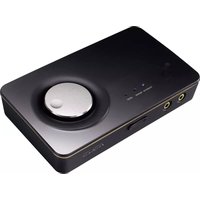
Xonar U7 MKII - Soundcard ASUS - Free user manual and instructions
Find the device manual for free Xonar U7 MKII ASUS in PDF.


Pick your language and provide your email: we'll send you a specifically translated version.
| Product Type | External USB Sound Card |
| Model | Xonar U7 MKII |
| Brand | ASUS |
| Audio Channels | 7.1 surround sound |
| Sampling Rate | Up to 192kHz / 24-bit |
| Signal-to-Noise Ratio (SNR) | 114 dB |
| Output Impedance | Headphone: 10 Ω; Line: 150 Ω |
| Output Power (Headphone) | Up to 200 mW (32Ω) |
| Input/Output Ports | USB (Type B), 3.5mm jacks (mic, headphone, line-in, line-out), optical S/PDIF, RCA |
| Dimensions (L x W x H) | 165 mm x 112 mm x 49 mm |
| Weight | Approx. 400 g |
| Power Supply | USB powered (5V, 500mA) |
| Driver Support | Windows 10/8.1/7; Mac OS X (driverless) |
| Main Features | High-definition 7.1 audio, built-in headphone amplifier, low-noise design, Xonar Audio Center software |
| Maintenance and Cleaning | Disconnect from power; clean with a soft, dry cloth |
| Safety Precautions | Avoid exposure to moisture, heat, and direct sunlight; do not disassemble |
| Spare Parts and Repairability | No user-serviceable parts inside; contact ASUS service for repairs |
| General Information | External USB sound card designed for high-quality audio on PC and Mac |
Frequently Asked Questions - Xonar U7 MKII ASUS
How do I install the drivers for the Xonar U7 MKII?
Download the latest drivers from the ASUS support website. On Windows, run the installer and follow the on-screen instructions. For Mac, the device is driverless and works plug-and-play.
Does the Xonar U7 MKII support virtual surround sound?
Yes, it supports 7.1 virtual surround sound using the Xonar Audio Center software. You can enable Dolby Headphone or DTS Connect for an immersive experience.
Can I connect a 5.1 or 7.1 speaker system?
Yes, the sound card has multiple 3.5mm jacks and optical output for connecting external speakers or receivers. For true 7.1, use the analog outputs with the appropriate cables.
What is the maximum headphone impedance supported?
The built-in headphone amplifier can drive headphones up to 150Ω comfortably. For higher impedance, a dedicated amplifier may be recommended.
How do I adjust the audio settings?
Use the Xonar Audio Center software which provides controls for equalizer, volume, bass boost, virtual surround, and sample rate settings.
The sound card is not recognized by my computer. What should I do?
Try a different USB port or cable. Ensure the drivers are properly installed. On Windows, check Device Manager for any yellow exclamation marks. On Mac, verify it appears in Audio MIDI Setup.
Can I use the microphone input for a headset?
Yes, the 4-pole mic/headphone combo jack supports headsets with a single TRRS plug. For separate mic and headphone, use the dedicated jacks.
Does the Xonar U7 MKII support ASIO?
Yes, it includes ASIO 2.0 drivers for low-latency audio applications. Configure ASIO in your recording software.
How do I enable 192kHz/24-bit playback?
In the Xonar Audio Center, set the sample rate to 192kHz and bit depth to 24-bit. Ensure your audio files and software support this resolution.
Where can I find the user manual?
The manual is available for download on the ASUS support page for the Xonar U7 MKII, or directly from online resources like notice-facile.com.
User questions about Xonar U7 MKII ASUS
0 question about this device. Answer the ones you know or ask your own.
Ask a new question about this device
No questions yet. Be the first to ask one.
Download the instructions for your Soundcard in PDF format for free! Find your manual Xonar U7 MKII - ASUS and take your electronic device back in hand. On this page are published all the documents necessary for the use of your device. Xonar U7 MKII by ASUS.
USER MANUAL Xonar U7 MKII ASUS


Manual assistant
Powered by Anthropic
Waiting for your message
Product information
Brand : ASUS
Model : Xonar U7 MKII
Category : Soundcard