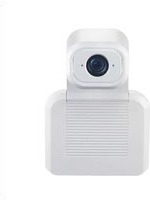
IntelliSHOT-M - Video conferencing system Vaddio - Free user manual and instructions
Find the device manual for free IntelliSHOT-M Vaddio in PDF.


Pick your language and provide your email: we'll send you a specifically translated version.
| Product Type | PTZ Camera for Video Conferencing |
| Dimensions (HxWxD) | 150 x 150 x 180 mm |
| Weight | 1.2 kg |
| Power Supply | PoE+ (802.3at) or 12V DC |
| Video Resolution | Full HD 1080p up to 60 fps |
| Optical Zoom | 20x optical zoom |
| Horizontal Field of View | 60° (wide end) |
| Auto Framing | Yes, with face detection |
| Control Interface | IR remote, RS-232, IP (VISCA over IP) |
| Video Output | HDMI, 3G-SDI, USB 2.0 |
| Audio | Built-in microphone array |
| Mounting | Tabletop or wall mount (included) |
| Maintenance | Clean lens with microfiber cloth; keep firmware updated via web interface |
| Safety | Use only provided power adapter; avoid exposure to water or extreme temperatures |
| Spare Parts / Repairability | Remote control, power supply, and mounting bracket available; user-replaceable lens cover |
| General Information | Warranty: 2 years; Manufactured in China; CE, FCC, RoHS certified |
Frequently Asked Questions - IntelliSHOT-M Vaddio
How do I connect the Vaddio IntelliSHOT-M to my computer?
Connect the camera using an HDMI, 3G-SDI, or USB cable. For USB, plug directly into a USB 2.0 port on your computer. Ensure the camera is powered via PoE+ or the included 12V DC adapter.
What is the maximum video resolution?
The camera supports Full HD 1080p at 60 fps for smooth video conferencing. Lower resolutions are also available via the web interface.
Can I control the camera remotely?
Yes, you can control pan, tilt, zoom via the IR remote, RS-232, or VISCA over IP. Direct control via USB is also supported with compatible software.
Does the IntelliSHOT-M support Power over Ethernet (PoE)?
Yes, it supports PoE+ (802.3at), which provides both power and data over a single Ethernet cable. A PoE switch or injector is required.
How do I update the firmware?
Access the camera's web interface via its IP address. Navigate to the Firmware Update section and upload the latest firmware file from the Vaddio website. Do not power off during update.
How should I clean the lens?
Use a soft, lint-free microfiber cloth to gently wipe the lens. For stubborn smudges, dampen the cloth with a small amount of lens cleaner or water. Never spray directly onto the camera.
What is the field of view?
The horizontal field of view at the wide end is 60°, and at the telephoto end (20x zoom) it narrows to approximately 3.3°.
How do I mount the camera?
The camera can be placed on a flat surface using the table stand or mounted on a wall using the included bracket. For ceiling mount, a separate adapter is required. Ensure the mounting surface can support the weight.
Is the IntelliSHOT-M compatible with Zoom or Microsoft Teams?
Yes, the camera works with any USB-based video conferencing software, including Zoom, Teams, and Skype for Business. It is plug-and-play, no additional drivers needed.
What is the warranty period?
Vaddio offers a 2-year limited warranty from the date of purchase. Extended warranties are available through authorized resellers.
User questions about IntelliSHOT-M Vaddio
0 question about this device. Answer the ones you know or ask your own.
Ask a new question about this device
No questions yet. Be the first to ask one.
Download the instructions for your Video conferencing system in PDF format for free! Find your manual IntelliSHOT-M - Vaddio and take your electronic device back in hand. On this page are published all the documents necessary for the use of your device. IntelliSHOT-M by Vaddio.
USER MANUAL IntelliSHOT-M Vaddio


Manual assistant
Powered by Anthropic
Waiting for your message
Product information
Brand : Vaddio
Model : IntelliSHOT-M
Category : Video conferencing system