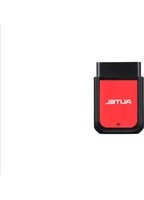
MaxiAP AP2500 - Car diagnostic tool Autel - Free user manual and instructions
Find the device manual for free MaxiAP AP2500 Autel in PDF.


Pick your language and provide your email: we'll send you a specifically translated version.
| Product Type | OBD2 Diagnostic Scanner |
| Brand | Autel |
| Model | MaxiAP AP2500 |
| Dimensions (approx.) | 190 x 90 x 30 mm (7.5 x 3.5 x 1.2 in) |
| Weight (approx.) | 230 g (0.5 lbs) |
| Power Source | 12V DC via OBD2 connector |
| Display | 2.8-inch color LCD |
| Supported Protocols | OBD2, CAN, ISO 9141, J1850 |
| Main Functions | Read/clear DTCs, live data, freeze frame, I/M readiness, vehicle information |
| Languages | Multilingual (including English, Spanish, French, etc.) |
| Firmware Upgrade | Via USB connection to PC |
| Compatibility | 1996 and newer OBD2 compliant vehicles (US), 2000 and newer in Europe |
| Maintenance | Keep clean and dry; avoid exposure to extreme temperatures or moisture |
| Safety | Follow vehicle manufacturer instructions; use in well-ventilated area; do not operate while driving |
| Spare Parts / Repairability | Non-user-serviceable; contact Autel support for repairs |
| Warranty | Typically 1 year (check official documentation) |
Frequently Asked Questions - MaxiAP AP2500 Autel
What does the Autel MaxiAP AP2500 do?
The Autel MaxiAP AP2500 is an OBD2 diagnostic scanner that reads and clears diagnostic trouble codes (DTCs), displays live data, freeze frame, I/M readiness status, and vehicle information for most 1996 and newer OBD2-compliant vehicles.
Which vehicles are compatible with the AP2500?
It works with 1996 and newer gasoline vehicles sold in the US (2000 and newer in Europe) that are OBD2 compliant. Some diesel vehicles may also be supported; check the manual for details.
How do I update the firmware on the AP2500?
You can update the firmware via a USB connection to a PC. Download the latest software from Autel’s official website and follow the instructions in the manual or on-screen prompts.
Can I erase trouble codes with the AP2500?
Yes, after reading the codes, you can erase them from the vehicle’s ECU. However, if the underlying issue is not fixed, the codes will reappear. Use the clear function with caution.
Does the AP2500 support live data graphing?
Yes, it can display live data in text or graphical format. You can select multiple PIDs to view real-time sensor readings.
What should I do if the scanner does not power on?
Ensure the vehicle’s ignition is turned on (key in ACC or ON position). Check the OBD2 connector for bent pins. If it still doesn’t power on, try on another vehicle or contact Autel support.
How do I interpret the diagnostic trouble codes?
The AP2500 provides a text description for each DTC. You can also look up the code in the manual or online. The display shows the code and a brief definition.
Can this tool test emissions readiness?
Yes, it includes an I/M readiness test that checks if the vehicle’s emission monitors are complete. This is useful for passing smog checks.
Is the AP2500 compatible with Android or iOS smartphones?
No, the AP2500 is a standalone handheld device with a built-in color LCD. It does not connect to a smartphone. It communicates directly with the vehicle’s OBD2 port.
What is the warranty period for the AP2500?
Typically, Autel offers a 1-year warranty against defects. Contact Autel customer support or check the product packaging for specific warranty terms.
User questions about MaxiAP AP2500 Autel
0 question about this device. Answer the ones you know or ask your own.
Ask a new question about this device
No questions yet. Be the first to ask one.
Download the instructions for your Car diagnostic tool in PDF format for free! Find your manual MaxiAP AP2500 - Autel and take your electronic device back in hand. On this page are published all the documents necessary for the use of your device. MaxiAP AP2500 by Autel.
USER MANUAL MaxiAP AP2500 Autel


Manual assistant
Powered by Anthropic
Waiting for your message
Product information
Brand : Autel
Model : MaxiAP AP2500
Category : Car diagnostic tool