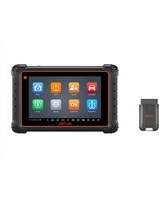
MaxiCOM MK900-TS - Car diagnostic tool Autel - Free user manual and instructions
Find the device manual for free MaxiCOM MK900-TS Autel in PDF.


Pick your language and provide your email: we'll send you a specifically translated version.
| Product Type | Automotive Diagnostic Tablet |
| Brand | Autel |
| Model | MaxiCOM MK900-TS |
| Display | 9.7-inch capacitive touchscreen |
| Operating System | Android 10.0 |
| Processor | Quad-core 2.1 GHz ARM Cortex-A72 |
| Memory | 4 GB RAM, 128 GB storage |
| Dimensions | 270 x 190 x 45 mm |
| Weight | 1.2 kg |
| Power Supply | Rechargeable Li-Ion battery, 12V DC input |
| Battery Capacity | 12000 mAh |
| Main Functions | Full OBD2 diagnostics, advanced ECU coding, bidirectional control, TPMS, battery testing, oscilloscope, J2534 pass-thru programming |
| Wireless Connectivity | Wi-Fi 802.11 a/b/g/n/ac, Bluetooth 5.0 |
| Cameras | Rear 8 MP with autofocus and LED flash |
| Software Updates | Free one-year subscription, extendable annually |
| Languages Supported | Multiple including English, Spanish, French, German |
| Maintenance | Keep screen clean, avoid extreme temperatures, charge battery regularly |
| Safety Precautions | Use only in well-ventilated areas, disconnect vehicle battery when not in use |
| Spare Parts | Replacement battery, charging cable, OBD2 cable, carrying case available |
| Repairability | Battery and cover replaceable; other repairs by authorized service center |
| General Information | Includes mains charger, OBD2 cable, USB cable, stylus, quick start guide, and hard carrying case |
Frequently Asked Questions - MaxiCOM MK900-TS Autel
How do I update the software on my MaxiCOM MK900-TS?
Connect the device to Wi-Fi, go to Settings > Software Update, and follow the on-screen instructions. A free one-year update subscription is included.
Can I use this scanner on all car makes and models?
Yes, the MK900-TS supports OBD2 protocols from 1996 onwards, plus advanced diagnostics for most domestic, Asian, and European vehicles. Check Autel's coverage list for exact models.
What is the battery life of the device?
The 12000 mAh battery lasts up to 8 hours of continuous use under normal conditions. Charge via the included 12V adapter.
How do I reset the device to factory settings?
Go to Settings > Backup & Reset > Factory Data Reset. Ensure you back up any custom configurations first.
Is the TPMS function included?
Yes, the MK900-TS includes TPMS activation and reading for most vehicles. Requires optional TPMS sensors or tool.
Can I connect an oscilloscope or other accessories?
Yes, the device supports external Bluetooth modules like the Autel MP408 for 4-channel oscilloscope functions.
How do I perform a bidirectional control test?
Select the Bidirectional Controls option from the diagnostic menu, choose the component (e.g., fuel pump), and follow the prompts to activate it.
What should I do if the screen becomes unresponsive?
Perform a forced restart by holding the Power button for 10 seconds. If the issue persists, contact Autel support.
Does the device come with a warranty?
Yes, Autel provides a one-year warranty against manufacturing defects. Extended warranties are available for purchase.
Can I export diagnostic reports?
Yes, after completing a diagnostic session, tap Report to save as PDF or email it directly from the device.
User questions about MaxiCOM MK900-TS Autel
0 question about this device. Answer the ones you know or ask your own.
Ask a new question about this device
No questions yet. Be the first to ask one.
Download the instructions for your Car diagnostic tool in PDF format for free! Find your manual MaxiCOM MK900-TS - Autel and take your electronic device back in hand. On this page are published all the documents necessary for the use of your device. MaxiCOM MK900-TS by Autel.
USER MANUAL MaxiCOM MK900-TS Autel


Manual assistant
Powered by Anthropic
Waiting for your message
Product information
Brand : Autel
Model : MaxiCOM MK900-TS
Category : Car diagnostic tool