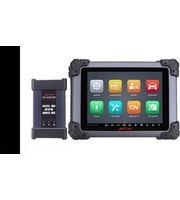
MaxiSYS Elite II Pro - Car diagnostic tool Autel - Free user manual and instructions
Find the device manual for free MaxiSYS Elite II Pro Autel in PDF.


Pick your language and provide your email: we'll send you a specifically translated version.
| Brand | Autel |
| Model | MaxiSYS Elite II Pro |
| Product Type | Automotive Diagnostic Scanner |
| Display | 10.1-inch HD touchscreen |
| Processor | Octa-core, 2.0 GHz |
| Operating System | Android |
| Memory | 4 GB RAM, 128 GB storage |
| Connectivity | Wi-Fi, Bluetooth, USB, Ethernet |
| Dimensions | 10.2 x 6.9 x 1.6 inches |
| Weight | 3.3 lbs (1.5 kg) |
| Power Source | Rechargeable lithium-ion battery, 12V DC |
| Battery Life | Up to 7 hours continuous use |
| Main Functions | OBD2 diagnostics, coding, programming, bidirectional controls, oscilloscope, multimeter, J2534 pass-thru |
| Supported Protocols | All OBD2 protocols, CAN, KWP, ISO 9141, J1850 |
| Software Updates | Free online updates via MaxiSYS PC Suite |
| Maintenance | Keep screen clean, update software regularly, store in protective case |
| Safety | Use in well-ventilated area, avoid flammable gases |
| Warranty | 1 year limited warranty |
| Repairability | Replaceable battery; service center recommended for other repairs |
Frequently Asked Questions - MaxiSYS Elite II Pro Autel
How do I update the software on my MaxiSYS Elite II Pro?
Download the MaxiSYS PC Suite from Autel official website, connect the tablet to your computer via USB, and follow the on-screen instructions to install the latest firmware and vehicle coverage.
Can this device program keys and immobilizers?
Yes, the MaxiSYS Elite II Pro supports key programming and immobilizer functions for many vehicles. Refer to the vehicle coverage list or use Online Programming feature for supported models.
What vehicle protocols are supported?
It supports all standard OBD2 protocols including CAN, KWP2000, ISO 9141, J1850, and many manufacturer-specific protocols for diagnostics, coding, and programming.
How do I connect the scanner to my vehicle?
Plug the included OBD2 cable into the vehicle's diagnostic port (usually under the dashboard), then turn the ignition on. The device will automatically detect the vehicle and establish communication.
Does the device include a multimeter or oscilloscope?
Yes, the MaxiSYS Elite II Pro has built-in 2-channel oscilloscope and multimeter functions. Additional test leads are required, which are sold separately.
What is the warranty period?
Autel offers a 1-year limited warranty against manufacturing defects. Extended warranty plans are available for purchase.
Can I use this scanner for coding and programming?
Absolutely. It supports advanced functions like ECU coding, programming, adaptation, and bidirectional controls for most vehicle systems.
How to perform a battery registration?
Navigate to Battery Registration under the service menu, select your vehicle, follow the prompts to enter new battery information. The tool will reset the battery management system.
Is the device suitable for heavy-duty trucks?
The MaxiSYS Elite II Pro is primarily designed for passenger cars and light trucks. For heavy-duty trucks, consider Autel’s MaxiSYS Heavy Duty series.
Where can I find the user manual?
The user manual is available for free download on notice-facile.com or from Autel’s official support website. You can also access it directly on the device.
User questions about MaxiSYS Elite II Pro Autel
0 question about this device. Answer the ones you know or ask your own.
Ask a new question about this device
No questions yet. Be the first to ask one.
Download the instructions for your Car diagnostic tool in PDF format for free! Find your manual MaxiSYS Elite II Pro - Autel and take your electronic device back in hand. On this page are published all the documents necessary for the use of your device. MaxiSYS Elite II Pro by Autel.
USER MANUAL MaxiSYS Elite II Pro Autel


Manual assistant
Powered by Anthropic
Waiting for your message
Product information
Brand : Autel
Model : MaxiSYS Elite II Pro
Category : Car diagnostic tool