
Nitro NGR200 - Game controller ACER - Free user manual and instructions
Find the device manual for free Nitro NGR200 ACER in PDF.


| Product type | Gaming monitor |
| Brand | Acer |
| Model | Nitro NGR200 |
| Screen size | 27 inches |
| Resolution | 1920 x 1080 pixels (Full HD) |
| Refresh rate | 144 Hz |
| Response time | 1 ms (VRB) |
| Panel technology | VA |
| Connectivity | 2x HDMI 2.0, 1x DisplayPort 1.2, 1x headphones output |
| Power supply | Power adapter, consumption 40 W (typical), standby 0.5 W |
| Dimensions (with stand) | 611.5 x 462.0 x 234.0 mm |
| Weight (with stand) | 5.6 kg |
| Adjustments | Tilt -5° to 20°, swivel, pivot, height |
| Main features | AMD FreeSync Premium, night mode, blue light filter, flicker-free |
| Maintenance and cleaning | Clean with a soft dry cloth, do not use abrasive products |
| Security | VESA 100 x 100 mm, Kensington lock |
| Spare parts and repairability | External power supply available, repairability score 7/10 |
| General information | Warranty 2 years, made in China |
Frequently Asked Questions - Nitro NGR200 ACER
User questions about Nitro NGR200 ACER
0 question about this device. Answer the ones you know or ask your own.
Ask a new question about this device
Download the instructions for your Game controller in PDF format for free! Find your manual Nitro NGR200 - ACER and take your electronic device back in hand. On this page are published all the documents necessary for the use of your device. Nitro NGR200 by ACER.
USER MANUAL Nitro NGR200 ACER
This guide outlines the operating procedures and safety precautions. Please read it carefully to make sure you are using your product properly and keep it for future reference.
Specifications
- Model: NGR200
- Connector Type: Wired / Detachable USB cable
- Cable Length: 2M • Dimensions (L x W x H): 152 x 115 x 58 mm
- Input Standard: XInput (X-Input) • Vibration: Dual-motor • Number of Keys: 17 • Weight: 172 ± 5g (without cable)
Package Contents
• Nitro Gaming Controller x 1 - Quick Start Guide x 1 - Warranty Booklet x 1 • USB-C to USB-A Cable x 1 • USB-A to USB-C Adapter x 1
Device features
- Directional Pad (D-Pad)
- Joysticks
- Select Button
- Turbo Button
- Mode Button
- Clear Button
- Start Button
- Action Buttons: A, B, X, Y
- Vibration Button (ON/OFF)
- LED Indicators
- Action Button: L1
- Action Button: L2
- Action Button: R1
- Action Button: R2
- USB-C Port
System Compatibility
- Windows® 7 and above
- Android™ 4.2 and above
- ChromeOS

Features
Enable / Disable Turbo Mode*: Press the Turbo / Clear button and Action button that you want to assign.
Adjust Turbo / Vibration Level: Hold the Turbo / Vibration button, then press either the up, right, or down buttons to adjust the speed / vibration level to high, medium, or low.
Controller Mode
• X-INPUT Mode: Plug in the device directly. - APP Mode**: Press R1 button then plug in the device.
* Turbo is a feature that allows for one button press to do a repeated amount of actions. **Android device must have USB OTG function.
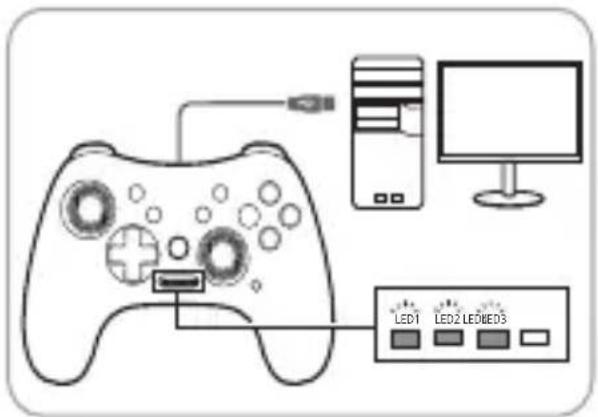
X-INPUT Mode (Windows® & ChromeOS website) = LED 1, 2, 3 ON

APP Mode (Android & ChromeOS APP) = LED 2 ON
FAQs
Q: Why is my gaming controller not activated?
A: Please make sure that the USB cable is properly connected to your gaming controller and that you have selected the proper Controller Mode. Refer to the Mode LED indicator for more information on the Controller Mode.
Caution
- Do not disassemble the device or operate the device under abnormal conditions.
- Do not submerge the device in water.
- If the device could not be functional, or there was thermal abnormal situation, please re-plug in the connector.
- If you still encounter problems after going through the corrective measures, please contact your dealer or an authorized service center for assistance.
- For more information regarding the Acer accessories, please visit the Acer website at www.acer.com.
Environment
Temperature:
- Operating: 0°C to 45°C • Non-operating: -10°C to 60°C
Humidity (non-condensing):
- Operating: 5% to 55% • Non-operating: 20% to 60%
Please visit www.acer.com for warranty.
X-INPUT MODE
X-INPUT MODE
X-INPUT mode (Windows® and ChromeOS website) = LED 1, 2, 3 ON

APP mode (Android and ChromeOS APP) = LED 2 ON
X-INPUT mode
X-INPUT function (Windows® and ChromeOS website) = LED 1, 2, 3 ON

APP function (Android and ChromeOS APP) = LED 2 ON
X-INPUT mode (Windows® and ChromeOS website)
= LED 1, 2, 3 ON

X INPUT Mode (Windows® & ChromeOS website) = LED 1, 2, 3 ON

APP Mode (Android and ChromeOS APP) = LED 2 ON
Compliant with Russian regulatory certification
X-INPUT Mode
(Windows® & ChromeOS websites)
APP Mode
(Android & ChromeOS APP)
X-INPUT Mode (Windows® & ChromeOS website) = LED 1, 2, 3 ON

APP Mode (Android & ChromeOS apps) = LED 2 ON
FAQ
Europe – EU Declaration of Conformity
We declare under our sole responsibility that the product is in conformity with all the essential requirements and other provisions of the European Council Directive RoHS Directive (2011/65/EU), EMC Directive (2014/30/EU) issued by the Commission of the European Community.

This product must not be disposed of with your other household waste. Treat it in compliance with local regulations or contact your local city office, your household waste disposal service, or the shop where you purchased the product.

FEDERAL COMMUNICATIONS COMMISSION (FCC) STATEMENT
This equipment has been tested and found to comply with the limits for a Class B digital device, pursuant to part 15 of the FCC Rules.
These limits are designed to provide reasonable protection against harmful interference in a residential installation. This equipment generates, uses and can radiate radio frequency energy and, if not installed and used in accordance with the instructions, may cause harmful interference to radio communications.
However, there is no guarantee that interference will not occur in a particular installation. If this equipment does cause harmful interference to radio or television reception, which can be determined by turning the equipment off and on, the user is encouraged to try to correct the interference by one or more of the following measures:
- Reorient or relocate the receiving antenna.
- Increase the separation between the equipment and receiver.
- Connect the equipment into an outlet on a circuit different from that to which the receiver is connected.
- Consult the dealer or an experienced radio/TV technician for help.
FCC Caution
Changes or modifications not expressly approved by the part responsible for compliance could void the user's authority to operate the equipment.
This device complies with Part 15 of the FCC Rules. Operation is subject to the following two conditions: (1) this device may not cause harmful interference, and (2) this device must accept any interference received, including interference that may cause undesired operation.
IC Statement
CAN ICES-003(B)/NMB-003(B)

Federal Communications Commission Declaration of Conformity
This device complies with Part 15 of the FCC Rules. Operation is subject to the following two conditions: (1) this device may not cause harmful interference, and (2) this device must accept any interference received, including interference that may cause undesired operation.
The following local Manufacturer /Importer is responsible for this declaration:
Product: Gaming Controller
Model Number: NGR200
Name of Responsible Party: Acer America Corporation
Address of Responsible Party: 333 West San Carlos St.
Suite 1500
San Jose, CA 95110
U. S. A.
Contact Person: Acer Representative
Phone No.: 254-298-4000
Fax No.: 254-298-4147
EU Declaration of Conformity
We,
Acer Incorporated
8F, 88, Sec. 1, Xintai 5th Rd., Xizhi, New Taipei City 221
And,
Acer Italy s.r.l.
Viale delle Industrie 1/A, 20044 Arese (MI), Italy
Tel: +39-02-939-921, Fax: +39-02 9399-2913
www.acer.it
Product: Gaming Controller
Trade Name: acer
Model Number: NGR200
SKU Number: NMW120 *****
(** = 0 ~ 9, a ~ z, A ~ Z, or Blank)
We, Acer Incorporated, hereby declare under our sole responsibility that the product described above is in conformity with the relevant Union harmonization legislation: EMC Directive 2014/30/EU and RoHS Directive 2011/65/EU. The following harmonized standards and/or other relevant standards have been applied:
EN55032:2015+A1:2020, Class B
EN55035:2017+A11:2020
EN IEC 61000-3-2:2019+A1:2021
EN 61000-3-3:2013+A1:2019+A2:2021
EN IEC 63000:2018
Year to begin affixing CE marking: 2022.

RU Jan / Sr. Manager
Acer Incorporated (New Taipei City)
10.30,2022
Date
Full disclaimer: This product works with devices capable of running the latest version of ChromeOS and has been certified to meet Google's compatibility standards. Google is not responsible for the operation of this product or its compliance with safety requirements. Android, Chromebook and the Works With Chromebook badge are trademarks of Google LLC.
- SPECIFICATIONS
- PACKAGE CONTENTS
- DEVICE FEATURES
- SYSTEM COMPATIBILITY
- FEATURES
- CONTROLLER MODE
- FAQS
- CAUTION
- ENVIRONMENT
- TEMPERATURE
- HUMIDITY (NON-CONDENSING)
- COMPLIANT WITH RUSSIAN REGULATORY CERTIFICATION
- FAQ
- EUROPE – EU DECLARATION OF CONFORMITY
- FEDERAL COMMUNICATIONS COMMISSION (FCC) STATEMENT
- FCC CAUTION
- IC STATEMENT
- FEDERAL COMMUNICATIONS COMMISSION DECLARATION OF CONFORMITY
- EU DECLARATION OF CONFORMITY
- ACER INCORPORATED
- ACER ITALY S.R.L
- PRODUCT: GAMING CONTROLLER
- TRADE NAME: ACER
- MODEL NUMBER: NGR
Brand : ACER
Model : Nitro NGR200
Category : Game controller