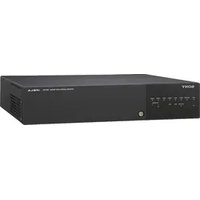
NSR-500 - VCR SONY - Free user manual and instructions
Find the device manual for free NSR-500 SONY in PDF.


Pick your language and provide your email: we'll send you a specifically translated version.
| Product Type | VHS VCR |
| Brand | Sony |
| Model | NSR-500 |
| Dimensions (W x H x D) | 430 x 90 x 300 mm |
| Weight | 4 kg |
| Power Supply | 220-240 V, 50 Hz |
| Power Consumption | 25 W |
| Video Format | VHS (PAL/SECAM) |
| Main Functions | Playback, recording, freeze frame, fast forward/rewind, timer programming |
| Maintenance and Cleaning | Clean the video heads with a cleaning cassette; dust the casing with a soft cloth |
| Safety | Unplug the power before any intervention; do not expose to moisture |
| Spare Parts | Video heads, belts, rollers, power supply |
| Repairability | Estimated repairability index: 7/10 (repair possible by a technician) |
| Included Accessories | SCART cable, remote control, power cable |
| Operating Temperature | 5°C to 35°C |
Frequently Asked Questions - NSR-500 SONY
How to connect the VCR to the TV?
Use a SCART cable to connect the SCART socket of the VCR to that of the TV. Then turn on both devices and select the AV channel on the TV.
How to program a timer recording?
Press the Menu button on the remote, navigate to Programming, then set the date, start and end time, as well as the desired channel. Confirm with OK.
Why is the image jerky or snowy?
This may be due to dirty video heads. Use a wet cleaning cassette following the manufacturer's instructions. If the problem persists, the VCR may need servicing by a professional.
How to clean the video heads?
Buy a special VHS cleaning cassette. Insert it and play for 10 to 15 seconds. Do not reuse these cassettes; discard them after use.
The cassette is stuck in the VCR, what to do?
First, unplug the device. Wait 30 seconds, then plug it back in. If the cassette does not eject, insert a thin object (like an unfolded paperclip) into the manual eject hole on the front panel while gently pulling the cassette.
Can I connect a camcorder to this VCR?
Yes, using the RCA (audio/video) jacks located on the front or back. Connect your camcorder cables to the corresponding inputs and select the external source (often AV or Input).
The VCR does not turn on, what to check?
Check that the power cord is properly plugged in and that the wall outlet works. Try a different outlet. If nothing happens, the internal fuse may be blown: contact a repairer.
How to set the clock of the VCR?
Press Menu, select Settings then Clock. Use the +/- or numeric keys to enter the time and date, then confirm with OK.
What is the lifespan of a video head?
Under normal use, video heads last about 2000 to 3000 hours. Regular maintenance (cleaning) can extend their lifespan.
Can I record on rewritable tapes?
Yes, standard VHS cassettes can be recorded over many times. Make sure the protection tab is in place (not broken) to enable recording.
User questions about NSR-500 SONY
0 question about this device. Answer the ones you know or ask your own.
Ask a new question about this device
No questions yet. Be the first to ask one.
Download the instructions for your VCR in PDF format for free! Find your manual NSR-500 - SONY and take your electronic device back in hand. On this page are published all the documents necessary for the use of your device. NSR-500 by SONY.
USER MANUAL NSR-500 SONY


Manual assistant
Powered by Anthropic
Waiting for your message
Product information
Brand : SONY
Model : NSR-500
Category : VCR