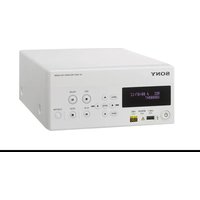
HVO-500MD - VCR SONY - Free user manual and instructions
Find the device manual for free HVO-500MD SONY in PDF.


Pick your language and provide your email: we'll send you a specifically translated version.
| Product Type | Medical Grade VCR (Video Cassette Recorder) |
| Brand | Sony |
| Model | HVO-500MD |
| Dimensions (W x H x D) | Approx. 430 x 85 x 350 mm (16.9 x 3.3 x 13.8 in) |
| Weight | Approx. 5.5 kg (12.1 lb) |
| Power Supply | AC 100-240V, 50/60 Hz |
| Power Consumption | Approx. 45 W |
| Video Input/Output | Composite (BNC), S-Video, RGB/Component via BNC |
| Audio Input/Output | RCA (2 channels), XLR (optional) |
| Recording Media | MiniDV cassettes |
| Recording Format | DV (25 Mbps), DVCAM |
| Playback Format | DV, DVCAM, Digital8 (with adapter) |
| Time-Lapse Recording | Yes, selectable intervals |
| Alarm/Event Recording | Supported with external trigger |
| RS-232C Control | Yes, for external control |
| Cleaning | Use Sony cleaning cassette; avoid abrasive materials |
| Safety Certifications | IEC 60601-1 (medical electrical equipment) |
| Spare Parts / Accessories | Remote control, power cord, cleaning cassette, manuals |
| Repairability | Serviceable by trained personnel; contact Sony support |
Frequently Asked Questions - HVO-500MD SONY
What type of cassette does the HVO-500MD use?
The HVO-500MD uses MiniDV cassettes for recording in DV or DVCAM format.
Can I play back old Digital8 tapes on this recorder?
Yes, with an optional Digital8 cassette adapter, the HVO-500MD can play back Digital8 tapes.
How do I clean the video heads?
Use a dry cleaning cassette specifically for MiniDV (e.g., Sony DVM-12CL). Insert it and play for 10-20 seconds. Do not use wet cleaners.
What is the power consumption of the HVO-500MD?
The power consumption is approximately 45 watts during normal operation.
How can I connect the recorder to a monitor?
Use the BNC composite, S-Video, or RGB/Component outputs. For medical displays, composite or S-Video is common.
Can I control the recorder remotely?
Yes, via RS-232C serial interface. You can send commands to start/stop recording, select mode, etc.
How do I set up time-lapse recording?
Access the menu via the front panel or remote, select Time-Lapse mode, and choose an interval (e.g., 0.5 sec to 1 hour). The recorder will capture one frame per interval.
What safety standards does the HVO-500MD comply with?
It complies with IEC 60601-1 (Medical Electrical Equipment) for safety and electromagnetic compatibility in healthcare environments.
Why is the cassette not ejecting?
Check if the unit is powered on and not in recording mode. If the mechanism is jammed, turn off the unit, wait 30 seconds, and try again. If still stuck, contact service.
Where can I find replacement parts or accessories?
Contact Sony authorized distributors or service centers. Common accessories include remote control (RMT-V500), cleaning cassette, and BNC cables.
User questions about HVO-500MD SONY
0 question about this device. Answer the ones you know or ask your own.
Ask a new question about this device
No questions yet. Be the first to ask one.
Download the instructions for your VCR in PDF format for free! Find your manual HVO-500MD - SONY and take your electronic device back in hand. On this page are published all the documents necessary for the use of your device. HVO-500MD by SONY.
USER MANUAL HVO-500MD SONY


Manual assistant
Powered by Anthropic
Waiting for your message
Product information
Brand : SONY
Model : HVO-500MD
Category : VCR