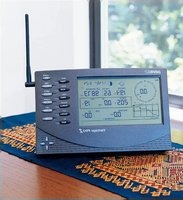
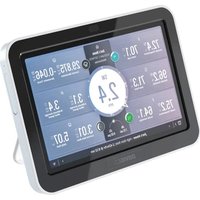
DAV-6312 - Weather Station DAVIS - Free user manual and instructions
Find the device manual for free DAV-6312 DAVIS in PDF.


Pick your language and provide your email: we'll send you a specifically translated version.
| Product Type | Weather Station |
| Brand | Davis |
| Model | DAV-6312 |
| Temperature Measurement Range | -40°C to 65°C |
| Humidity Measurement Range | 1% to 100% RH |
| Wind Speed Range | 0 to 322 km/h |
| Wind Direction | 360° with 16-point compass |
| Rainfall Resolution | 0.2 mm per tip |
| Barometric Pressure Range | 540 to 1100 hPa |
| Display Type | LCD with backlight |
| Wireless Range | Up to 300 m (line of sight) |
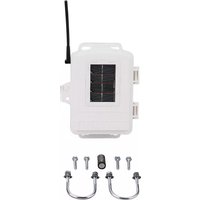
| Power Supply (Sensor) | 2 AA batteries |
| Power Supply (Console) | AC adapter (included) or batteries |
| Data Logging | Yes, up to 256 records |
| Update Interval | Wind: 2.5 s; Others: 10 s |
| Mounting | Pole mount included |
| Dimensions (Console) | 160 x 100 x 25 mm |
| Weight (Console) | 250 g |
| Weather Forecast | Yes, based on pressure trends |
| Alarms | High/low temperature, wind, rain |
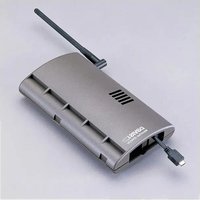
| Connectivity | Optional USB data logger |
| Included Manual | PDF (English) |
Frequently Asked Questions - DAV-6312 DAVIS
How do I set up the Davis DAV-6312 weather station?
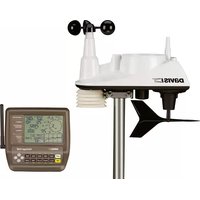
Place the outdoor sensor array in an open area, mount it on a pole using the included hardware. Install batteries and turn on the console. The console will automatically sync with the sensor within a few minutes. Refer to the manual for detailed steps.
How often do I need to change the batteries?
Battery life varies but typically lasts 1-2 years for the sensor array using quality AA alkaline batteries. The console can be plugged in via AC adapter or use batteries as backup.
Can I connect the station to my computer?
Yes, via an optional USB data logger (sold separately). This allows you to download and analyze weather data on your computer using Davis software.
What does the wind direction reading mean?
Wind direction is reported in degrees from true north (0° = North, 90° = East, etc.) and as compass points (N, NNE, NE, etc.). The sensor must be oriented correctly during installation.
How do I clean the rain collector?
Periodically remove debris from the rain funnel. Use a soft brush and water to clean the tipping bucket mechanism. Avoid touching the internal parts. Ensure the unit is level after cleaning.
What should I do if the console shows 'NO SIGNAL'?
Check that batteries are installed in the sensor array and that it is within range (up to 300 m). Ensure there are no large metal obstructions. You may need to re-sync by pressing the reset button on the sensor or console.
Is the weather station waterproof?
The outdoor sensor array is weather-resistant but not submersible. The console is for indoor use only. Ensure all seals are intact and the sensor is mounted away from sprinklers.
How do I reset the weather station to factory settings?
On the console, go to the setup menu and select 'Factory Reset' or press and hold the reset button with a paperclip. This will erase all data and stored settings.
Can I add additional sensors?
The DAV-6312 supports up to 6 additional sensors (e.g., UV, solar radiation, soil moisture) using Davis's optional add-on sensors, provided they are compatible with the wireless protocol.
What is the warranty for this product?
Davis offers a 2-year limited warranty against defects in materials and workmanship. Register your product online to activate warranty coverage.
User questions about DAV-6312 DAVIS
0 question about this device. Answer the ones you know or ask your own.
Ask a new question about this device
No questions yet. Be the first to ask one.
Download the instructions for your Weather Station in PDF format for free! Find your manual DAV-6312 - DAVIS and take your electronic device back in hand. On this page are published all the documents necessary for the use of your device. DAV-6312 by DAVIS.
USER MANUAL DAV-6312 DAVIS
Manual assistant
Powered by Anthropic
Waiting for your message
Product information
Brand : DAVIS
Model : DAV-6312
Category : Weather Station