AC337 - Baby monitor ANGELCARE - Free user manual and instructions
Find the device manual for free AC337 ANGELCARE in PDF.


| Product Type | Baby Monitor |
| Brand | Angelcare |
| Model | AC337 |
| Dimensions (Nursery Unit) | 12.5 x 8.5 x 6.5 cm |
| Dimensions (Parent Unit) | 7.5 x 4.5 x 3 cm |
| Weight (per unit) | 200 g |
| Power Supply (Nursery Unit) | AC adapter (5V, 1A) |
| Power Supply (Parent Unit) | Rechargeable AAA Ni-MH battery |
| Battery Life (Parent Unit) | Up to 8 hours |
| Sound Monitoring | Yes, with voice activation |
| Movement Detection | Under-mattress sensor pad |
| Additional Functions | Two-way talk, night light, lullabies, temperature display |
| Range | Up to 200 m in open field |
| Frequency | DECT 1.9 GHz |
| Cleaning | Wipe with dry or slightly damp cloth |
| Safety Features | Movement alarm, low battery indicator, out of range alarm |
| Spare Parts Available | Sensor pad, AC adapter, batteries |
| Repairability | Battery replacement, sensor pad replacement |
| Country of Origin | China |
| Warranty | 1 year |
Frequently Asked Questions - AC337 ANGELCARE
User questions about AC337 ANGELCARE
0 question about this device. Answer the ones you know or ask your own.
Ask a new question about this device
Download the instructions for your Baby monitor in PDF format for free! Find your manual AC337 - ANGELCARE and take your electronic device back in hand. On this page are published all the documents necessary for the use of your device. AC337 by ANGELCARE.
USER MANUAL AC337 ANGELCARE
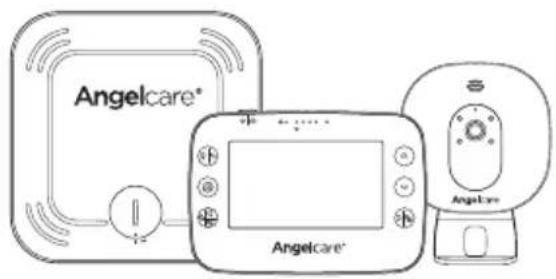
Model AC327
Baby Movement Monitor, with Video
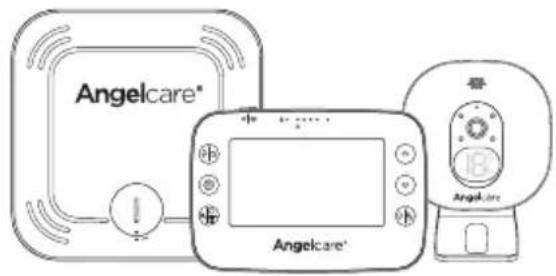
Model AC337
Baby Movement Monitor, with Video
WARNING
Keep user's guide for future reference. Please read the warnings and safety instructions carefully before assembling & using the product. Failure to follow the warnings and the instructions could result in serious injury or death or damage to the product.
IMPORTANT - INTENDED USE
This product is NOT intended and should NOT be used to prevent Sudden Infant Death Syndrome (SIDS). This product is NOT intended to diagnose, treat, mitigate, cure or prevent any disease or condition. This is a product to monitor the movement of healthy babies and is not a substitute for parental care.

WARNINGS
1. Because of the serious strangulation risk to infant & toddlers, parents & caregivers should note the following Warnings

⚠ WARNING - Strangulation Hazard - Children have STRANGLED in cords
- KEEP the Nursery Unit and adaptor cords OUT of the reach of children more than 3 feet or 1 metre away
- NEVER use extension cords with adaptors. ONLY use adaptors provided
- This product is NOT a Toy. NEVER allow children to play with it
2.
⚠ WARNING - MOVEMENT SENSOR PAD - NO ALARM
- Sources of vibration & movement, other than your baby's, can be detected by the Sensor Pad and interfere with the performance of your Angelcare monitor
- The alarm will not sound if it detects movement other than your baby's
- High sensitivity settings can pick up other sources of vibration & movement - please read instructions on sensitivity setting to adjust accordingly
- Other active and older babies (toddlers) in the same room can be detected and the alarm will not sound
-
Ensure the baby's environment is FREE from any movements or vibrations when using the Sensor Pad - see below warnings 3 to 11
-
DO NOT use a cot mobile and other cot accessories that may produce movements or vibrations
-
Fans (including ceiling), washing machines, floor boards, central heating or loud music are all forms of movement and vibration and may interfere and be detected by the Sensor Pad
-
If an additional Nursery Unit is added then it must be positioned at least 2 metres minimum from Nursery Unit 1 and Sensor Pad as this could interfere with performance
-
DO NOT use with bedside cot touching parent's/carer's bed as the Sensor Pad will detect your movements
-
DO NOT place the cot against a wall or skirting board as vibrations may be detected
-
Following removal of baby from the cot, some mattresses may still detect mattress movement due to it forming back into shape and alarm may not sound
-
Ensure cot is stable to eliminate any movement
-
Cot should not be placed in reaching distance of another cot or bed
-
DO NOT use other wireless devices in the same room as the monitor (including mobile phones, microwaves...). They may interfere with signal and performance
-
The Sensor Pad is made of plastic and does not permit air to circulate. Therefore, mildew build up could develop underneath the mattress in the Sensor Pad area
We suggest rotating & airing /drying the mattress regularly to prevent any mildew. AVOID CONTACT WITH MOISTURE. Clean - wipe with a dry lint free cloth
-
The Sensor Pad is not suitable for use above age 24 months
-
This product cannot replace responsible adult supervision
- This product is designed to aid in the monitoring of your child. When using the monitor, you must still
provide the supervision necessary for the continued safety of your child
- Use this appliance ONLY for its intended use as described in this manual
- The Sensor Pad is not intended to be used to determine if a child is out of the cot
- ALWAYS be sure to immediately check on baby whenever an alarm sounds
- Keep cords out of the reach of ANY children
- ONLY use the chargers and power adaptors provided. Do not use other types as this may damage the device and battery pack (if included in your model)
- Adult assembly required. Keep small parts away from children when assembling
- Follow instructions and test this monitor and its functions so you are familiar with it prior to actual use. ALWAYS be sure that both the transmitter and receiver are working properly and are within range of each other – check periodically and when changing location of the Nursery Unit
- DO NOT touch the plug contacts especially with sharp or metal objects
- DO NOT use the baby monitor near water Care should be taken so that objects DO NOT fall onto units and that liquids are not spilled into either unit or Sensor Pad through its openings

CAUTION
RISK OF ELECTRIC SHOCK DO NOT OPEN

DO NOT EXPOSE TO RAIN OR MOISTURE
- Keep monitor AWAY from heat sources (such as stoves, radiators, etc.). Heat can damage the case or electrical parts
- ALWAYS place both the Nursery Unit and the Parent Unit on a flat solid surface in an upright position that allows for proper VENTILATION. DO NOT place on sofas, cushions, beds, etc. which may block ventilation or anywhere that would muffle the sound or interfere with the normal flow of air
- The baby monitor can only be used between 10°C and 40°C (50°F and 104°F)
WARNINGS AND SAFETY INSTRUCTIONS - BATTERY SPECIFIC
- ALWAYS keep all batteries away from children
- The Parent Unit battery is a replaceable Li-Ion battery. The Wireless Sensor Pad uses a replaceable Button Cell Lithium Battery. Only use the Angelcare recommended replacement battery (see Technical Specification)
- Danger of explosion if the wrong battery is used or if replaced incorrectly. Refer to User's Guide for
correct battery installation
- DO NOT short circuit supply terminals
- DO NOT mix old and new batteries and only use Angelcare recommended replacement batteries (see Technical Specification)
- This product contains a Button Cell Battery and if swallowed can cause internal chemical burns in as little as two hours and lead to death. Dispose of used batteries immediately. Keep new and used batteries away from children. If you think batteries might have been swallowed or placed inside any of the body, seek medical attention.
- The Button Cell Battery represents a small part and a choking hazard – KEEP away from children!
- Exercise care in handling batteries in order not to short out the batteries with conducting materials such as rings, bracelets and keys
- Overcharging, short circuiting, reverse charging, mutilation, or incineration of batteries must be avoided to prevent one or more of the following occurrences: release of toxic materials, release of hydrogen and/or oxygen, gas and rise in surface temperature
- DO NOT attempt to recharge batteries provided with or identified for use with this product that are not intended to be charged The batteries may leak corrosive electrolyte or explode
- Incorrect polarity installation of the batteries in the end product must be avoided Reverse insertion of batteries can cause charging, and that may result in leakage or explosion
- Remove batteries from units if you store the product over 30 days because the batteries could leak and damage the product
- Discard 'dead' batteries as soon as possible since 'dead' batteries are more likely to leak in a product. If a battery has leaked or vented, discard product responsibly
- DO NOT store this product, or the batteries provided with or identified for use with this product, in high-temperature & high humidity environments and avoid direct sunlight
IMPORTANT SAFETY INSTRUCTIONS
38. Sensor Pad –
- If your cot does not have a solid, stationary, completely flat, firm surface including a spring or slat base, place a hard board between the cot base and the Sensor Pad, to ensure correct operation (see specification on STEP 2)
-
The Sensor Pad functions with standard cot sprung and foam mattresses and not memory foam (partial or full), hollow frame construction mattresses and water beds. Please consult Angelcare if unsure of mattress compatibility
-
This monitor uses public airwaves to transmit signals. The Parent Unit may pick up signals or interference from other nursery monitors in your
area. Your monitor may even be picked up by other households. To protect your privacy, make sure both units are turned OFF when not in use
- Power cord protection - Protect the Adaptor's power cord from being walked on or pinched by furniture or other items - Power supply cords should be routed so that they are not likely to be walked on or pinched by items upon or against them, paying particular attention to cords and plugs, convenience receptacle, and the point where they exit from the product. The socket outlet should be installed near the equipment and should be easily accessible. Make sure to plug the adaptor to the socket outlet nearest to the equipment and that is easily accessible. To disconnect from mains, unplug the adaptor
- Only use attachments/accessories and replacement parts specified by the manufacturer. Any mounting of the product should follow the manufacturer's instructions
- DO NOT position this product on an unstable cart, stand, tripod, bracket or table. The product may fall, causing serious injury to a child or adult and serious damage to the product
- Use ONLY the stand sold with the product
- Be sure replacement parts are supplied by Angelcare and have the same characteristics as original part. Unauthorised substitution may result in fire, electric shock or fire
- Unplug this appliance during lightning storms or when not used for long periods of time
- Servicing - DO NOT attempt to service this product yourself as opening or removing covers (except battery door) may expose you to dangerous voltage or other hazards
- Power Supply – see Technical Specification within this guide
- Overloading - DO NOT overload wall outlets, extension cords or integral convenience receptacles as this can result in a risk of fire or electric shock
- Nursery Unit Antenna - The antenna used for this transmitter must be installed to provide a separation distance of at least 8" (20 cm) from all persons and must not be collocated or operating in conjunction with any other antenna or transmitter
- Cleaning - Disconnect all units before cleaning. DO NOT immerse any part of the monitor in water. Clean only with a dry cloth
SET UP REQUIREMENTS
WHAT'S IN THE BOX
1 Nursery Unit
2 Stand (for Nursery Unit)
3 2 x AC Adaptors
4 Parent Unit
5 Lithium Ion Battery Pack (for Parent Unit)
6 Sensor Pad (on model AC327 and AC337)
7 CR2450 Battery (for Sensor Pad) (on model AC327 and AC337)
B Hardware (for wall mounting)
WHAT YOU NEED
Hardboard, if the cot does not have a firm surface (see specification on STEP 2)



1- SETTING UP THE PARENT UNIT


Charge the Parent Unit 8 hours prior to first use
Regular charging time is 4 hours
2- SETTING UP THE SENSOR PAD (ON MODEL AC327 AND AC337)
The Sensor Pad is designed to detect subtle baby movements on the surface of the mattress. The alarm will only sound if NO movement is detected for 20 seconds.

- Remove the battery cover and insert the battery face with + face up
-
Replace the battery cover, align 2 dots and click to secure
-
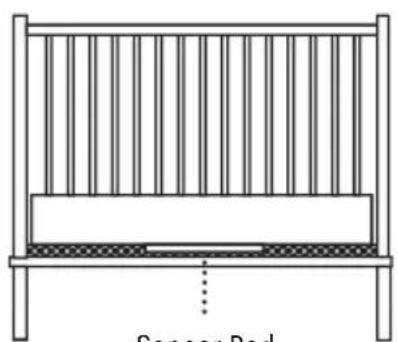
Remove the mattress from the cot, place Sensor Pad - Angelcare® logo side up - on base in approximate centre of mattress. It should be centred on the hardboard if your cot requires a hardboard support (see 'IMPORTANT' note below)
- Replace the mattress

IMPORTANT
- If your cot does not have a solid, stationary, completely flat, firm surface including a spring or slat base, place a hardboard between the cot base and the Sensor Pad, to ensure correct operation. The hardboard support must measure at least 30 x 30 cm (12" x 12") and 6 mm (1/4") thick. This hardboard support must be larger than the Sensor Pad surface area
- The Sensor Pad functions with standard cot sprung and foam mattresses and not memory foam (partial or full), hollow frame construction mattresses and water beds. Please consult Angelcare if unsure of mattress compatibility. The hardboard maintains a constant pressure on the Sensor Pad, enabling it to detect the baby's movements even when the baby is at the edges of the cot

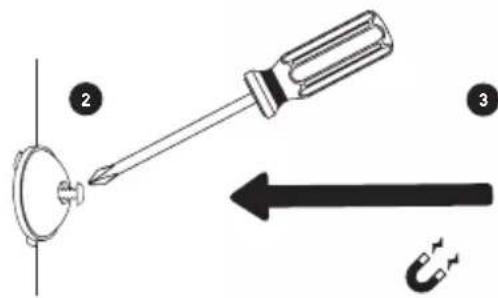
3- SETTING UP THE NURSERY UNIT
Sensor Pad
Place the Nursery Unit and Adaptor cord at least 1 metre from the cot


1 Wall-Mounted
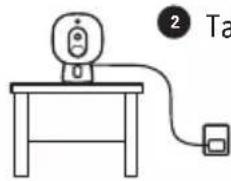
2 Tabletop
WALL-MOUNTED
1



TABLETOP

2

4- TURNING ON YOUR MONITOR
NURSERY UNIT PARENT UNIT


Note:
- Your Nursery Unit and Parent Unit come pre-paired
• Each time you power ON your Nursery Unit, the internal thermometer will need to calibrate to ensure accuracy. This automatic process will take approximately 30 minutes
PAUSING AND RESTARTING THE SENSOR PAD
- Allows you to pause the Sensor Pad if you remove baby from the cot, e.g. for feeding or comforting. Ensure to un-pause the Sensor Pad before putting baby in the cot
NURSERY UNIT
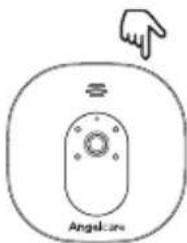
PARENT UNIT

TEST THE SENSOR PAD (ON MODEL AC327 AND AC337)
- Sources of vibration & movement other than your baby's can be detected by the Sensor Pad and interfere with the performance of your Angelcare monitor. The alarm will not sound if it detects movement other than your baby's
- There are 4 sensitivity settings. The unit is set at level 3 (default) and can be adjusted accordingly
- The Sensor Pad will detect false movements if you are touching the cot
- The monitor will produce a Rouse alarm single beep tone designed to stir baby if no movement has been detected for 15 seconds. If no further movement is detected, the main alarm will sound at 20 seconds – a series of continuous beeps
SENSOR PAD FOUR CORNER TEST
- Place the Sensor Pad at the approximate centre of baby's sleeping area and put the mattress back in place
- Switch ON both Nursery & Parent Units – check both units are paired (connected)
- Immediately pat your hand lightly and continuously on a corner of the mattress twice for Sensor to detect movement. If movement is detected you will hear a TIC sound every 5 seconds and PU will flash green for a single sensor pad
- Step away from the cot
- The alarm will sound from the Nursery and Parent Unit after 20 seconds. If the Alarm does not sound, ensure everything is setup correctly and try again; check battery levels on all units, follow the manual for 'NO ALARMS' - the sensitivity setting may require lowering by a single level due to other vibrations/movements
- If the alarm sounds, pat your hand lightly on a corner of mattress twice for Sensor to detect movement. It may take up to 8 seconds to recognise movement and for alarm to stop.
- If the alarm continues, even after lightly patting the corner of your mattress twice, adjust the sensitivity higher and repeat this test


IMPORTANT
- Test your monitor before first use
- Prior to use and on a regular basis (before placing your child in the cot) always check the Sensor Pad is detecting no movements or vibrations in its environment
- Test your monitor every time you move the Sensor Pad to a different place
5- GETTING TO KNOW YOUR MONITOR
NURSERY UNIT
1 Speaker
2 Microphone
3 Camera Lens
4 Powerindicator (on model AC327 & AC320)
Temperature Indicator (on model AC337)
5 Micro USB port
6 Pause Sensor Pad / Pairing button
7 Power ON/OFF
B Magnet for tabletop stand and wall mount

PARENT UNIT
1 Power ON/OFF (Press & Hold)
/ Sleep mode (Quickly press & release)
2 Talk-back / Return & save settings
3 Menu / Select
4 Zoom & pan feature / Navigate left / Switch Nursery Unit sound
5 Movement indicator (TIC function)
6 Power indicator
7 Visual sound indicator
B Microphone
9 Volume up / Navigate up
10 Volume down / Navigate down
11 Navigate right / View mode
12 Rechargeable battery compartment
13 Micro USB charging port
14 Speaker
15 Folding stand

FRONT SIDE

REAR SIDE
TOP STATUS BAR

(on model AC327 and AC337)
1 Sensor Pad movement detection is activated
2 Sensor Pad alert
3 Sensor Pad lost link
4 Sensor Pad movement detection is OFF
5 Sensor Pad is paused
6 Sensor Pad is low battery
7 Sensor Pad has never been paired
8 Nursery Unit selected and broadcasting sound
9 "TIC" function is activated (on model AC327 and AC337)
10 "VOX" function is activated
11 Temperature alert is activated
12 Temperature alert: too hot
13 Temperature alert: too cold
14 Night vision is activated
15 Second Sensor Pad is low battery (on model AC327 and AC337) - only shown if you have 2 Sensor Pads paired
16 Volume level indicators
17 Reception quality indicators
18 Parent Unit battery level indicators
MAIN MENU


1 Movement Sensor Pad Activation (on model AC327 and AC337):
ON: The Parent & Nursery Units will alarm if there is no movement after 20 seconds
PAUSE: Allows you to pause the Sensor Pad if you remove baby from the cot, e.g. for feeding or comforting
- The Pause icon in the status bar will flash
- On the AC327, the Nursery Unit Power indicator will slowly blink
- On the AC337, the Nursery Unit temperature indicator will show a pause "P" symbol Ensure to un-pause the Sensor Pad before putting baby in the cot (Turn movement detection ON)
OFF: When your baby gets older, allows you to turn movement detection OFF and use your monitor for video only
2 Tic Activation (on model AC327 and AC337): If movement detection is activated, allows you to hear a Tic sound every 5 seconds. In the event you have two Sensor Pads connected, the Tic indication will flash green for Sensor Pad 1 and blue for Sensor Pad 2
3 VOX Activation: Sound Activated' (VOX ON) means that it will transmit sounds only when it detects them, based on the setting of the sensitivity level. To save power, after 10 seconds, the sound transmission will stop if no sound is detected. Once sound is detected transmission will automatically activate. 'Continuous Sound' (VOX OFF) means the sound monitoring is continuously ON, picking up all sounds
4 Screen Brightness
5 Sleep Mode Set-Up
6 Temperature Settings
7 General Settings

IMPORTANT
- To confirm your settings, you'll always need to press the button. A confirmation icon will
then appear on the screen: Settings have been saved. Settings have not been saved - If you have 2 Nursery Units & 2 Sensor Pads paired with your monitor, you can only change the settings of the viewing Nursery Unit
- If a function icon appears in grey (grayed out) it means you are unable to use or adjust

TEMPERATURE SETTINGS MENU

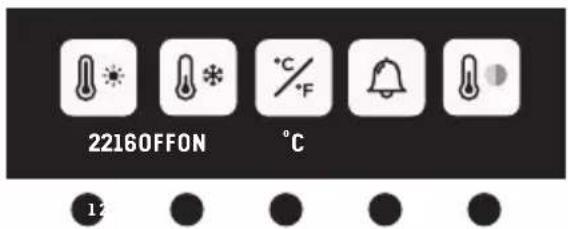
1 Set warmer temperature alarm
2 Set colder temperature alarm
Note: The range between the minimum and maximum temperature can not be less than 4° C / 7° F.
3 Set Celsius or Fahrenheit display
4 Activate the temperature alarm
5 Activate the Nursery temperature colour code display (on model AC337)
White: Temperature is normal
Red: Temperature is too hot
Blue: Temperature is too cold
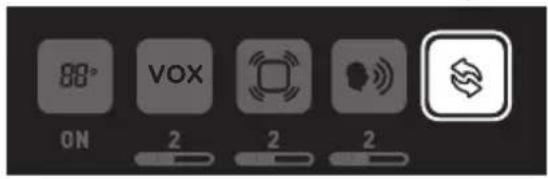
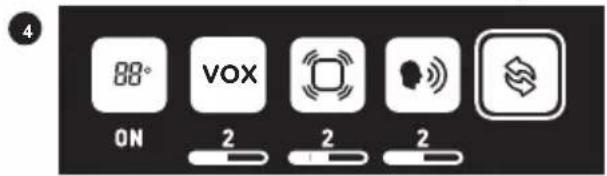
GENERAL SETTINGS MENU

1 Activate Nursery Unit display (on model AC337)
2 Set VOX sensitivity: The sensitivity of the microphone is adjustable and has 4 levels (the most sensitive is level 4). This means that sound will only transmit based on the level that you set
3 Set Sensor Pad sensitivity (on model AC327 & AC337): To ensure adequate monitoring of your child's movements, you can adjust the sensitivity of the Sensor Pad
4 Set Nursery Unit speaker volume
5 Pairing Menu
PAIRING MENU
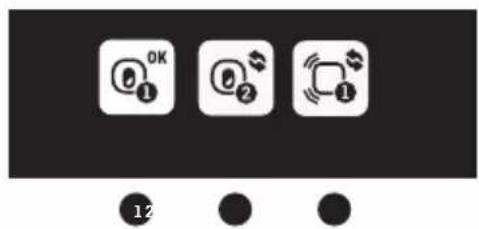
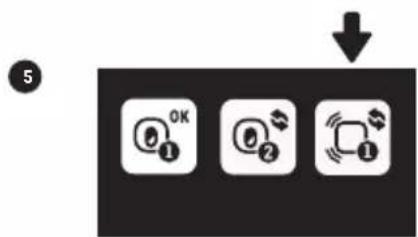
1 Nursery Unit 1 Status
2 Nursery Unit 2 Status
3 Sensor Pad 1 Status (on model AC327 and AC337)
Nursery Unit and Sensor Pad Status Icons:
OK Green: Connected/Paired
Blue: Add a Nursery Unit or Sensor Pad
✗ Red: Remove Nursery Unit or Sensor Pad
Confirmation process ON THE SCREEN:
Blue: "Link" icon animation when pairing (Linking timeout: 60s)
Green: Successful pairing
Red: Failed pairing, please try again
ALERTS ICONS


(on model AC327 and AC337)
1 Sensor Pad alert: If after 20 seconds there is NO movement detected both the Parent Unit and Nursery Unit speakers will emit loud consecutive beeps - this is the movement alarm
2 Sensor Pad is paused
3 Sensor Pad lost link: Parent Unit and Nursery Unit speakers will emit loud consecutive beeps
4 Sensor Pad battery is low: Parent Unit will emit 3 consecutive beeps, every 5 seconds
5 Parent Unit is out-of-range: Parent Unit will emit 2 consecutive beeps, every 10 seconds
6 Temperature is too hot: Parent Unit will emit 3 consecutive beeps, every 5 seconds
7 Temperature is too cold: Parent Unit will emit 3 consecutive beeps, every 5 seconds
Note: Press any key to stop alarm and make the alert icon disappear
In the case of a Sensor Pad alarm, the monitor will Pause the Sensor Pad. In Pause mode, the movement detection feature is disabled. To reactivate the Sensor Pad, simply un-pause the Sensor Pad into the first menu
6- ADDING ACCESSORIES
Your Angelcare monitor allows you to add an additional Nursery Unit and Sensor Pad. Please contact your local distributor to see what is available in your country
IMPORTANT:
- When using two Nursery Units you will only be able to hear audio from one Nursery Unit at a time (Nursery Unit sound transmitted is highlighted in the info bar). In split screen, the sound transmitted from the Nursery Unit will be indicated on the screen by a speaker icon shown to the right of the CAM icons
- When using two Sensor Pads with one Monitor, it is recommended that each Sensor Pad is located in separate rooms
7- TROUBLESHOOTING
- Ensure that you fully charge your battery for 8 hours before its first use.
- To maintain maximum battery life, it is recommended that you fully discharge your battery periodically. If your Parent Unit is not in use, please turn it OFF.
NO SOUND IS BEING TRANSMITTED
- Check the volume level on the Parent Unit and the Nursery Unit to ensure they are set to an appropriate level.
- Try bringing the Parent Unit closer to the Nursery Unit to see if you get sound.
- Charge the Parent Unit.
WEAK RECEPTION
- Bring units closer together.
- Change the position of one or both units.
- Place units on a flat surface away from baby's reach.
- Recharge the Parent Unit.
STATIC, DISTORTION, INTERFERENCES (FROM OTHER MONITORS, WIRELESS PHONES, WALKIE-TALKIES, ETC.)
- Rotate Parent Unit or move it away from source of interference.
FEEDBACK (LOUD NOISES EMITTED FROM THE PARENT UNIT)
- Move units further apart (at least 3 metres).
- Decrease volume on Parent Unit.
THE PARENT UNIT SCREEN IS BLACK (PARENT UNIT IS OFF)
- Turn the Parent Unit back ON by pushing and holding the POWER ON/OFF button for 2 seconds.
- Recharge the Parent Unit.
MOVEMENT SENSOR PAD - NO ALARM
- Sources of vibration & movement, other than your baby's, can be detected by the Sensor Pad and the alarm will not sound.
- Refer to Warnings 3 to 11 and see STEP 4, TEST THE SENSOR PAD.
MOVEMENT SENSOR PAD - FALSE ALARMS
- Replace the Sensor Pad battery CR2450.
- Turn OFF the Nursery Unit.
- Sensor Pad False alarms may happen for several reasons, always be sure to immediately check on baby whenever an alarm sounds:
- Nursery Unit has not been turned OFF after you have removed your baby from the cot
- Make sure there is no bedding between the mattress and the Sensor Pad
- Sensor Pad has not been placed under the mattress properly. Be sure the Sensor Pad is on a flat, firm surface with the printed side facing up
- The sensitivity level may also need to be adjusted
• Refer to Warnings 3 to 11 and see STEP 4, TEST THE SENSOR PAD
NO SOUND IS BEING TRANSMITTED:
- Check that both units are powered ON.
- Check that Parent Unit is not on MUTE.
HOW TO CHECK THE PARENT UNIT BATTERY:
- Unplug the adaptor from the Parent Unit and check the battery level indicator.
LOSS OF CONNECTIVITY BETWEEN THE NURSERY UNIT AND PARENT UNIT
- If your Nursery Unit becomes un-paired from your Parent Unit, please follow the steps below to re-pair them.
- Turn ON the Parent Unit and keep the Nursery Unit OFF
- Press menu button
- It will directly jump to General setting menu. Select the Pairing Icon and press menu button
- In the Pairing Menu, select Nursery Unit 1 Icon and press menu button
- If Nursery Unit 1 is marked as connected select it to go the Nursery Unit 1 Pairing option. You will now need to remove it by selecting the red icon. The linking icon will appear on the screen until Successful Pairing Icon appears on the screen. You'll now be able to proceed with step 4
- The Linking Icon will appear on the screen
- Turn ON the Nursery Unit and press and hold its "pause/pairing" button until the power LED (AC327 & AC320) or temperature indicator (AC337) starts blinking while pairing
- If the connection has been made, the Green Successful Pairing Icon 🎨 will appear on the screen and the menu will show the OK Paired Icon 🎨
- Otherwise, the Red Failed Pairing Icon will appear on the screen. You will need to try again
3
4
![graph TD A["①"] --> B["②"] style A fill:#fff,stroke:#000 style B fill:#fff,stroke:#000](/content/2026/07/1412046/images/696a97f44dce6ebf3ebf580b45673bbd5d693cb688082a22599d511e72f5fd73.jpg)
6


LOSS OF CONNECTIVITY BETWEEN THE SENSOR PAD AND THE NURSERY UNIT (ON MODELS AC327 & AC337)
- If your Sensor Pad becomes un-paired from your Parent Unit, please follow the steps below to re-pair them. In order to reconnect your Sensor Pad to your Nursery Unit, you need to make sure the Nursery Unit is paired with the Parent Unit first
- Remove the battery of the Sensor Pad
Note: If you have two Sensor Pads, you will need to remove the battery from both of them first and then follow the steps below
- Press menu button
- Select the General setting menu and press menu button
- Select the Pairing Icon and press menu button
- In the Pairing Menu, select Sensor Pad 1 Icon and press menu button
- If Sensor Pad is marked as connected select it to go the the Sensor Pad Pairing option. You will now need to remove it by selecting the red icon. The linking icon will appear on the screen until Successful Pairing Icon appears on the screen. You'll now be able to proceed with step 5
- Insert the battery into the Sensor Pad. It will automatically activate it
- If the connection has been made, the Green Successful Pairing Icon will appear on the screen and the menu will show the OK Paired Icon
- Otherwise, the Red Failed Pairing Icon will appear on the screen. You will need to try again



CUSTOMER CARE - LIMITED WARRANTY
Angelcare® warrants to the original owner of this product that Angelcare® monitor is free from any material and workmanship defects for the term of the warranty period (see warranty table below to determine the warranty for your country). If this monitoring system fails to function properly when used as directed under normal conditions and during the warranty period, Angelcare® will either repair or replace the product, at our discretion, free of charge. Please contact your local distributor to validate warranty and warranty period.
The product must be accompanied by a proof of purchase, either a bill of sale or other proof that the monitoring system is within the warranty period. Angelcare® will bear the cost of repairing or replacing the product and shipping it back to you.
This warranty does not apply to a product which has been damaged as a result of improper maintenance, an accident, improper voltage supply or any other form of misuse. The warranty is also void if the owner repairs or modifies the product in any way. Angelcare® is not liable
for any incidental or consequential damages with regard to this product. The warranty also excludes any liability other than what is stated above. No other warranty is given.
This warranty does not cover products and accessories which are not Angelcare®-branded, or any problems that result from usage that is not in accordance with product instructions, failure to follow the product instructions, or problems caused by using accessories, parts or components not supplied by Angelcare.
LEGAL RIGHTS VARY FROM COUNTRY TO COUNTRY. SOME COUNTRIES DO NOT ALLOW THE EXCLUSION OR LIMITATION OF INCIDENTAL OR CONSEQUENTIAL DAMAGES, SO THE ABOVE LIMITATIONS MAY NOT APPLY TO YOU.
WE ARE NOT IN ANY WAY RESPONSIBLE FOR ANY OUTCOME RESULTING FROM THE USE OF THIS PRODUCT.
| Warranty term per country | |
| North America, UK, South Africa, Russia 1 year | |
| Other countries 2 years | |
TECHNICAL SPECIFICATIONS
Range:
Open field (Open area without obstructions):
- Between the Nursery Unit and the Parent Unit: up to 250 metres
- Between the Nursery Unit and the Sensor Pad: up to 6 metres
Number of Channels:
Europe: 19 channels.
Thermometer Guidelines:
High Temperature Alarm: 22°C
Low Temperature Alarm: 16°C
Power Supply:
1 included Li-Ion battery 1300 mAh 3.7V (manufactured by Icon Energy System (Shenzhen) Co Ltd) for the Parent Unit
2 x 100-240 V AC / 5V DC 0.6A Adaptors for the Parent Unit and the Nursery Unit
1 included CR2450 3V battery for model AC327 and AC337 (wireless Sensor Pad)
Caution: To reduce the risk of electric shock, do not expose this product to rain or moisture.
Danger of explosion if batteries are incorrectly replaced. The battery included for the Parent Unit is a user replaceable Li-ion rechargeable battery. Only use the Angelcare recommended replacement battery. The battery for the Sensor Pad is a user replaceable Lithium (not Li-Ion) battery and is NOT rechargeable. To obtain information on replacement batteries please contact Angelcare customer service: www.angelcarebaby.
com or contact your local distributor. Instructions will be included with the replacement battery. Keep all batteries away from children.
ErP Compliance
- CAUTION: RISK OF EXPLOSION IF BATTERY IS REPLACED BY AN INCORRECT TYPE
Transmission:
Transmission between the Parent Unit and the Nursery Unit is made on 2.4 GHz frequency.
Transmission between the Nursery Unit and the Sensor Pad is made on 2.4 GHz frequency for model AC327 and AC337.
Maximum RF Power Transmitted:
- 20dBm (100mW) between Nursery Unit and Parent Unit
- 4dBm (2.5mW) between Nursery Unit and Sensor Pad
Hereby, Angelcare Monitors Inc., declares that this Baby Monitor is in compliance with Directive 2014/53/EU. The full text of the EU declaration of conformity is available at the following internet address:
https://www.angelcarebaby.com/declaration-of-conformity
RF Exposure - This device is designed and manufactured to comply with Radio Frequency (RF) radiation exposure limits for EU for an uncontrolled environment. To maintain the compliance, human exposure to the nursery unit shall not be less than 20 cm during normal operation.
PROTECT THE ENVIRONMENT
The wheelie bin symbols mean that according to local laws and regulations your product and/or its battery shall be disposed of separately from household waste. When the product/battery reaches its end of life take it to a collection point designated by local authorities. The separate disposal and recycling will help conserve natural resources and protect human health and the environment. Refer to User's Guide for removal of batteries.
See product for compliance marks specific to this device.

Contact information
IMPORTANT! This Angelcare® monitor is a personal care product. Please do not return this product to the store. If you have questions or need help, please call your distributor before returning this product.
We, at Angelcare®, stand behind all of our products. If you are not completely satisfied or have any questions, please contact your distributor before returning this product:
United States and Canada: Please contact us at: info@angelcarebaby.com
Other countries: Find your local distributor by visiting our website:
To learn more, watch the set-up videos and other functionalities on our website.
https://angelcare.zendesk.com/hc/

- MODEL AC327
- MODEL AC337
- WARNING
- IMPORTANT - INTENDED USE
- WARNINGS
- BECAUSE OF THE SERIOUS STRANGULATION RISK TO INFANT & TODDLERS, PARENTS & CAREGIVERS SHOULD NOTE THE FOLLOWING WARNINGS
- ⚠ WARNING - STRANGULATION HAZARD - CHILDREN HAVE STRANGLED IN CORDS
- ⚠ WARNING - MOVEMENT SENSOR PAD - NO ALARM
- CAUTION
- WARNINGS AND SAFETY INSTRUCTIONS - BATTERY SPECIFIC
- IMPORTANT SAFETY INSTRUCTIONS
- SENSOR PAD
- SET UP REQUIREMENTS
- WHAT'S IN THE BOX
- WHAT YOU NEED
- SETTING UP THE PARENT UNIT
- SETTING UP THE SENSOR PAD (ON MODEL AC327 AND AC337)
- IMPORTANT
- SETTING UP THE NURSERY UNIT
- WALL-MOUNTED
- TABLETOP
- TURNING ON YOUR MONITOR
- NURSERY UNIT PARENT UNIT
- NOTE
- PAUSING AND RESTARTING THE SENSOR PAD
- NURSERY UNIT
- PARENT UNIT
- TEST THE SENSOR PAD (ON MODEL AC327 AND AC337)
- SENSOR PAD FOUR CORNER TEST
- GETTING TO KNOW YOUR MONITOR
- (ON MODEL AC327 AND AC337)
- MAIN MENU
- TEMPERATURE SETTINGS MENU
- GENERAL SETTINGS MENU
- PAIRING MENU
- ALERTS ICONS
- ADDING ACCESSORIES
- TROUBLESHOOTING
- NO SOUND IS BEING TRANSMITTED
- WEAK RECEPTION
- STATIC, DISTORTION, INTERFERENCES (FROM OTHER MONITORS, WIRELESS PHONES, WALKIE-TALKIES, ETC.)
- FEEDBACK (LOUD NOISES EMITTED FROM THE PARENT UNIT)
- THE PARENT UNIT SCREEN IS BLACK (PARENT UNIT IS OFF)
- MOVEMENT SENSOR PAD - NO ALARM
- MOVEMENT SENSOR PAD - FALSE ALARMS
- HOW TO CHECK THE PARENT UNIT BATTERY
- LOSS OF CONNECTIVITY BETWEEN THE NURSERY UNIT AND PARENT UNIT
- LOSS OF CONNECTIVITY BETWEEN THE SENSOR PAD AND THE NURSERY UNIT (ON MODELS AC327 & AC337)
- CUSTOMER CARE - LIMITED WARRANTY
- TECHNICAL SPECIFICATIONS
- RANGE
- NUMBER OF CHANNELS
- THERMOMETER GUIDELINES
- POWER SUPPLY
- ERP COMPLIANCE
- TRANSMISSION
- HTTPS://WWW.ANGELCAREBABY.COM/DECLARATION-OF-CONFORMITY
- PROTECT THE ENVIRONMENT
- CONTACT INFORMATION
Brand : ANGELCARE
Model : AC337
Category : Baby monitor