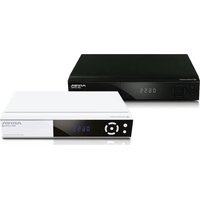
Ariva 255Combo S - Media player Ferguson - Free user manual and instructions
Find the device manual for free Ariva 255Combo S Ferguson in PDF.


Pick your language and provide your email: we'll send you a specifically translated version.
| Product Type | Combo Digital Satellite and Terrestrial Receiver / Media Player |
| Model | Ariva 255Combo S |
| Brand | Ferguson |
| Dimensions (W x D x H) | Approx. 260 x 150 x 40 mm |
| Weight | Approx. 0.8 kg |
| Power Supply | DC 12V, 1.5A (via external adapter) |
| Power Consumption | Max 18 W (standby < 1 W) |
| Video Output | HDMI (1080p), Composite (RCA) |
| Audio Output | HDMI, Digital Optical (SPDIF), Stereo RCA |
| Connectivity | Ethernet, Wi-Fi (802.11 b/g/n), USB 2.0 x2 |
| Supported Satellite Standards | DVB-S2/S, Multi-stream, Unicable |
| Supported Terrestrial Standards | DVB-T2/T, DVB-C (optional) |
| Media Playback | USB: AVI, MKV, MP4, MP3, JPEG; internal PVR recording to USB |
| Channel Memory | Up to 5,000 satellite and terrestrial channels |
| CAS | Conax, Nagravision (via CI slot) |
| Maintenance | Keep clean, avoid moisture, update firmware via USB or OTA |
| Cleaning | Wipe with dry soft cloth; no solvents |
| Safety | Use only supplied adapter, keep ventilation slots clear |
| Spare Parts / Repairability | Contact Ferguson support; external PSU replaceable; limited user-serviceable parts |
| Warranty | 2 years (check local conditions) |
Frequently Asked Questions - Ariva 255Combo S Ferguson
How do I connect the Ferguson Ariva 255Combo S to my TV?
Use an HDMI cable for best quality. Alternatively, use the composite RCA (yellow, white, red) cables for older TVs. Then power on the device and select the correct HDMI/AV input on your TV.
How do I scan for satellite channels?
Go to Menu > Installation > Antenna Setup. Select your satellite (e.g., Astra 19.2E). Choose 'Blind Scan' or 'Auto Scan' and start. Ensure your dish is properly aligned.
Can I record TV programs?
Yes, you can record to a USB flash drive or external HDD (formatted FAT32). Plug in the USB, go to EPG or live TV, press REC button. The device supports timeshift as well.
Why is my remote control not working?
First, check the batteries. Ensure nothing is blocking the IR sensor on the front panel. If still not working, try re-pairing: press and hold the 'OK' and 'MUTE' buttons for 5 seconds until the LED blinks.
How do I update the firmware?
Download the latest firmware from Ferguson's support site onto a USB stick (FAT32, file named 'firmware.bin'). Insert into the receiver, go to Menu > System > Software Update > USB. Do not turn off during update.
What media formats are supported via USB?
The player supports AVI, MKV, MP4, MOV, MP3, WMA, JPEG, PNG, and BMP. Maximum resolution is 1920x1080. USB must be FAT32 or NTFS.
How do I set up the network connection?
Go to Menu > Settings > Network. Choose wired (Ethernet) or wireless. For Wi-Fi, select your SSID, enter password. Use DHCP unless you have a static IP. Test connection with 'Internet Test'.
The device shows 'No Signal' on satellite. What should I do?
Check that the satellite dish is correctly aligned and the LNB cable is securely connected. Verify the correct satellite is selected in Antenna Setup. Test with a known working receiver if possible.
Can I use a CAM module for pay TV?
Yes, there is a CI (Common Interface) slot on the rear. Insert the CAM module with the smart card, then go to Menu > Conditional Access to manage settings.
How do I reset to factory defaults?
Go to Menu > System > Factory Reset. Enter the default password '0000' (or '1234' if changed). Confirm. This will erase all channels and settings.
User questions about Ariva 255Combo S Ferguson
0 question about this device. Answer the ones you know or ask your own.
Ask a new question about this device
No questions yet. Be the first to ask one.
Download the instructions for your Media player in PDF format for free! Find your manual Ariva 255Combo S - Ferguson and take your electronic device back in hand. On this page are published all the documents necessary for the use of your device. Ariva 255Combo S by Ferguson.
USER MANUAL Ariva 255Combo S Ferguson


Manual assistant
Powered by Anthropic
Waiting for your message
Product information
Brand : Ferguson
Model : Ariva 255Combo S
Category : Media player