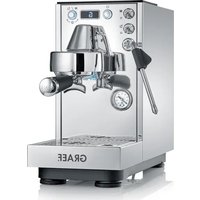
MCM12 - Coffee machine GRAEF - Free user manual and instructions
Find the device manual for free MCM12 GRAEF in PDF.


Pick your language and provide your email: we'll send you a specifically translated version.
| Product type | Automatic bean-to-cup coffee machine |
| Brand | Graef |
| Model | MCM12 |
| Dimensions (W x D x H) | 28 x 35 x 40 cm |
| Weight | 8.5 kg |
| Power supply | 220-240 V, 50/60 Hz, 1450 W |
| Maximum pressure | 15 bar |
| Water tank capacity | 1.8 L |
| Bean hopper capacity | 250 g |
| Types of coffee prepared | Espresso, long coffee, cappuccino, latte macchiato |
| Frothing system | Professional steam wand |
| Grind adjustment | Electronic, 13 levels |
| Main functions | Pre-infusion, automatic shut-off, automatic rinse, intensity and temperature programming |
| Display screen | Backlit LCD screen |
| Water filter | Removable filter (not included) |
| Maintenance and cleaning | Automatic descaling and cleaning program, removable drip tray, dishwasher-safe parts |
| Safety | Automatic shut-off in case of overheating, safety lock on water tank |
| Spare parts and repairability | Seal, steam wand, tank, grinder, parts available via Graef after-sales service |
| Package contents | Machine, user manual, maintenance dosing spoon, water hardness test |
Frequently Asked Questions - MCM12 GRAEF
How to descale the Graef MCM12 machine?
Use the built-in descaling program: fill the water tank with a mixture of water and descaling solution (without hydrochloric acid), place a container under the nozzle, then activate the cycle via the menu. Then rinse with clean water.
What to do if the machine does not turn on?
Check that the power cord is properly plugged in and that the outlet works. Make sure the water tank and bean hopper are in place. If the problem persists, contact customer service.
How to adjust the grind fineness?
Turn the grind adjustment knob (located in the bean hopper) to the desired level (from 1 to 13). We recommend adjusting by one level increments and brewing a coffee to assess the result.
Can I use ground coffee instead of beans?
Yes, the machine has a compartment for ground coffee. Open the lid, add a dose of ground coffee and select the corresponding program. Do not use the grinder simultaneously.
How to clean the steam wand?
After each use, wipe the wand with a damp cloth. For deep cleaning, remove the wand (if detachable) and soak it in warm soapy water. Rinse and put it back.
Why is the coffee too weak or too strong?
Adjust the coffee intensity via the menu (mild, medium, strong). Also check the grind fineness: too fine a grind can give bitter coffee, too coarse gives weak coffee.
How to change the water filter?
Remove the used filter from the tank, insert the new filter by pushing it all the way to the stop. Activate the filter in the machine's menu and run a rinse cycle. Follow the instructions in the manual.
What does the error message 'E01' mean?
The code 'E01' generally indicates a water pressure problem. Check the water level in the tank and make sure it is correctly installed. If the error persists, contact customer service.
How to prepare a cappuccino with the MCM12?
Brew an espresso in a cup. Then use the steam wand to heat and froth the milk: immerse the wand in cold milk, activate the steam and gently move the container up and down. Pour the frothed milk over the espresso.
Where to find spare parts for the Graef MCM12?
Spare parts (seals, steam wand, tank, grinder) are available from the Graef after-sales service. Check the official website or contact an authorized dealer.
User questions about MCM12 GRAEF
0 question about this device. Answer the ones you know or ask your own.
Ask a new question about this device
No questions yet. Be the first to ask one.
Download the instructions for your Coffee machine in PDF format for free! Find your manual MCM12 - GRAEF and take your electronic device back in hand. On this page are published all the documents necessary for the use of your device. MCM12 by GRAEF.
USER MANUAL MCM12 GRAEF

Manual assistant
Powered by Anthropic
Waiting for your message
Product information
Brand : GRAEF
Model : MCM12
Category : Coffee machine