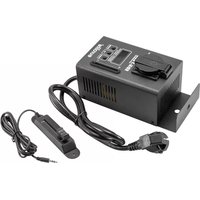
EDX-1 USB - Dimmer Eurolite - Free user manual and instructions
Find the device manual for free EDX-1 USB Eurolite in PDF.


Pick your language and provide your email: we'll send you a specifically translated version.
| Product Type | USB Dimmer |
| Model | EDX-1 USB |
| Brand | Eurolite |
| Input Voltage | 5 V DC (USB powered) |
| Maximum Load Current | 2 A |
| Number of Channels | 1 |
| Control Interface | USB, manual push button |
| Supported LED Types | Single-color constant voltage LED strips (12-24V) |
| Dimming Method | PWM (Pulse Width Modulation) |
| Dimensions (approx.) | 10 x 5 x 3 cm |
| Weight | 100 g |
| Operating Temperature | 0°C to 40°C |
| Storage Temperature | -20°C to 60°C |
| Protection Class | IP20 (indoor use only) |
| Power Supply | USB 2.0/3.0 port |
| Maintenance | Clean with a soft, dry cloth |
| Safety Warnings | Keep away from moisture and direct sunlight |
| Spare Parts & Repairability | No user-replaceable parts; contact service for repairs |
| General Information | Designed for indoor use with compatible LED lighting |
Frequently Asked Questions - EDX-1 USB Eurolite
How do I connect the EDX-1 USB dimmer to my LED strip?
Connect the LED strip to the output screw terminals, ensuring correct polarity (positive to +, negative to -). Then plug the dimmer into a USB power source.
What type of LED strips are compatible?
The dimmer works with single-color constant voltage LED strips operating at 12V or 24V DC. It cannot be used with addressable RGB or analog strips.
Can I control the dimmer with a computer?
Yes, the USB interface allows software control via a computer. You may need to install a driver or use compatible lighting software. Manual control via the onboard button is also possible.
What is the maximum power the dimmer can handle?
The dimmer supports a maximum load current of 2 A. For a 12V strip, that's up to 24W; for a 24V strip, up to 48W. Exceeding this may damage the device.
Does the dimmer support DMX control?
No, the EDX-1 USB is a simple PWM dimmer with USB control. It does not support DMX or other lighting protocols directly.
How do I reset the dimmer to factory settings?
Unplug the USB power, wait 10 seconds, then reconnect. This will reset the device to its default dimming level.
Can I use the dimmer indoors only?
Yes, the dimmer has an IP20 rating and is suitable only for indoor use. Avoid exposure to moisture, dust, or extreme temperatures.
Why is my LED strip flickering?
Flickering can occur if the power supply is inadequate or the load is near the maximum. Ensure a stable USB power source (5V, 2A+) and check connections. Also, some LED strips may not be fully compatible with PWM dimming.
How do I clean the dimmer?
Use a soft, dry cloth to wipe the exterior. Do not use liquids or cleaning agents, as they may damage the electronics.
Is the dimmer compatible with my smartphone?
Direct smartphone control is not supported. However, you can use a computer or a USB OTG adapter with a compatible control app on Android, though this is not guaranteed.
User questions about EDX-1 USB Eurolite
0 question about this device. Answer the ones you know or ask your own.
Ask a new question about this device
No questions yet. Be the first to ask one.
Download the instructions for your Dimmer in PDF format for free! Find your manual EDX-1 USB - Eurolite and take your electronic device back in hand. On this page are published all the documents necessary for the use of your device. EDX-1 USB by Eurolite.
USER MANUAL EDX-1 USB Eurolite


Manual assistant
Powered by Anthropic
Waiting for your message
Product information
Brand : Eurolite
Model : EDX-1 USB
Category : Dimmer