
HR3851 - Jackhammer MAKITA - Free user manual and instructions
Find the device manual for free HR3851 MAKITA in PDF.

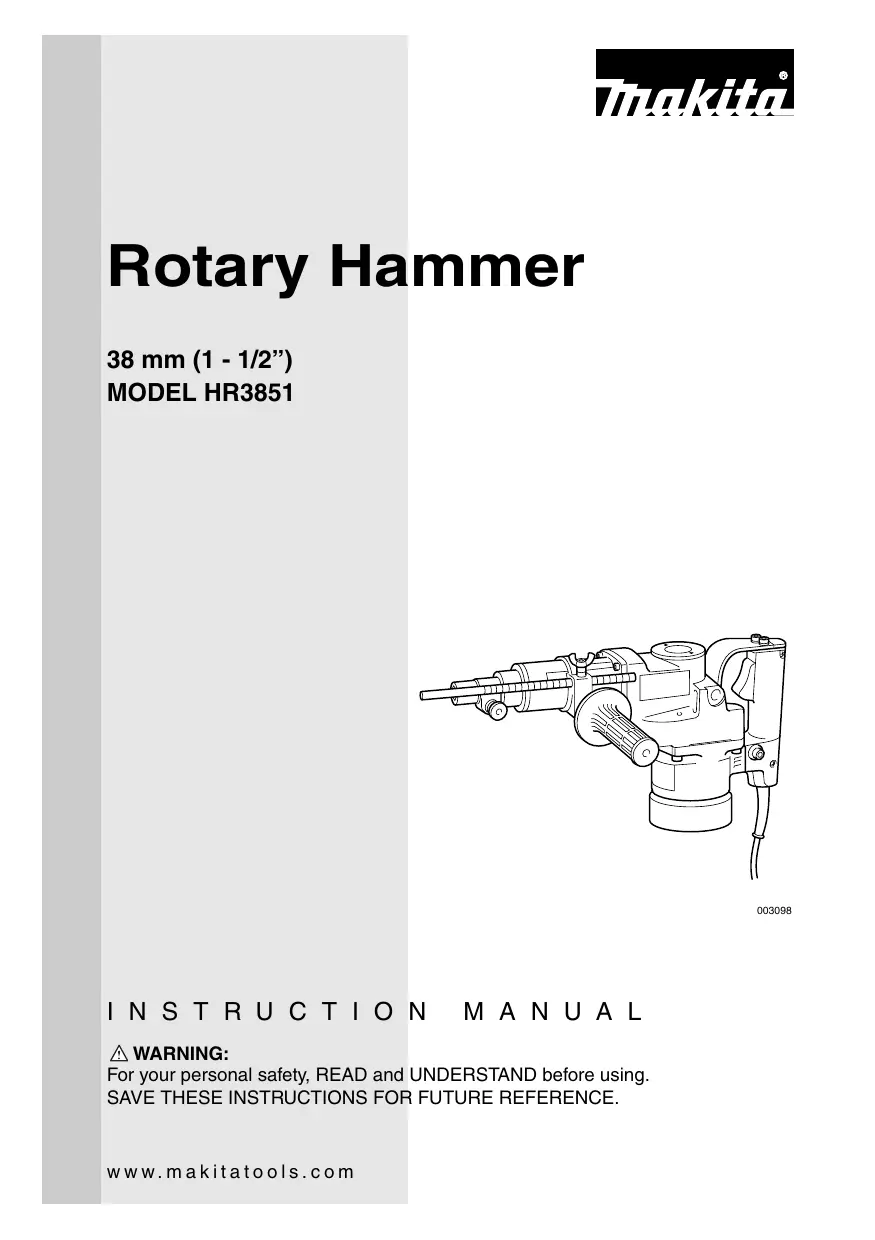

| Brand | MAKITA |
| Model | HR3851 |
| Product Type | Rotary hammer |
| Capacity (carbide-tipped bit) | 38 mm (1-1/2") |
| Capacity (core bit) | 118 mm (4-5/8") |
| No load speed | 240 rpm |
| Blow frequency | 2,900 blows/min |
| Overall length | 445 mm |
| Net weight | 7.5 kg |
| Power supply | 120 V ~, 60 Hz |
| Operating modes | Drilling with percussion, hammer only |
| Side handle | Yes, adjustable |
| Depth stop | Yes, adjustable |
| Bit retention system | Quick-release by rotating collar |
| Tool shank type | Spline |
| Electrical protection | Grounding required (3-prong plug) |
| Switch | Trigger switch |
| Carbon brushes | Automatic wear replacement (auto-stop) |
| Lubrication | Internal grease, refill every 6 months |
| Included accessories | Side handle, depth stop, hex wrench, pin wrench |
| Warranty | 1 year (limited) |
| Country of origin | Japan |
| Service centers | Authorized Makita network (see manual) |
Frequently Asked Questions - HR3851 MAKITA
User questions about HR3851 MAKITA
0 question about this device. Answer the ones you know or ask your own.
Ask a new question about this device
Download the instructions for your Jackhammer in PDF format for free! Find your manual HR3851 - MAKITA and take your electronic device back in hand. On this page are published all the documents necessary for the use of your device. HR3851 by MAKITA.
USER MANUAL HR3851 MAKITA
For your personal safety, READ and UNDERSTAND before using.
SAVE THESE INSTRUCTIONS FOR FUTURE REFERENCE.
SPECIFICATIONS
| Model | HR3851 | |
| Capacities | Carbide-tipped bit | 38 mm (1-1/2") |
| Core bit | 118 mm (4-5/8") | |
| No load speed (RPM) | 240/min. | |
| Blows per minute | 2,900 | |
| Overall length | 445 mm (17-1/2") | |
| Net weight | 7.5 kg (16.5 lbs) | |
- Manufacturer reserves the right to change specifications without notice.
- Specifications may differ from country to country.
GENERAL SAFETY RULES
USA001-2
(For All Tools)
WARNING:
Read and understand all instructions. Failure to follow all instructions listed below, may result in electric shock, fire and/or serious personal injury.
SAVE THESE INSTRUCTIONS
Work Area
- Keep your work area clean and well lit. Cluttered benches and dark areas invite accidents.
-
Do not operate power tools in explosive atmospheres, such as in the presence of flammable liquids, gases, or dust. Power tools create sparks which may ignite the dust or fumes.
-
Keep bystanders, children, and visitors away while operating a power tool. Distractions can cause you to lose control.
Electrical Safety
- Grounded tools must be plugged into an outlet properly installed and grounded in accordance with all codes and ordinances. Never remove the grounding prong or modify the plug in any way. Do not use any adaptor plugs. Check with a qualified electrician if you are in doubt as
to whether the outlet is properly grounded. If the tools should electrically malfunction or break down, grounding provides a low resistance path to carry electricity away from the user.
5. Avoid body contact with grounded surfaces such as pipes, radiators, ranges and refrigerators. There is an increased risk of electric shock if your body is grounded.
6. Do not expose power tools to rain or wet conditions. Water entering a power tool will increase the risk of electric shock.
7. Do not abuse the cord. Never use the cord to carry the tools or pull the plug from an outlet. Keep cord away from heat, oil, sharp edges or moving parts. Replace damaged cords immediately. Damaged cords increase the risk of electric shock.
8. When operating a power tool outside, use an outdoor extension cord marked "W-A" or "W". These cords are rated for outdoor use and reduce the risk of electric shock.
Personal Safety
- Stay alert, watch what you are doing and use common sense when operating a power tool. Do not use tool while tired or under the influence of drugs, alcohol, or medication. A moment of inattention while operating power tools may result in serious personal injury.
- Dress properly. Do not wear loose clothing or jewelry. Contain long hair. Keep your hair, clothing, and gloves away from moving parts. Loose clothes, jewelry, or long hair can be caught in moving parts.
- Avoid accidental starting. Be sure switch is off before plugging in. Carrying tools with your finger on the switch or plugging in tools that have the switch on invites accidents.
-
Remove adjusting keys or wrenches before turning the tool on. A wrench or a key that is left attached to a rotating part of the tool may result in personal injury.
-
Do not overreach. Keep proper footing and balance at all times. Proper footing and balance enables better control of the tool in unexpected situations.
- Use safety equipment. Always wear eye protection. Dust mask, non-skid safety shoes, hard hat, or hearing protection must be used for appropriate conditions. Ordinary eye or sun glasses are NOT eye protection.
Tool Use and Care
- Use clamps or other practical way to secure and support the workpiece to a stable platform. Holding the work by hand or against your body is unstable and may lead to loss of control.
- Do not force tool. Use the correct tool for your application. The correct tool will do the job better and safer at the rate for which it is designed.
- Do not use tool if switch does not turn it on or off. Any tool that cannot be controlled with the switch is dangerous and must be repaired.
- Disconnect the plug from the power source before making any adjustments, changing accessories, or storing the tool. Such preventive safety measures reduce the risk of starting the tool accidentally.
- Store idle tools out of reach of children and other untrained persons. Tools are dangerous in the hands of untrained users.
- Maintain tools with care. Keep cutting tools sharp and clean. Properly maintained tools with sharp cutting edges are less likely to bind and are easier to control.
- Check for misalignment or binding of moving parts, breakage of parts, and any other condition that may affect the tools operation. If damaged, have the tool serviced before using. Many accidents are caused by poorly maintained tools.
- Use only accessories that are recommended by the manufacturer for your
model. Accessories that may be suitable for one tool, may become hazardous when used on another tool.
SERVICE
- Tool service must be performed only by qualified repair personnel. Service or main
tenance performed by unqualified personnel could result in a risk of injury.
- When servicing a tool, use only identical replacement parts. Follow instructions in the Maintenance section of this manual. Use of unauthorized parts or failure to follow Maintenance instructions may create a risk of electric shock or injury.
USE PROPER EXTENSION CORD: Use only three-wire extension cords that have three-prong grounding-type plugs and three-pole receptacles that accept the tool's plug. Make sure your extension cord is in good condition. Replace or repair damaged or worn cord immediately. When using an extension cord, be sure to use one heavy enough to carry the current your product will draw. An undersized cord will cause a drop in line voltage resulting in loss of power and overheating. Table 1 shows the correct size to use depending on cord length and nameplate ampere rating. If in doubt, use the next heavier gage. The smaller the gage number, the heavier the cord.
Table 1: Minimum gage for cord
| Ampere Rating | Volts | Total length of cord in feet | ||||
| 120 V | 25 ft. | 50 ft. | 100 ft. | 150 ft. | ||
| More Than | Not More Than | AWG | ||||
| 0 | 6 | 18 | 16 | 16 | 14 | |
| 6 | 10 | 18 | 16 | 14 | 12 | |
| 10 | 12 | 16 | 16 | 14 | 12 | |
| 12 | 16 | 14 | 12 | Not Recommended | ||
GROUNDING INSTRUCTIONS
This tool should be grounded while in use to protect the operator from electric shock. The tool is equipped with a three-conductor cord and three-prong grounding type plug to fit the proper grounding type receptacle. The green (or green and yellow) conductor in the cord is the grounding wire. Never connect the green (or green and yellow) wire to a live terminal. Your unit is for use on 120 volts and has a plug that looks like Fig. "A".
An adapter Fig. "B" and "C" is available for connecting Fig. "A" type plugs to two-prong receptacles. The green-colored rigid ear, lug, etc., extending from the adapter must be connected to a permanent ground, such as a properly grounded outlet box.
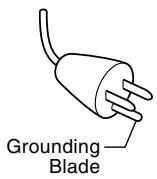
Fig. A
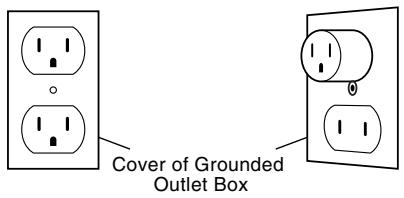
Fig. B
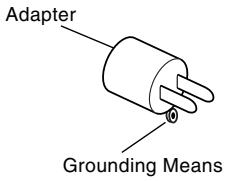
Fig. C
SPECIFIC SAFETY RULES
USB010-2
DO NOT let comfort or familiarity with product (gained from repeated use) replace strict adherence to rotary hammer safety rules. If you use this tool unsafely or incorrectly, you can suffer serious personal injury.
- Hold tools by insulated gripping surfaces when performing an operation where the cutting tool may contact hidden wiring or its own cord. Contact with a "live" wire will make exposed metal parts of the tool "live" and shock the operator.
- Wear ear protectors when using the tool for extended periods. Prolonged exposure to high intensity noise can cause hearing loss.
-
Wear a hard hat (safety helmet), safety glasses and/or face shield. Ordinary eye or sun glasses are NOT safety glasses. It is also highly recommended that you wear a dust mask and thickly padded gloves.
-
Be sure the bit is secured in place before operation.
- Under normal operation, the tool is designed to produce vibration. The screws can come loose easily, causing a breakdown or accident. Check tightness of screws carefully before operation.
- In cold weather or when the tool has not been used for a long time, let the tool warm up for a while by operating it under no load. This will loosen up the lubrication. Without proper warm-up, hammering operation is difficult.
-
Always be sure you have a firm footing. Be sure no one is below when using the tool in high locations.
-
Hold the tool firmly with both hands.
- Keep hands away from moving parts.
- Do not leave the tool running. Operate the tool only when hand-held.
-
Do not point the tool at any one in the area when operating. The bit could fly out and injure someone seriously.
-
Do not touch the bit or parts close to the bit immediately after operation; they may be extremely hot and could burn your skin.
- Some material contains chemicals which may be toxic. Take caution to prevent dust inhalation and skin contact. Follow material supplier safety data.
SAVE THESE INSTRUCTIONS
WARNING:
MISUSE or failure to follow the safety rules stated in this instruction manual may cause serious personal injury.
FUNCTIONAL DESCRIPTION
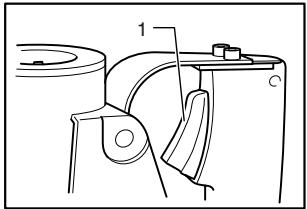
003111
1. Switch trigger
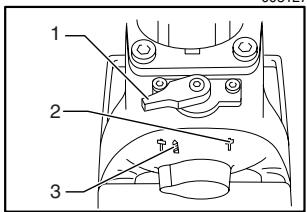
003127
- Change lever
- For hammering only
- For rotation with hammering
CAUTION:
- Always be sure that the tool is switched off and unplugged before adjusting or checking function on the tool.
Switch action
CAUTION:
- Before plugging in the tool, always check to see that the switch trigger actuates properly and returns to the "OFF" position when released.
To start the tool, simply pull the switch trigger. Release the switch trigger to stop.
Selecting the action mode
Rotation with hammering
For drilling in concrete, masonry, etc., rotate the change lever to the symbol.
Hammering only
For chipping, scaling or demolition operations, rotate the change lever to the symbol.
CAUTION:
- Do not rotate the change lever when the tool is running under load. The tool will be damaged.
- To avoid rapid wear on the mode change mechanism, be sure that the change lever is always positively located in one of the two action mode positions.
ASSEMBLY
003146
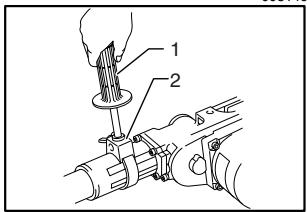
1. Side grip
2. Grip base

003153

1. Red dot (Tool holder)
2. Rde dot (Tool retainer)
003154
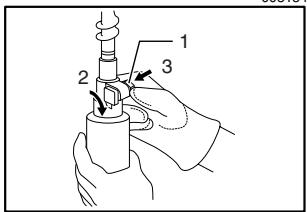
1. Tool retainer
2. Turn 180°
3. Press in

CAUTION:
- Always be sure that the tool is switched off and unplugged before carrying out any work on the tool.
Side grip (auxiliary handle)
For maximum control and safer operation, always use the side grip with this tool. The side grip swings around to either side, allowing easy handling of the tool in any position. Loosen the side grip by turning it counterclockwise, swing it to the desired position and then tighten it by turning clockwise.
The side grip can also be installed in the position shown in the figure. Remove the side grip from the grip base by turning the side grip counterclockwise. Screw the side grip on either side of the tool, whichever is convenient.
Installing or removing the bit
Press in the tool retainer and turn it until the red dots on the tool retainer and the tool holder are aligned. Release the tool retainer.
Insert the bit into the tool holder as far as it will go. Press in the tool retainer and turn it a full 180 degrees. Then release it to secure the bit.
To remove the bit, follow the installation procedure in reverse.
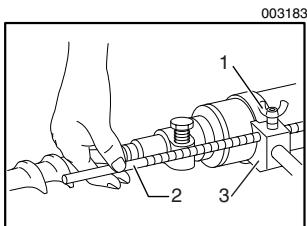
- Clamp screw
- Depth gauge
- Grip base
OPERATION
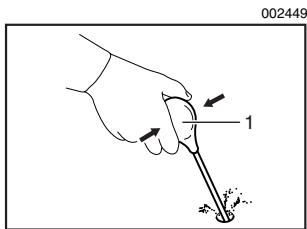
1. Blow-out bulb
Depth gauge
The depth gauge is convenient for drilling holes of uniform depth. Insert the depth gauge into the hole in the grip base. Adjust the depth gauge to the desired depth and then tighten the clamp screw to secure the depth gauge.
NOTE:
- The depth gauge cannot be used at the position where the depth gauge strikes against the tool body.
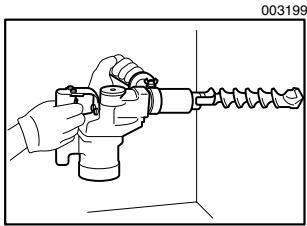
Hammer drilling operation
Set the change lever to the symbol.
Position the bit at the desired location for the hole, then pull the switch trigger. Do not force the tool. Light pressure gives best results. Keep the tool in position and prevent it from slipping away from the hole.
Do not apply more pressure when the hole becomes clogged with chips or particles. Instead, run the tool at an idle, then remove the bit partially from the hole. By repeating this several times, the hole will be cleaned out and normal drilling may be resumed.
CAUTION:
- There is a tremendous and sudden twisting force exerted on the tool/bit at the time of hole break-through, when the hole becomes clogged with chips and particles, or when striking reinforcing rods embedded in the concrete. Always use the side grip (auxiliary handle) and firmly hold the tool by both side grip and switch handle during operations. Failure to do so may result in the loss of control of the tool and potentially severe injury.
Blow-out bulb (optional accessory)
After drilling the hole, use the blow-out bulb to clean the dust out of the hole.
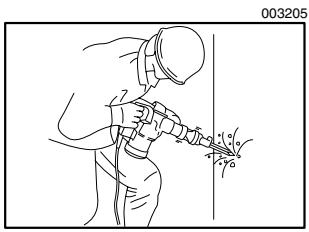
Chipping/Scaling/Demolition
Set the change lever to the symbol.
Hold the tool firmly with both hands. Turn the tool on and apply slight pressure on the tool so that the tool will not bounce around, uncontrolled. Pressing very hard on the tool will not increase the efficiency.
Core bit (optional accessory)
When using the center bit
Screw the core bit on the adapter. Install the adapter with the core bit in the tool in the same manner as a drill bit.
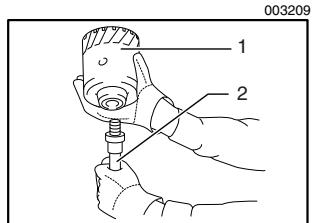
- Core bit
- Adapter

- Center bit
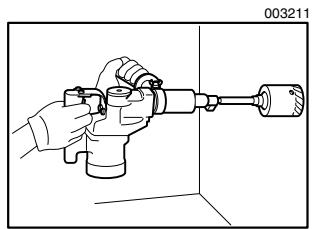
Install the center bit.
Rest the core bit on the concrete and turn the tool on. Once the core bit has cut a shallow groove into the concrete, remove the center bit. Then resume drilling.

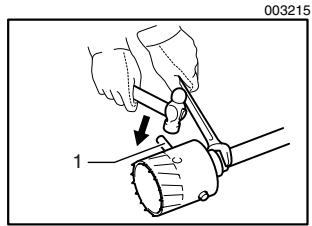
1. Rod
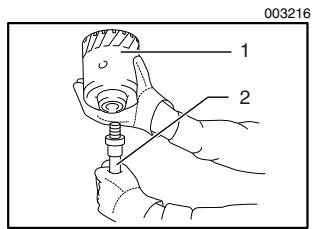
1. Core bit

2. Adapter
MAINTENANCE
To remove the core bit, follow the procedures 1 or 2.
- Rotate the change lever to the T position. Then rest the core bit on the concrete and turn the tool on. The core bit will come loose from the hammering action.
- Hold the adapter with the wrench, insert the rod (optional accessory) into the hole in the core bit and tap with a hammer to unscrew.
When not using the center bit
Screw the core bit on the adapter. Install the adapter with the core bit in the tool in the same manner as a drill bit.
Rotate the change lever to the T position. Rest the core bit on the concrete and turn the tool on. Once the core bit has cut a shallow groove into the concrete, rotate the change lever to the S T position and resume drilling.
NOTE:
- No problem is caused even if the core bit unscrews slightly during brief use since the core bit rotates in the tightening direction.
To remove the core bit, follow the same removal procedures covered in "When using the center bit".
CAUTION:
- Always be sure that the tool is switched off and unplugged before attempting to perform inspection or maintenance.
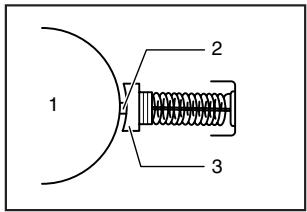
001146
- Commutator
- Insulating tip
- Carbon brush
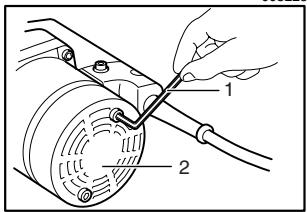
003225
- Hex wrench
- Rear cover
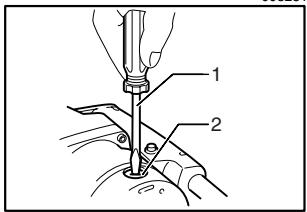
003231
- Screwdriver
- Brush holder cap
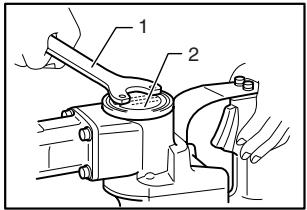
003236
- Lock nut wrench
- Crank cap
Replacing carbon brushes
When the resin insulating tip inside the carbon brush is exposed to contact the commutator, it will automatically shut off the motor. When this occurs, both carbon brushes should be replaced. Keep the carbon brushes clean and free to slip in the holders. Both carbon brushes should be replaced at the same time. Use only identical carbon brushes.
Use a hex wrench to remove the rear cover.
Use a screwdriver to remove the brush holder caps. Take out the worn carbon brushes, insert the new ones and secure the brush holder caps.
Lubrication
This tool requires no hourly or daily lubrication because it has a grease-packed lubrication system. It should be relubricated after every 6 months of operation. Send the complete tool to Makita Authorized or Factory Service Center for this lubrication service. However, if circumstances require that you should lubricate it by yourself, proceed as follows.
Run the tool for several minutes to warm it up. Switch off and unplug the tool.
Remove the crank cap using a Makita lock nut wrench 35 (optional accessory). Rest the tool on the table with the bit end pointing upwards. This will allow the old grease to collect inside the crank housing.
Wipe out the old grease inside and replace with a fresh grease (60 g; 2 oz). Use only Makita genuine hammer grease (optional accessory). Filling with more than the specified amount of grease (approx. 60 g; 2 oz) can cause faulty hammering action or tool failure. Fill only with the specified amount of grease.
Reinstall the crank cap and tighten with the lock nut wrench.
CAUTION:
- Do not tighten the crank cap excessively. It is made of resin and is subject to breakage.
To maintain product SAFETY and RELIABILITY, repairs, any other maintenance or adjustment should be performed by Makita Authorized or Factory Service Centers, always using Makita replacement parts.
ACCESSIONS
CAUTION:
- These accessories or attachments are recommended for use with your Makita tool specified in this manual. The use of any other accessories or attachments might present a risk of injury to persons. Only use accessory or attachment for its stated purpose.
If you need any assistance for more details regarding these accessories, ask your local Makita service center.
- Spline shank Carbide-tipped bits
- Bull point
Cold chisel
Scaling chisel
Grooving chisel - Spline shank to A-Taper adapter
- Spline shank to SDS adapter
Core bit
Core bit adapter - Hammer grease
- Depth gauge
- Blow-out bulb
- Safety goggles
- Lock nut wrench 35
- Hex wrench
- Plastic carrying case
Memo
Memo
Memo
Makita U.S.A., Inc.
14930 Northam Street
La Mirada, CA 90638-5753

Fold
MAIL THIS PORTION
Your answers to the following questions are appreciated.
1. This product was purchased from:
Home Center
Hardware/Lumber Store
Tool Distributor
Industrial Supply
Construction Supply
□ Other(
2. Use of the product is intended for:
Construction Trade
Industrial Maintenance
Home Maintenance
Hobby
□ Other ( )
3. How did you learn about this product:
Magazine
From Dealer
□ Newspaper
Store Display
Catalog
Radio
Exhibition
From Friend
Previous Usage
Other(
4. Most favored points are:
Design
Features
Size
Price
Makita Brand
Repair Service
Durability
Power
Other(
5. Any comments:
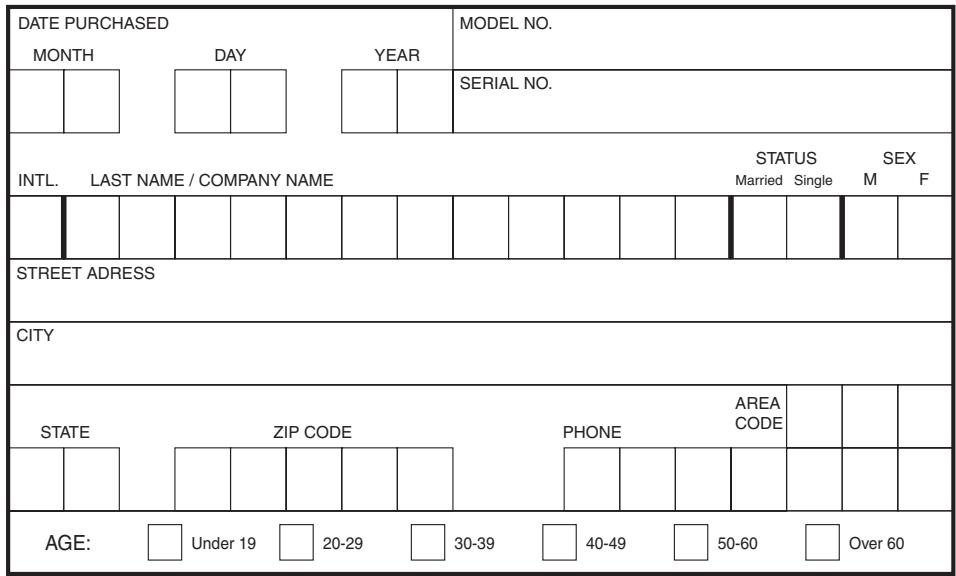
BE SURE TO COMPLETE THE CUSTOMER'S PORTION OF THIS FORM AND RETAIN FOR YOUR RECORDS.
Please return this portion by facsimile or mail.
Facsimile No: (714) 522-8133
FACTORY SERVICE CENTERS
1-800-4-MAKITA
RETAIN THIS PORTION FOR YOUR RECORDS
ALABAMA
2365 Pelham Parkway
Pelham, AL 35124
(205)620-1791
ARIZONA
3707 E. Broadway Rd., Ste. 6
Phoenix, AZ 85040
(602)437-2850
ARKANSAS
Shackleford Shopping Center
240 South Shackleford Rd.,
Ste.C
Little Rock, AR 72211
(501)224-5733
CALIFORNIA
41850 Christy St.
Fremont, CA 94538-5107
(510)657-9881
1421 N. Clovis Ave., Ste. 112
Fresno, CA 93727
(559)252-5166
14930 Northam St.
La Mirada, CA 90638-5753
(714)522-8088
1970 Fulton Avenue
Sacramento, CA 95825
(916)482-5197
1440 South "E" Street
San Bernardino, CA 92408
(909)885-1289
7674 Clairemont Mesa Blvd.
San Diego, CA 92111
(858)278-4471
1714 E.McFadden Ave., Unit M
Santa Ana, CA 92705
(714)667-5066
1565 Winchester B.
Campbell, CA 95008-0501
(408)379-0377
16735 Saticoy St., Ste. 105
Van Nuys, CA 91406
(818)782-2440
COLORADO
11839 E. 51st Ave.
Denver, CO 80239-2709
(303) 371-2850
CONNECTICUT
508 Spring St.
Windsor Locks, CT 06096
(860)292-6405
FLORIDA
620 Douglas Ave. Suite 1302
Altamonte Springs, FL 32714
(407) 774-6000
750 East Sample Road
Pompano Beach, FL 33064
(954)781-6333
Thompson Center Waters
5501 W.Waters Ave., Ste. 406
Tampa, FL 33634
(813) 886-8292
GEORGIA
4680 River Green Parkway
Duluth, GA 30096-2566
(770)476-8911
HAWAII
4510 Salt Lake Blvd., Suite A7
Honolulu, HI 96818
(808) 847-0038
ILLINOIS
1450 Feehanville Dr.
Mt. Prospect, IL 60056-6011
(847)297-3100
INDIANA
8403 Michigan Road, Unit 1
Indianapolis, IN 46268
(317) 334-9980
KANSAS
8819 W. 95th St.
Overland Park, KS 66212
(913)642-1111
KENTUCKY
1215 S. Hurstbourne Parkway
Louisville, KY 40222
(502)326-3740
LOUSIANA
5626 Jefferson Hwy.
Harahan, LA 70123
(504)733-4138
MARYLAND
7541-45 Ritchie Highway
Glen Burnie, MD 21061
(410)590-0160
MASSACHUSETTS
232 Providence Hwy.
Westwood, MA 02090
(617)461-9754
MICHIGAN
37454 Ann Arbor Trail
Livonia, MI 48150
(313)432-1012
MINNESOTA
6427 Penn Ave. South
Richfield, MN 55423
(612)869-5199
MISSOURI
9876 Watson Road
St. Louis, MO 63126-2221
(314) 909-9889
NEBRASKA
4129 S. 84th St.
Omaha, NE 68127
(402)597-2925
NEVADA
3375 S. Decatur Blvd.
Suites.22-24
Las Vegas, NV 89102
(702)368-4277
NEW JERSEY
251 Herrod Blvd.
Dayton, NJ 08810-1539
(609) 655-1212
NEW MEXICO
5805 Menaul Blvd. NE
Albuquerque, NM 87110
(505)881-4619
NEW YORK
4917 Genessee Street
Cheektowaga, NY 14225
(716)685-9503
131-35 31st Ave.
Flushing, NY 11354
(718)886-0971
NORTH CAROLINA
3501-G S. Tryon St.
Charlotte, NC 28217
(704)527-0611
OHIO
6253 E. Main St.
Columbus, OH 43213
(614)860-0222
6379 Pearl Road
Parma Heights, OH 44130
(440)843-7555
1617 E. Kemper Rd.
Sharonville, OH 45246
(513)771-0788
OKLAHOMA
552 E. Memorial Road
Oklahoma City, OK 73114
(405)752-2655
OREGON
828 19th Avenue., N.W.
Portland, OR 97209
(503)222-1823
PENNSYLVANIA
Springwater Plaza
364 Wilmington W. Chester
Pike
Glen Mills, PA 19342
(610)459-4122
6200 Babcock Blvd
Pittsburgh, PA 15237
(412)366-6363
PUERTO RICO
200 Guayama St.
Hato Rev, PR 00917
(787)250-8776
TENNESSEE
4655 Nolensville Rd.
Nashville, TN 37211
(615)331-9922
TEXAS
Farmers Branch, TX 75234
(972) 243-1150
12701 Directors Dr.
Stafford, TX 77477-3701
(281)565-8665
3453 IH-35 North, Ste. 101
San Antonio, TX 78219
(210) 228-0676
UTAH
145 E. 1300 S., Ste. 101
Salt Lake City, UT 84115
(801)359-3410
VIRGINIA
5760 Northampton Blvd., Ste.
102
Virginia Beach, VA 23455
(757)460-0280
WASHINGTON
22220 84th Ave. So., Bldg. A
Kent, WA 98032
(253) 395-8055
WISCONSIN
Lincoln Plaza Shopping Ctr.
2245 S.108th St.West Allis, WI
53227
(414)541-4776
CUSTOMER'S RECORD
| When you need service: Send complete tool (prepaid) to one of the Makita Factory Service Centers listed, or to an Authorized Makita Service Center. Be sure to attach a letter to the outside of the carton detailing the problem with your tool. | Date Purchased |
| Dealer's Name & Address | |
| Model No. | |
| Serial No. |
WARNING
Some dust created by power sanding, sawing, grinding, drilling, and other construction activities contains chemicals known to the State of California to cause cancer, birth defects or other reproductive harm. Some examples of these chemicals are:
- lead from lead-based paints,
crystalline silica from bricks and cement and other masonry products, and - arsenic and chromium from chemically-treated lumber.
Your risk from these exposures varies, depending on how often you do this type of work. To reduce your exposure to these chemicals: work in a well ventilated area, and work with approved safety equipment, such as those dust masks that are specially designed to filter out microscopic particles.
MAKITA LIMITED ONE YEAR WARRANTY
Warranty Policy
Every Makita tool is thoroughly inspected and tested before leaving the factory. It is warranted to be free of defects from workmanship and materials for the period of ONE YEAR from the date of original purchase. Should any trouble develop during this one-year period, return the COMPLETE tool, freight prepaid, to one of Makita's Factory or Authorized Service Centers. If inspection shows the trouble is caused by defective workmanship or material, Makita will repair (or at our option, replace) without charge.
This Warranty does not apply where:
- repairs have been made or attempted by others:
- repairs are required because of normal wear and tear:
- the tool has been abused, misused or improperly maintained:
alterations have been made to the tool.
IN NO EVENT SHALL MAKITA BE LIABLE FOR ANY INDIRECT, INCIDENTAL OR CONSEQUENTIAL DAMAGES FROM THE SALE OR USE OF THE PRODUCT. THIS DISCLAIMER APPLIES BOTH DURING AND AFTER THE TERM OF THIS WARRANTY.
MAKITA DISCLAIMS LIABILITY FOR ANY IMPLIED WARRANTY, INCLUDING IMPLIED WARRANTY OF "MERCHANTABILITY" AND "FITNESS FOR A SPECIFIC PURPOSE," AFTER THE ONE-YEAR TERM OF THIS WARRANTY.
This Warranty gives you specific legal rights, and you may also have other rights which vary from state to state. Some states do not allow the exclusion or limitation of incidental or consequential damages, so the above limitation or exclusion may not apply to you. Some states do not allow limitation on how long an implied warranty lasts, so the above limitation may not apply to you.
Makita Corporation
3-11-8, Sumiyoshi-cho,
Anjo, Aichi 446-8502 Japan
- SPECIFICATIONS
- GENERAL SAFETY RULES
- (FOR ALL TOOLS)
- WARNING
- SAVE THESE INSTRUCTIONS
- WORK AREA
- ELECTRICAL SAFETY
- PERSONAL SAFETY
- TOOL USE AND CARE
- SERVICE
- GROUNDING INSTRUCTIONS
- SPECIFIC SAFETY RULES
- FUNCTIONAL DESCRIPTION
- CAUTION
- SWITCH ACTION
- SELECTING THE ACTION MODE
- ROTATION WITH HAMMERING
- HAMMERING ONLY
- ASSEMBLY
- SIDE GRIP (AUXILIARY HANDLE)
- INSTALLING OR REMOVING THE BIT
- OPERATION
- DEPTH GAUGE
- NOTE
- HAMMER DRILLING OPERATION
- BLOW-OUT BULB (OPTIONAL ACCESSORY)
- CHIPPING/SCALING/DEMOLITION
- CORE BIT (OPTIONAL ACCESSORY)
- WHEN USING THE CENTER BIT
- MAINTENANCE
- WHEN NOT USING THE CENTER BIT
- REPLACING CARBON BRUSHES
- LUBRICATION
- ACCESSIONS
- MEMO
- MAIL THIS PORTION
- THIS PRODUCT WAS PURCHASED FROM
- USE OF THE PRODUCT IS INTENDED FOR
- HOW DID YOU LEARN ABOUT THIS PRODUCT
- MOST FAVORED POINTS ARE
- ANY COMMENTS
- FACTORY SERVICE CENTERS
- 1-800-4-MAKITA
- RETAIN THIS PORTION FOR YOUR RECORDS
- ALABAMA
- ARIZONA
- ARKANSAS
- CALIFORNIA
- COLORADO
- CONNECTICUT
- FLORIDA
- GEORGIA
- HAWAII
- ILLINOIS
- INDIANA
- KANSAS
- KENTUCKY
- LOUSIANA
- MARYLAND
- MASSACHUSETTS
- MICHIGAN
- MINNESOTA
- MISSOURI
- NEBRASKA
- NEVADA
- NEW JERSEY
- NEW MEXICO
- NEW YORK
- NORTH CAROLINA
- OHIO
- OKLAHOMA
- OREGON
- PENNSYLVANIA
- PUERTO RICO
- TENNESSEE
- TEXAS
- UTAH
- VIRGINIA
- WASHINGTON
- WISCONSIN
- CUSTOMER'S RECORD
- MAKITA LIMITED ONE YEAR WARRANTY
- WARRANTY POLICY
- MAKITA CORPORATION
Brand : MAKITA
Model : HR3851
Category : Jackhammer