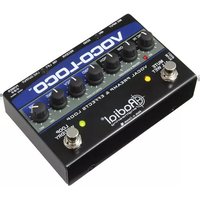
Voco-Loco - Audio effect pedal Radial Engineering - Free user manual and instructions
Find the device manual for free Voco-Loco Radial Engineering in PDF.


Pick your language and provide your email: we'll send you a specifically translated version.
| Product Type | Vocal Effects Processor with Mixer and Effects Loop |
| Brand | Radial Engineering |
| Model | Voco-Loco |
| Dimensions (W x D x H) | Approximately 8.5 x 3.5 x 2 inches (216 x 89 x 51 mm) |
| Weight | Approximately 1.5 lbs (0.68 kg) |
| Power Supply | 15V DC 400mA center-positive (adapter included) |
| Inputs | 1 x XLR mic input, 1 x 1/4" instrument input, 1 x 1/4" effects return |
| Outputs | 1 x XLR balanced output, 1 x 1/4" effects send, 1 x 1/4" dry output |
| Mixer Section | Blend control for dry/wet mix with footswitch for mute |
| Effects Loop | Dedicated send and return for external pedals |
| Phantom Power | Yes, switchable for condenser microphones |
| Ground Lift | Yes, rear-panel switch |
| Construction | Steel chassis with baked enamel finish |
| Care Instructions | Wipe with dry cloth; avoid liquids and solvents |
| Safety Features | Electrically isolated circuit; use only specified power adapter |
| Spare Parts Availability | Contact Radial Engineering for service or replacement parts |
Frequently Asked Questions - Voco-Loco Radial Engineering
What power supply does the Voco-Loco require?
The Voco-Loco requires a 15V DC 400mA center-positive adapter. A compatible adapter is included with the unit.
Can I use the Voco-Loco with a condenser microphone?
Yes, the Voco-Loco has a switchable phantom power (48V) on the XLR input, suitable for most condenser microphones.
How do I connect external effects pedals?
Use the Effects Send output to connect to your pedal chain, and return the signal via the Effects Return input. The blend control mixes the dry and wet signals.
What is the function of the footswitch?
The footswitch toggles the mute function, allowing you to silently tune or cue without affecting the output.
Can I use the Voco-Loco as a standalone preamp?
Yes, the Voco-Loco provides a balanced XLR output and can serve as a vocal preamp with effects loop.
How do I eliminate ground loop hum?
Flip the Ground Lift switch on the rear panel to lift the ground connection, reducing hum from ground loops.
What is the blend control for?
The Blend knob adjusts the mix between the dry microphone signal and the processed (wet) signal from the effects loop.
Does the Voco-Loco have any onboard effects?
No, the Voco-Loco does not have built-in effects. It is designed to integrate your own external effects pedals via the effects loop.
Can I use it with a guitar?
Yes, the Voco-Loco has a 1/4" instrument input in addition to the XLR mic input, so it can process guitar signals with external effects.
How do I clean the Voco-Loco?
Use a soft dry cloth to wipe the surface. Avoid using liquids, sprays, or solvents to prevent damage.
User questions about Voco-Loco Radial Engineering
0 question about this device. Answer the ones you know or ask your own.
Ask a new question about this device
No questions yet. Be the first to ask one.
Download the instructions for your Audio effect pedal in PDF format for free! Find your manual Voco-Loco - Radial Engineering and take your electronic device back in hand. On this page are published all the documents necessary for the use of your device. Voco-Loco by Radial Engineering.
USER MANUAL Voco-Loco Radial Engineering


Manual assistant
Powered by Anthropic
Waiting for your message
Product information
Brand : Radial Engineering
Model : Voco-Loco
Category : Audio effect pedal